1514
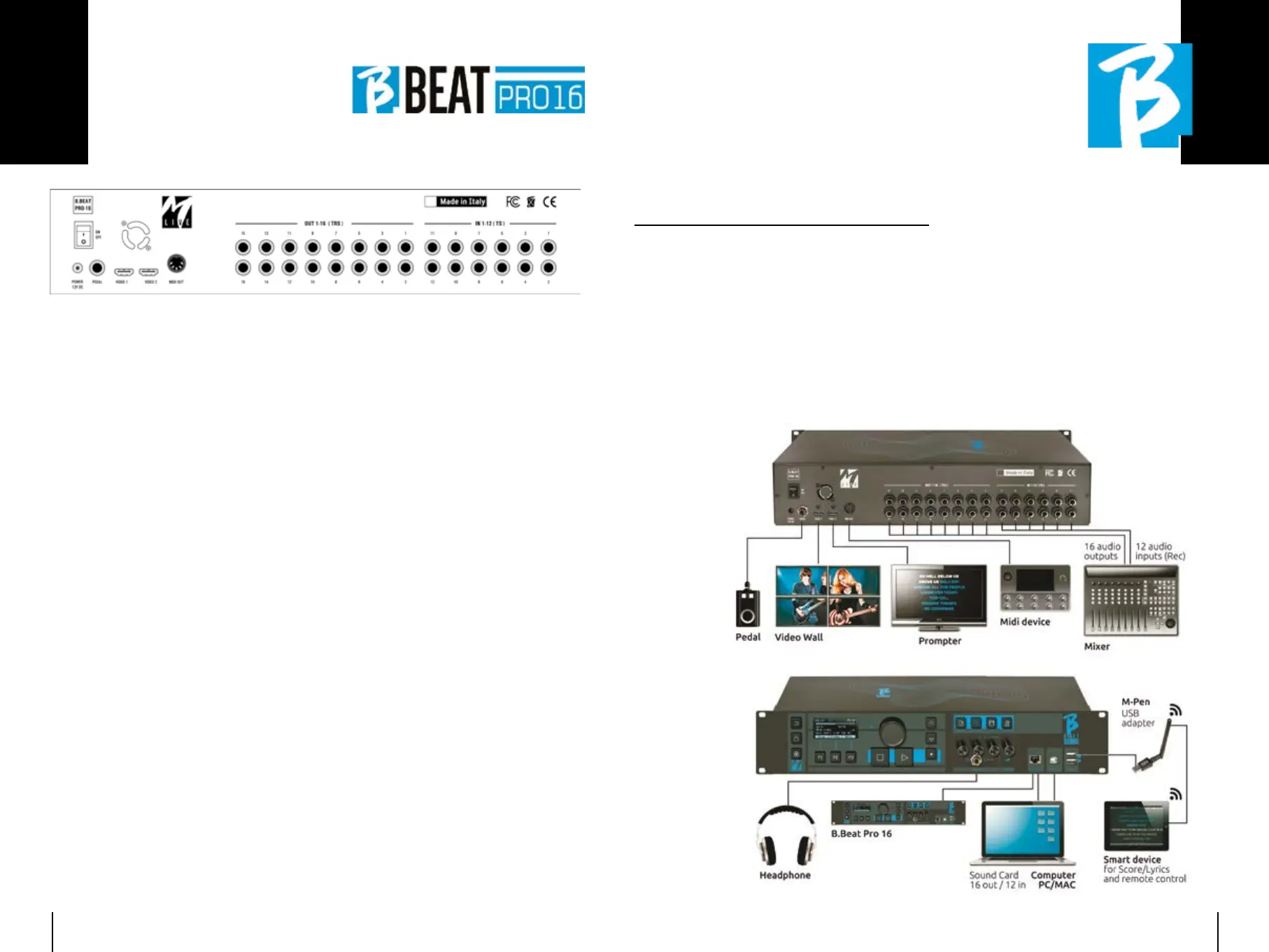
ON OFF: ON OFF: switches B.Beat PRO16 on or off.
SWITCHING OFF: SWITCHING OFF: switch off B.beat by
pressing and holding the LIVE button for
1 second. Only then will it be possible to
switch off the power supply to the B.Beat
via the On/Off button on the rear. ATTEN-
TION: failure to switch off via the LIVE but-
ton may lead to the need for a RESET. The
reset procedure is possible from B.Beat
MANAGER or via USB stick. For more infor-
mation, read the B.Beat Manager guide. To
switch off B.Beat press and hold the LIVE
button for one second until the switch off
screen appears.
[put screen switch off]. Switch off B.beat
from the switch on the back, or press Re-
Boot F3 to restart B.beat.
PEDAL: PEDAL: : a Start Stop pedal can be con-
nected. The first press corresponds to
PLAY, the second press corresponds to
STOP.
Here is a list of functions:
• Pressed once: PLAY
• Pressed the second time: STOP (pause)
• Pressed twice quickly: starts
the selected Next song.
• Pressed longer than 1 second: in
case you have a loaded Playlist,
it enters the playlist
[corresponds to ENTER].
• When in playlist:
pressed once scrolls the list
down, pressed twice quickly scrolls
back up the list.
• When in Playlist:
held down for more than one second
loads the selected element in the
memory.
Video 1 and 2:Video 1 and 2: connects any video device
with an Video interface.
OUT 1-16:OUT 1-16: 16 Balanced Mono audio out-
puts. Tracks 1 to 16 can be routed to
channels 1 to 16. Tracks 17 to 24 can be
output in channels 1 to 8. Tracks 17 to 24
cannot be routed to the headphones.
IN 1-12IN 1-12: 12 unbalanced audio inputs.
Inputs 1 and 2 are those that enter the
Headphone and are adjusted with the po-
tentiometer: In Ch 1-2
C'MON,
let's start!
MAIN FEATURES MAIN FEATURES
AND CONNECTIONSAND CONNECTIONS
The primary function of B.Beat PRO16 is
to accompany your live performances by
playing pre-recorded DAW audio tracks. In
addition to audio tracks B.Beat PRO16 can
play videos, images and lyrics that can be
sent via Video to a monitor; it reads and
transmits Midi Files that contain messag-
es for your instrument set-up on stage.
Let's first see a complete connection dia-
gram of B.Beat PRO16 by imagining a live
set-up, on a stage. B.Beat includes a 12
in and 16 out Sound card and a 12-track
recorder. Two B.Beat PRO16 can be syn-
chronised to be used as Main and Spare in
case of failure or crash.
Let's take a look at
Back panel


 To Next Page
 Loading...

