9
Display & Control Maps
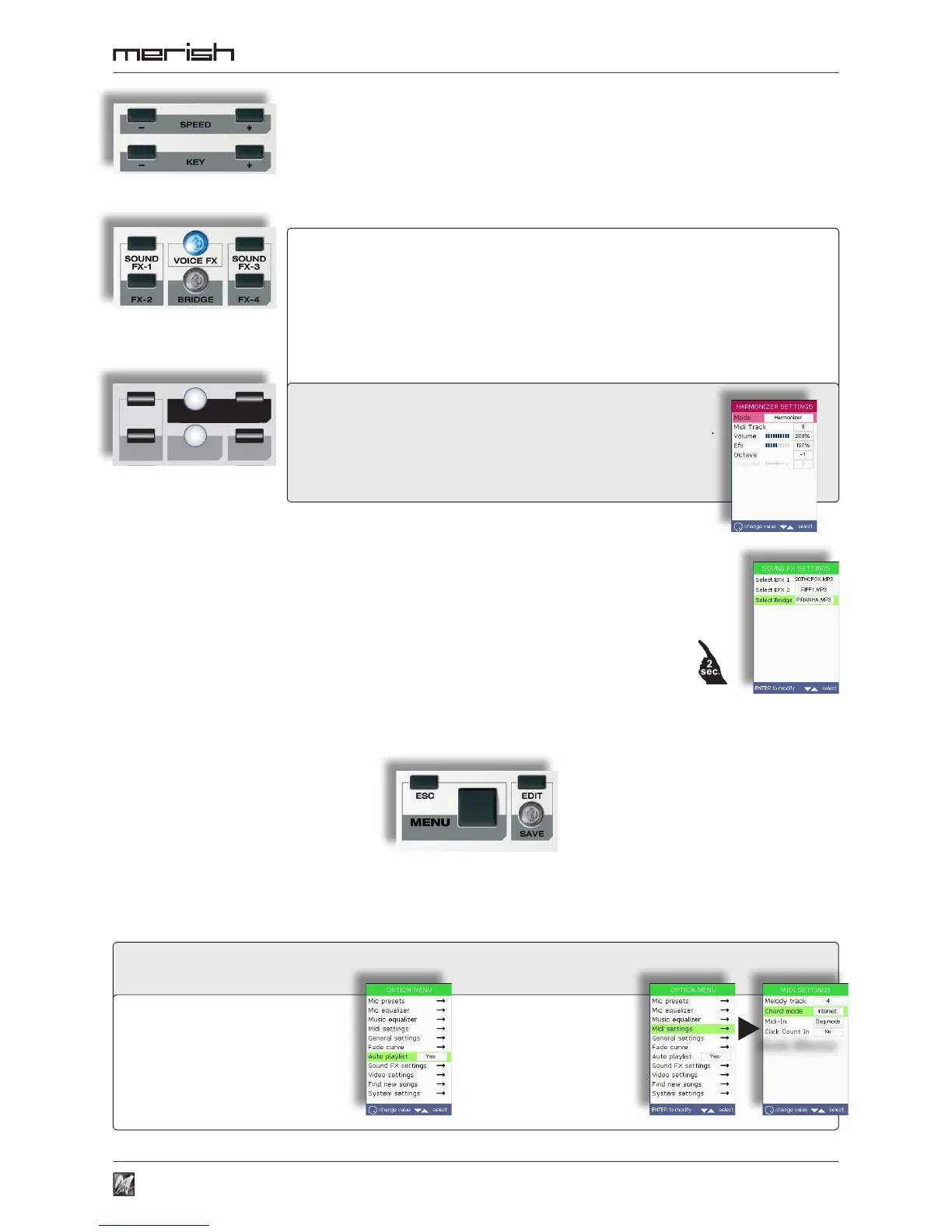
MENU opens the panel of the system’s options and settings:
SPEED
-
/ + change the songs’ playback speed.
KEY
-
/ + change the song’s key.
The changes are temporary (i.e. are only applied to the current performance), can be eliminated by pressing the
SPEED or KEY buttons simultaneously respectively, or can be made permanent with SAVE.
ESC a l l o w s t o e x i t t h e c u r r e n t
environment (function, menu,
editing, playlist, list, etc.), returning
to the upper level or the main
work environment.
EDIT allows access to the editing of
the currently selected function
(playlist, song, instrument, etc.).
options with a value box can be
sel ect ed w ith th e UP /DO WN
buttons and modied directly with
the DIAL;
the options with “→”
have a dedicated sub-
menu, accessible by
selecting the option with
the UP/DOWN buttons
and pressing ENTER.
SOUND FX-1 FX-2 FX-3 FX-4 (MERISH) • SOUND FX-1 FX-2 (MERISH Plus & MERISH Gold)
when kept pressed down, play sound effects that can be used as comments,
announcements, attention tones/sounds, etc. (selectable with MENU > Sound FX settings);
NB: this function is blocked when MP3 songs are being played .
The support CD contains a collection of (MP3) sound effects that can be chosen at will and put in the “sfx” folder
of the USB pen/Compact Flash.
VOICE FX when pressed repeatedly, selects various effects that transform
the voice: Woman, Megaphone, Monster, Child and No Effect.
(MERISH Plus & MERISH Gold)
HARMONIZER
enables/disables the microphone’s Harmonizer / Melody Tracker effect.
(HARMONIZER) Control
opens the panel of the settings of the Harmonizer / Melody Tracker effect.
BRIDGE plays a piece of music, which can be selected with MENU > Sound effects and used
as a bridge between songs or as an “emergency” song.
The support CD contains a collection of pieces of music (MP3 les) that can be chosen at will and put in the
“bridge” folder of the USB pen/Compact Flash card.
If pressed down for a couple of seconds, allow direct access to the choice of the tune in the SOUND FX
SETTINGS sub-menu).
SAVE lights up when changes are made to
the current function (playlist, song,
instrument, etc.) and, if pressed,
saves them.
Sub-Menu



 To Next Page