3.1 Where and how to mount your mobile CB radio
① You should choose the most appropriate setting from a simple and
practical point of view.
② Your CB radio should not interfere with the driver or the passengers.
③ Remember to provide for the passing and protection of different
wires (e.g, power ,antenna, accessory cabling) so that they do not
interfere in any way with the driving of the vehicle.
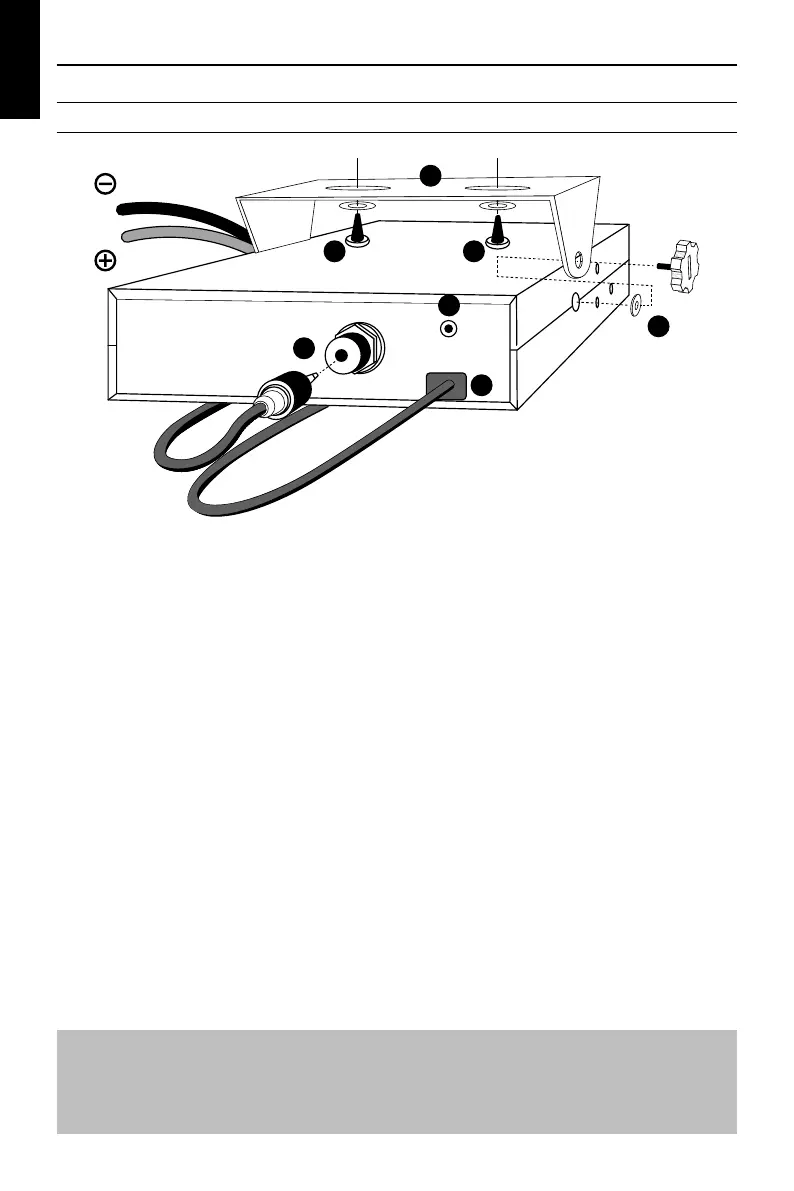
④To install your equipment, use the cradle ❶ and the self-tapping
screws ❷ provided (drilling diameter 3.2mm). Take care not to
damage the vehicle's electrical system while drilling the dash
board.
⑤Do not forget to insert the rubber joints ❸ between the CB and
it's support as these have a shock-absorbing effect which permits
gentle orientation and tightening of the set.
⑥Choose where to place the microphone support and remember
that the microphone cord must stretch to the driver without
interfering with the controls of the vehicle.
2 2
1
C
A
B
3
BLACK
RED
Power supply (DC.12.8V)
Antenna connector (SO-239)
Jack for external loudspeaker
(8Ω,∅3.5mm)
WARNING!
DO NOT connect this equipment to a power supply if you are not
absolutely certain of the grounding type!
SECTION 3
INSTALLATION
8


 To Next Page