YOUNG DSD
DIGITAL-TO-ANALOG CONVERTER AND PREAMPLIFIER
REVISION 1.1 – march 2014
Copyright © 2014, M2Tech Srl
15
www.m2tech.biz
4. Remote Control
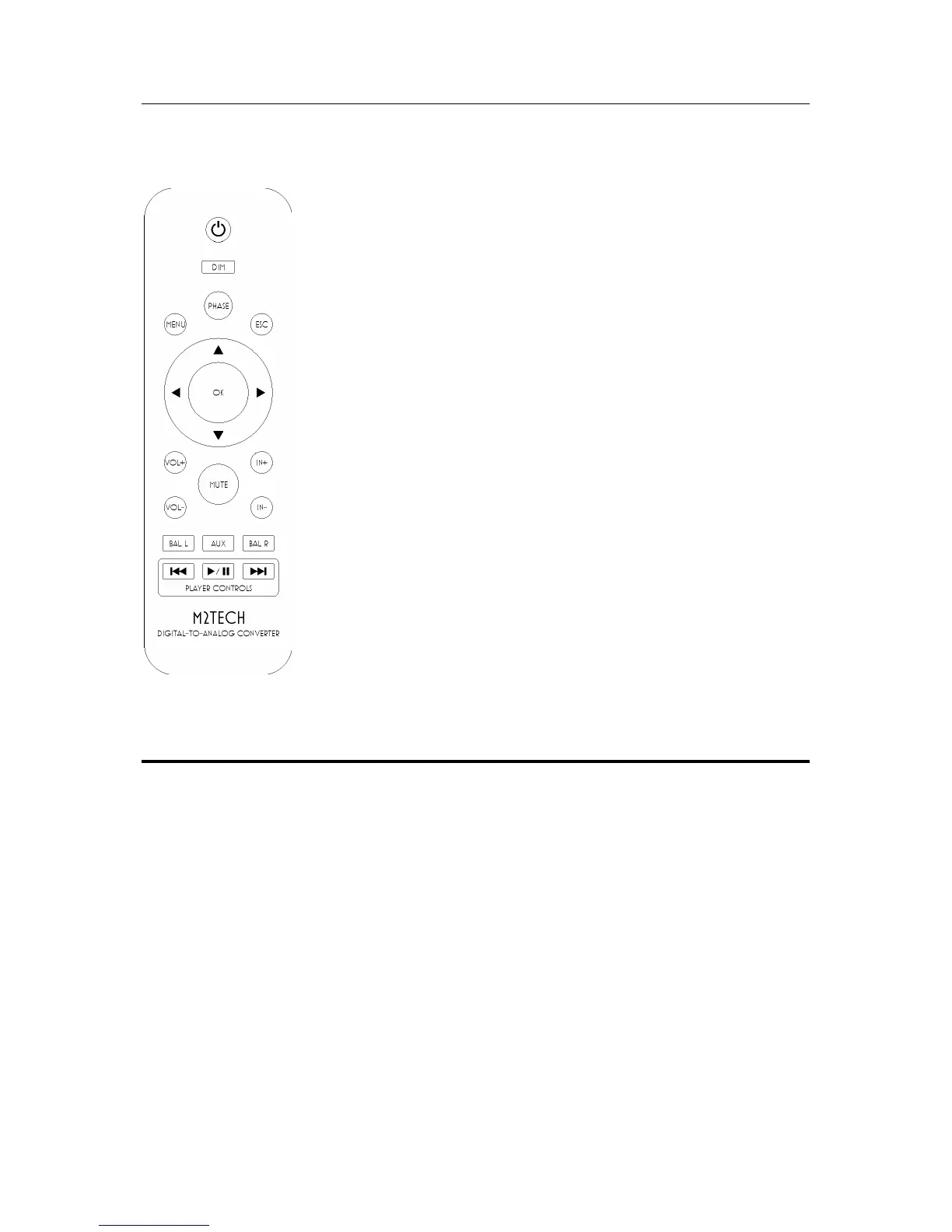
The YOUNG DSD comes with a fully-loaded remote control which
allows for setting all of its controls.
Standby key: This allows for putting the YOUNG DSD in standby
mode (prolonged push) and for awakening it.
DIM: Display dimming.
PHASE: Analog signal phase toggle.
MENU: Configuration menu access.
ESC: Menu exit with changes discarded.
Cursor keys: Allow for menu navigation.
OK: Menu exit with changes stored.
VOL+/VOL-: Volume setting.
MUTE: Mute toggle on/off.
IN+/IN-: Input selection.
BAL L/BAL R: Balance setting.
AUX: Reserved for future use.
Player Controls: these buttons are dedicated to the control of
an audio player running on the computer attached to the YOUNG
DSD. The following commands can be sent: Play/pause, next
Figure 3 track, previous track


 To Next Page