OM-210 089 Page 18
SECTION 4 − OPERATION
4-1. Controls
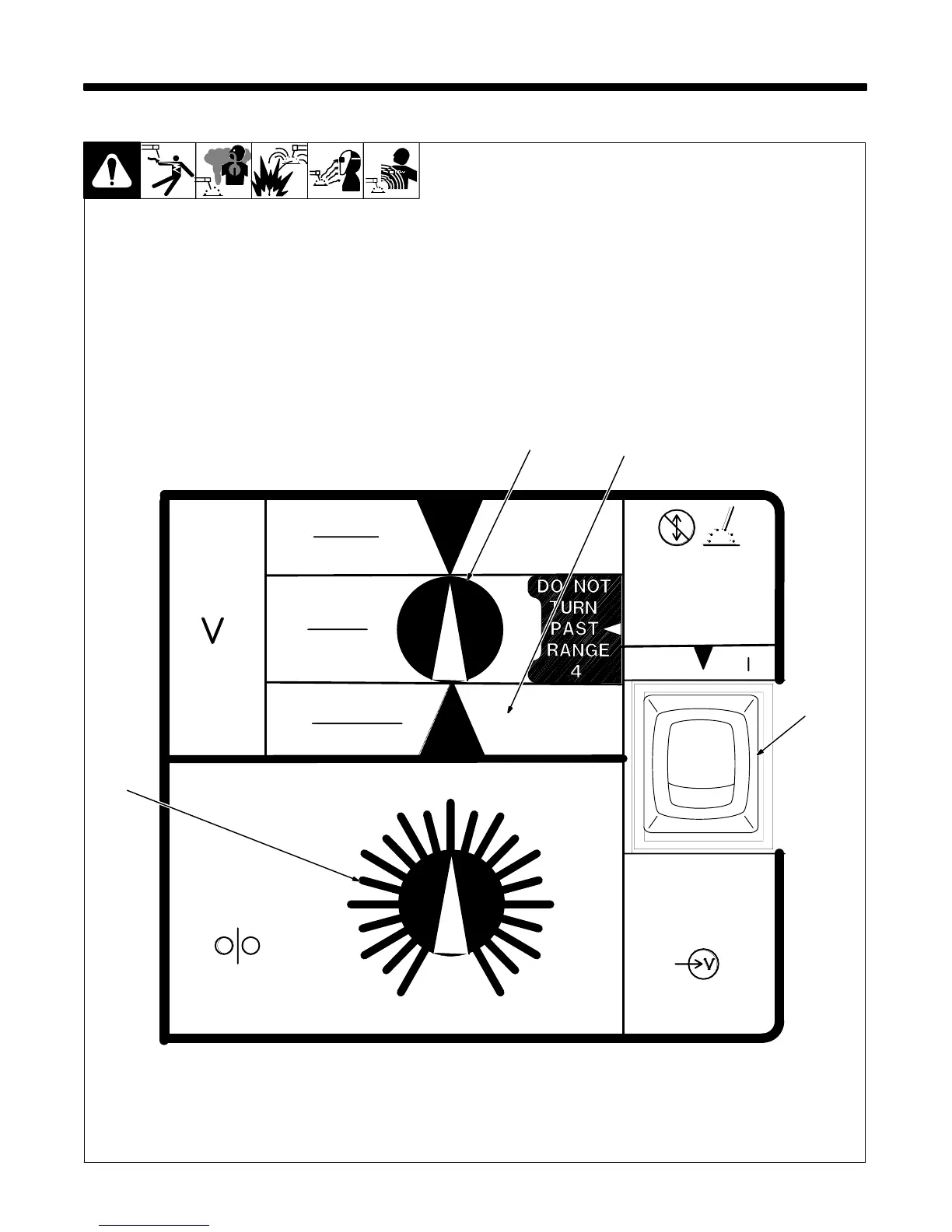
1 Voltage Switch
The higher the selected number,
the thicker the material that can be
welded (see weld setting label in
welding power source or Sections
4-2 and 4-3, as applicable). Do not
switch under load.
2 Voltage Switch - Purge “0”
Position
In purge position, fan runs but
there is no weld output.
3 Wire Speed Control
Use control to select a wire feed
speed. As Voltage switch setting
increases, wire speed range also
increases (see weld setting label in
welding power source or Sections
4-2 or 4-3, as applicable).
4 Power Switch
Ref. ST-205 387
2
1
3
MAX.
(STEEL)
THICKNESS
MATERIAL
18−24 GA.
.022−.047
.062
16 GA.
.125
11 GA.
1
0
WIRE
FEED
SPEED
2
3
4
WELD
VOLTS
10
9
8
7
6
5
OOFF
INPUT
POWER
ON
Do not switch
while welding
Ne pas commuter
durant LeSoudure
1
2
34
PURGE
4



 To Next Page