PressSystem 620080020 Rev07 062018.doc
19
6 FUNZIONAMENTO ED IMPIEGO - OPERATION AND USE
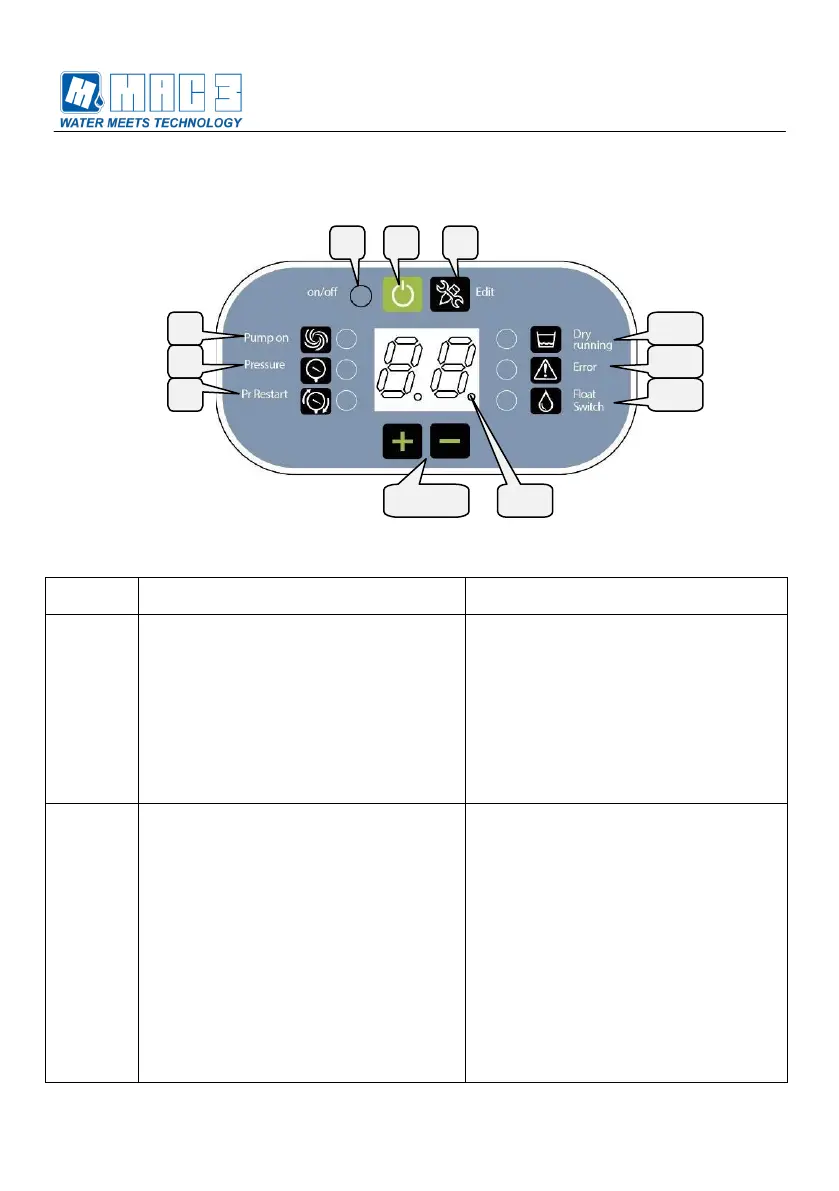
6.1 Tastiera - Keyboard
Tasto ON/OFF:
Permette di accendere o spengere la
pompa
Ripristina il normale funzionamento del
dispositivo a seguito di un errore
Permette di uscire dalla stato di
modifica di un parametro senza salvare
il dato modificato
ON/OFF button:
Allows to turn on or off the pump
Reset the normal operation of the
device after an error
Allows to exit without storing the
modified data
Tasto EDIT:
Permette di visualizzare il valore
impostato al parametro selezionato
Se premuto per più di 2 secondi
permette la modifica del parametro
selezionato. L’abilitazione alla modifica
viene indicato con il lampeggio del
relativo led.
Terminata la modifica, ripremendo il
tasto EDIT si salva il valore in
maniera permanente.
Premendo il tasto ON/OFF si esce
dalla modifica senza salvare il valore.
EDIT button:
Allows to display the set value of the
selected parameter
Allows to modify the selected
parameter if the button is pressed for
more than 2 seconds.
Enabling change is indicated by the
flashing of the led.
if the EDIT button is pressed the
value will be stored permanently.
if the ON/OFF button is pressed the
value will not be stored and it is
possible to exit without saving.


 To Next Page