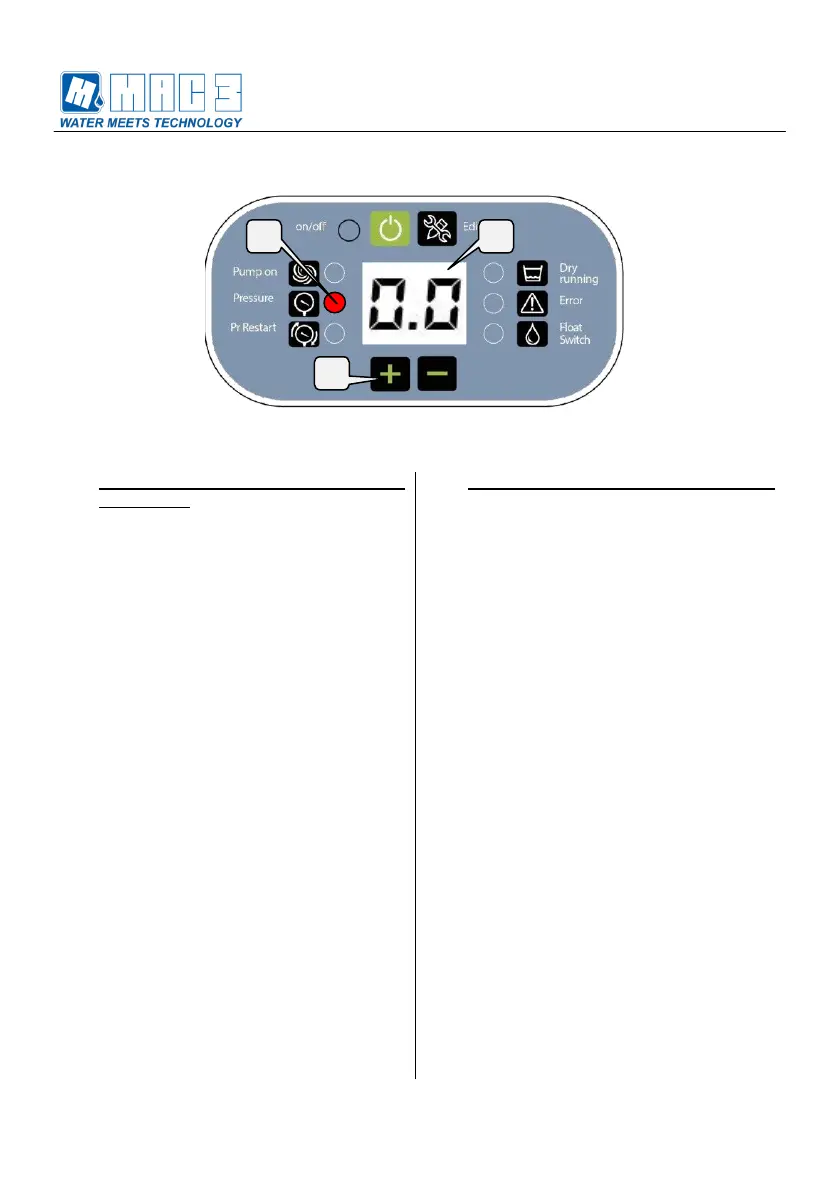
6. Memorizzazione valore minimo
(prima fase):
Durante la prima fase della procedura è
necessario far memorizzare al dispositivo
la pressione minima di impianto. La
condizione migliore è avere una pressione
minima misurata pari a 0 bar, per cui
sarebbe opportuno svuotare
completamente l’impianto. Se tale
operazione non fosse possibile è
necessario portare l’impianto alla
pressione minima disponibile.
6.1 Dopo aver portato l’impianto alla
pressione minima possibile, impostare
sul display con i tasti + e – il valore
di pressione pari a quella letta sul
manometro di riferimento.
6.2 Premere contemporaneamente i tasti
+ e – per qualche secondo fino a
che la cifra del display inizia a
lampeggiare
6.3 Se il display visualizza il valore “9.9” la
prima fase è stato eseguita
correttamente ed è possibile
continuare altrimenti è necessario
ripetere le operazioni a partire dal
punto 6.
6. Store the minimum value (first phase):
During the first phase of the procedure is
necessary to store the minimum pressure
value of the system. The best condition is
to have a minimum pressure measured like
0 bar, so it would be appropriate to
completely empty the system. If that is not
possible it is necessary to bring the system
pressure to the minimum pressure
available.
6.1 When the system is at the lowest
pressure, set the value of pressure
equal to the reference manometer
using the + and – buttons.
6.2 Simultaneously press the + and –
buttons for some seconds until the digit
of the display will start to flash.
6.3 If the display shows the value "9.9", the
first phase has been completed
successfully and you can continue,
otherwise you have to repeat the
procedure from step 6.


 To Next Page