R113/R116 Self-Propelled Disc Mower Quick Card MD #214620 Rev. A
Supplement to R113/R116 SP Disc Mower Operator’s Manual
R113/R116 SP Quick Card
Subject to change without notice.
Use this card as a guide only. Refer to your Operator’s Manual
for detailed settings and adjustment procedures.
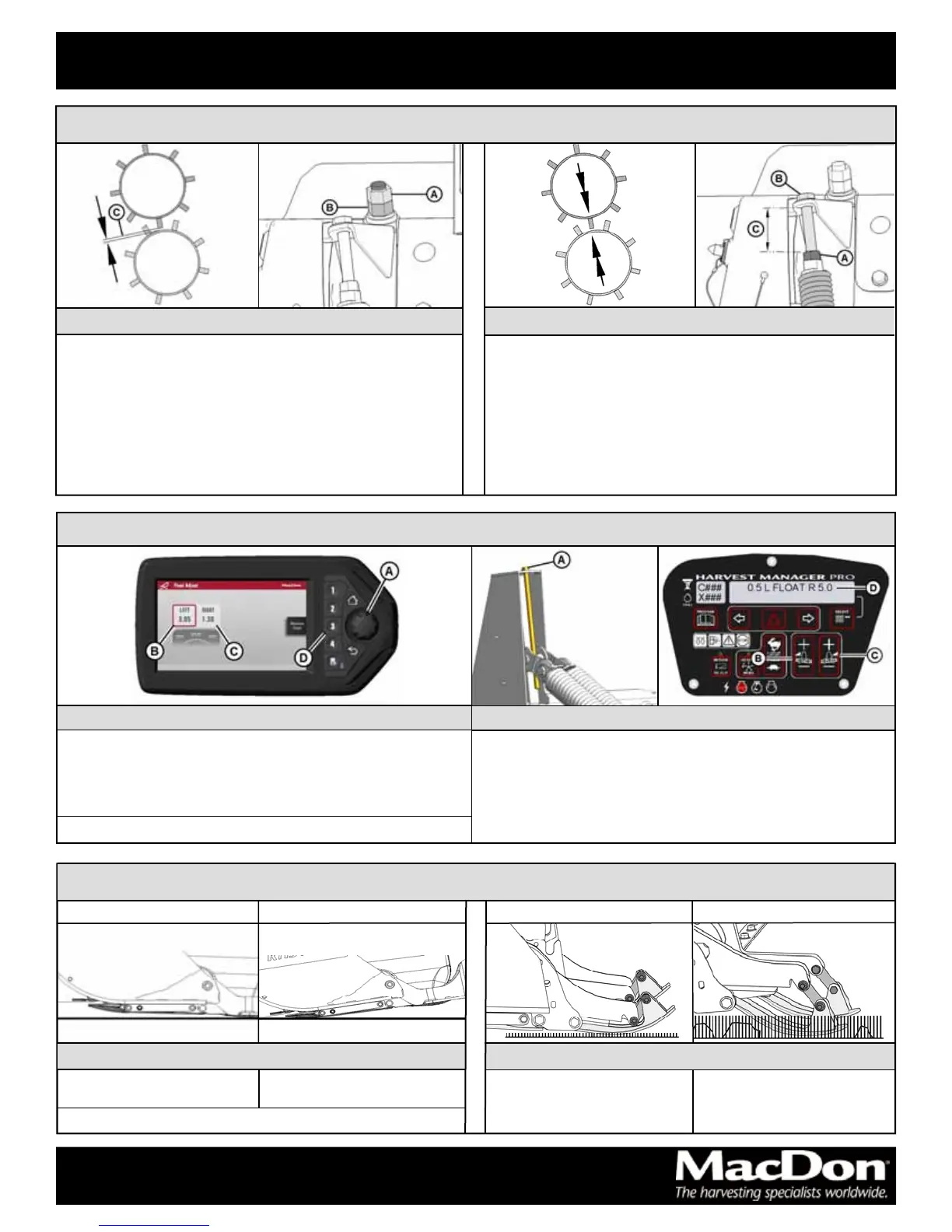
Shallow Angle Steep Angle
Rocks / ridges / loose ground:
Shallow angle
High stubble / rocks / cane:
Lower position
Short stubble / smooth ground:
Upper position
Skid Shoes
Upper Position Lower Position
Cutting Height
Roll Gap
Increase conditioning:
1. Loosen jam nut (A).
2. Turn lower nut (B) counterclockwise to decrease roll gap (C).
3. Tighten jam nut (A).
Decrease conditioning:
1. Loosen jam nut (A).
2. Turn lower nut (B) clockwise to increase roll gap (C).
3. Tighten jam nut (A).
Roll Tension
Light crops—less tension:
1. Loosen jam nut (A).
2. Turn bolt (B) counterclockwise to increase exposed thread (C).
3. Tighten jam nut (A).
Heavy / tough crops—more tension:
1. Loosen jam nut (A).
2. Turn bolt (B) clockwise to decrease exposed thread (C).
3. Tighten jam nut (A).
Conditioning
Smooth / level / firm ground:
Steep angle
Header Angle
M1170
1. Turn scroll knob (A) to highlight left float (B) or right float (C).
2. Press knob (A) to activate selection.
3. Rotate scroll knob to adjust float setting.
4. Press scroll knob when finished.
M155 / M155E4
1. Coarse adjust float with drawbolt (A):
• clockwise to increase float (makes header lighter).
• counterclockwise to decrease float (makes header heavier).
2. Fine adjust left float with switch (B) or right float with switch (C):
• Setting displays at (D).
• Press + to increase or — to decrease float.
Float
NOTE: Check float after significantly changing header angle.
NOTE: Adjust float in small increments.





 To Previous Page