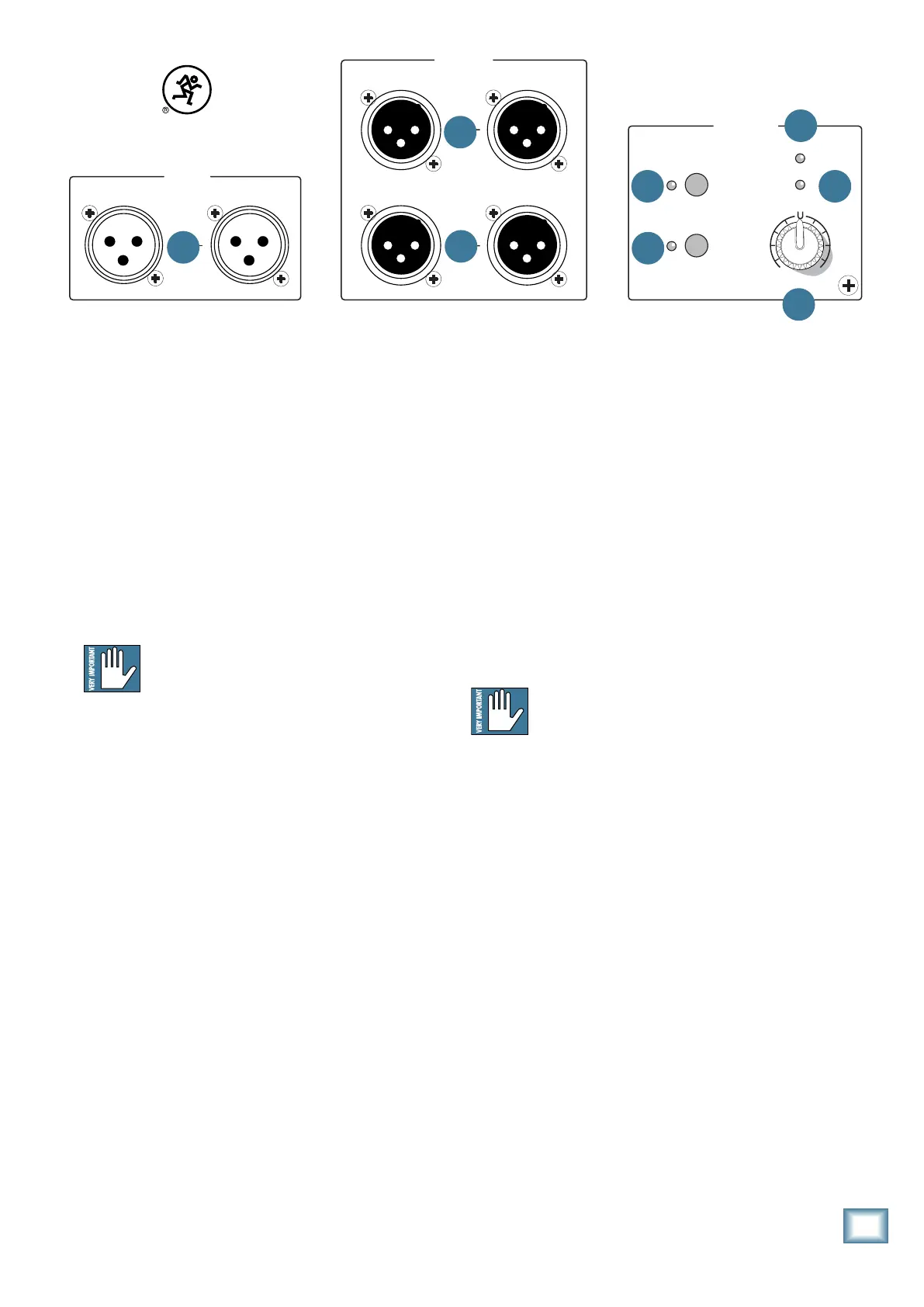
9. SIG/LIMIT LED
This bi-color LED illuminates green whenever there is
a signal present at the main inputs. It senses the signal
just after the level control, so adjustments to the level
controlwillaffectthesig/limitindicator.
The HD1501 has a built-in limiter that helps to pre-
vent the amplifier outputs from clipping or overdriving
thetransducer.Thesig/limitindicatorlightsinyellow
when the limiter is activated. It’s okay for it to blink
yellow occasionally, but if it blinks frequently or lights
continuously, turn down the input level until it only
blinks occasionally.
Excessive limiting may lead to
overheating, which in turn trips the thermal
protect circuitry and interrupts the
performance. See ‘Thermal Considerations’ on
page 11 for more information.
POWER
ON
FULL RANGE
HIGH PASS
OUTPUTS
SETTINGS
AB
AB
AB
HD1501
15 -INCH HIGH DEFINITION POWERED SUBWOOFER
POWER
LIGHT ON
SIG/ LIMIT
THERMAL
LEVEL
+
6dB6dB
-
POLARITY
INVERT
INPUTS
REVISION
SERIAL NUMBER
WARNING:
TO REDUCE THE RISK OF FIRE OR ELECTRIC SHOCK, DO NOT EXPOSE THIS EQUIPMENT TO RAIN OR
MOISTURE. DO NOT REMOVE COVER. NO USER SERVICEABLE PA RTS INSIDE. REFER SERVICING TO QUALIFIED PERSONNEL.
AV IS:
RISQUE DE CHOC ELECTRIQUE — NE PAS OUVRIR
4
5
6
7
10
3
9
8
10. THERMAL LED
The HD1501 is equipped with a thermal protection
circuit that monitors the internal temperature of the
amplifier and heatsink. If the temperature begins to
exceed a safe operating level, this indicator lights and
the amplifier output is limited to allow the amplifier to
cool. If the amplifier becomes excessively hot, the amp is
muted until it cools, then the HD1501 returns to normal
operation.
When the HD1501 is in thermal protect mode, the
power LED (2) will remain lit, indicating that the unit
is still powered on despite the lack of output. If POWER
LIGHT ON (7) is engaged, the front panel power LED
will go out when in thermal protect mode.
Activation of the thermal protection circuit
is an indication that you should take steps
to avoid continued thermal problems. See
“Thermal Considerations” on page 11.
9
Owner’s Manual
Owner’s Manual


 To Next Page