EasyManua.ls Logo

Mackie MP-20TWS - User Manual

Mackie MP-20TWS
13 pages
Print Icon
To Next Page IconTo Next Page
Loading...
OWNER’S MANUAL
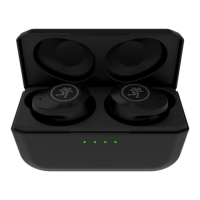
True Wireless Dual-Driver Earbuds with Active Noise Cancelling
MP-20TWS

Other manuals for Mackie MP-20TWS

Question and Answer IconNeed help?

Do you have a question about the Mackie MP-20TWS and is the answer not in the manual?

Summary

Important Safety Instructions

General Usage and Safety Precautions

Covers warnings on environment, children, volume, cleaning, modification, water immersion, sleeping, and medical conditions.

Battery and Electrical Warnings

Cautions regarding battery exposure to heat, explosion risk from incorrect replacement, and static electricity effects.

Getting Started: First Steps

Initial Setup and Preparation

Instructions to remove the plastic tab between earbuds and charging case, and check L/R markings for proper fit.

Charging and Power Connection

Guide on connecting the USB-C cable to the case for charging earbuds and the case itself.

Case and Earbud Status Indicators

Explains the function of case buttons and LEDs for checking battery status and initiating pairing.

Earbud Controls and Functions

Left Earbud Controls

Details tap and hold functions for the left earbud: ambient mode, track skipping, volume control, and reset.

Right Earbud Controls

Details tap and hold functions for the right earbud: play/pause, calls, track skipping, volume, and reset.

Illustrated Guide to Earbud Features

Touch Control Actions

Visual guide to single tap, double tap, triple tap, and hold actions for both left and right earbuds.

Bluetooth Pairing and ANC

Bluetooth Pairing Process

Step-by-step guide for initial Bluetooth pairing and automatic reconnection of previously paired devices.

Service and Troubleshooting

Troubleshooting Common Issues

Provides solutions for no power, poor sound/noise, and no sound issues, including checking connections.

Limited Warranty and Support

Summary

Important Safety Instructions

General Usage and Safety Precautions

Covers warnings on environment, children, volume, cleaning, modification, water immersion, sleeping, and medical conditions.

Battery and Electrical Warnings

Cautions regarding battery exposure to heat, explosion risk from incorrect replacement, and static electricity effects.

Getting Started: First Steps

Initial Setup and Preparation

Instructions to remove the plastic tab between earbuds and charging case, and check L/R markings for proper fit.

Charging and Power Connection

Guide on connecting the USB-C cable to the case for charging earbuds and the case itself.

Case and Earbud Status Indicators

Explains the function of case buttons and LEDs for checking battery status and initiating pairing.

Earbud Controls and Functions

Left Earbud Controls

Details tap and hold functions for the left earbud: ambient mode, track skipping, volume control, and reset.

Right Earbud Controls

Details tap and hold functions for the right earbud: play/pause, calls, track skipping, volume, and reset.

Illustrated Guide to Earbud Features

Touch Control Actions

Visual guide to single tap, double tap, triple tap, and hold actions for both left and right earbuds.

Bluetooth Pairing and ANC

Bluetooth Pairing Process

Step-by-step guide for initial Bluetooth pairing and automatic reconnection of previously paired devices.

Service and Troubleshooting

Troubleshooting Common Issues

Provides solutions for no power, poor sound/noise, and no sound issues, including checking connections.

Limited Warranty and Support

Mackie MP-20TWS Specifications

General IconGeneral
TypeIn-Ear
WirelessYes
Driver Size6mm
Frequency Response20Hz - 20kHz
Impedance16 Ohms
Bluetooth Version5.0
Charging Time1.5 hours
Water ResistanceIPX4
MicrophoneYes
Bluetooth CodecSBC, AAC
Sensitivity100 dB

Related product manuals