SP260 2x6 Speaker Processor
28
SP260 2x6 Speaker Processor
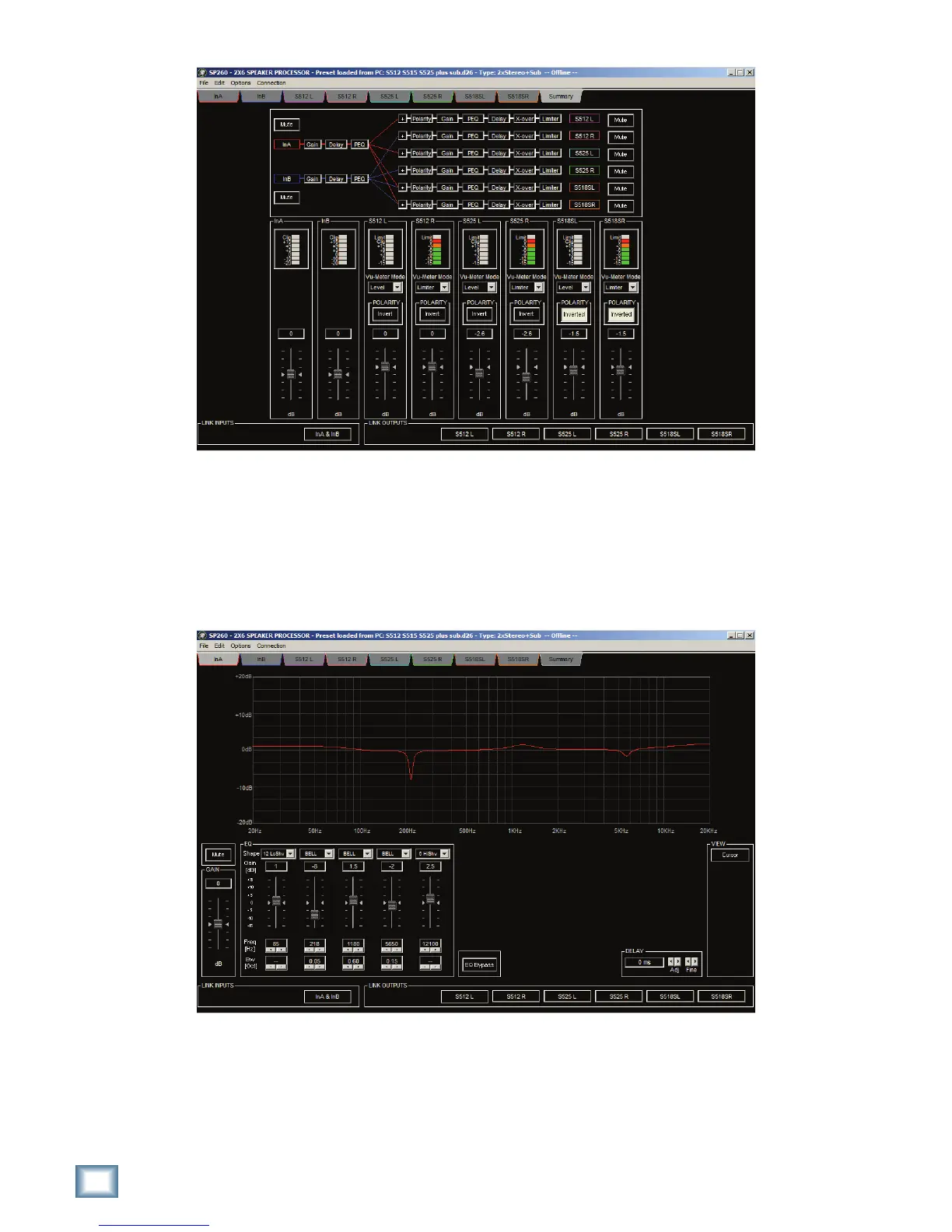
Summary Screen
The Summary Screen lets you keep tabs on critical processor parameters and input/output levels in a single view.
At the top is a signal routing overview showing the processing elements in order from input to output, plus input
routing to each output. You can also mute and unmute inputs and outputs using the buttons flanking the processor
flow diagram. Meters are located in the center of the screen, along with mode settings that let you switch between
level and limiter activity per channel. Below that are the polarity invert buttons for each output, followed by input
and output gain controls.
Input Screens
There are 2 input tabs, one for Input A and one for Input B. The top of the screen shows you the EQ graph for
THESELECTEDINPUT#LICKINGTHE#URSORBUTTONINTHE6IEWSECTIONWILLADDNODESTOTHEGRAPHSOYOUCANCLICK
and drag to dial in EQ settings. Below the EQ graph, starting from the left are the Mute and Gain controls, followed
by the 5-band EQ controls and EQ bypass button. Double clicking gain controls will reset them to 0. A popup menu
over each EQ band lets you choose between shelving and parametric (bell) types. Frequency and bandwidth
controls are below the gain control for each EQ band. To the right are the course and fine adjustment controls
for your input delay.



 To Next Page