- 17 -
General Settings
1. Touch [ General ] in the settings page.
2. Touch to highlight a setting.
3. Touch on the option to display/select an option.
4. Touch [ ] or press the Menu button on the front panel to exit.
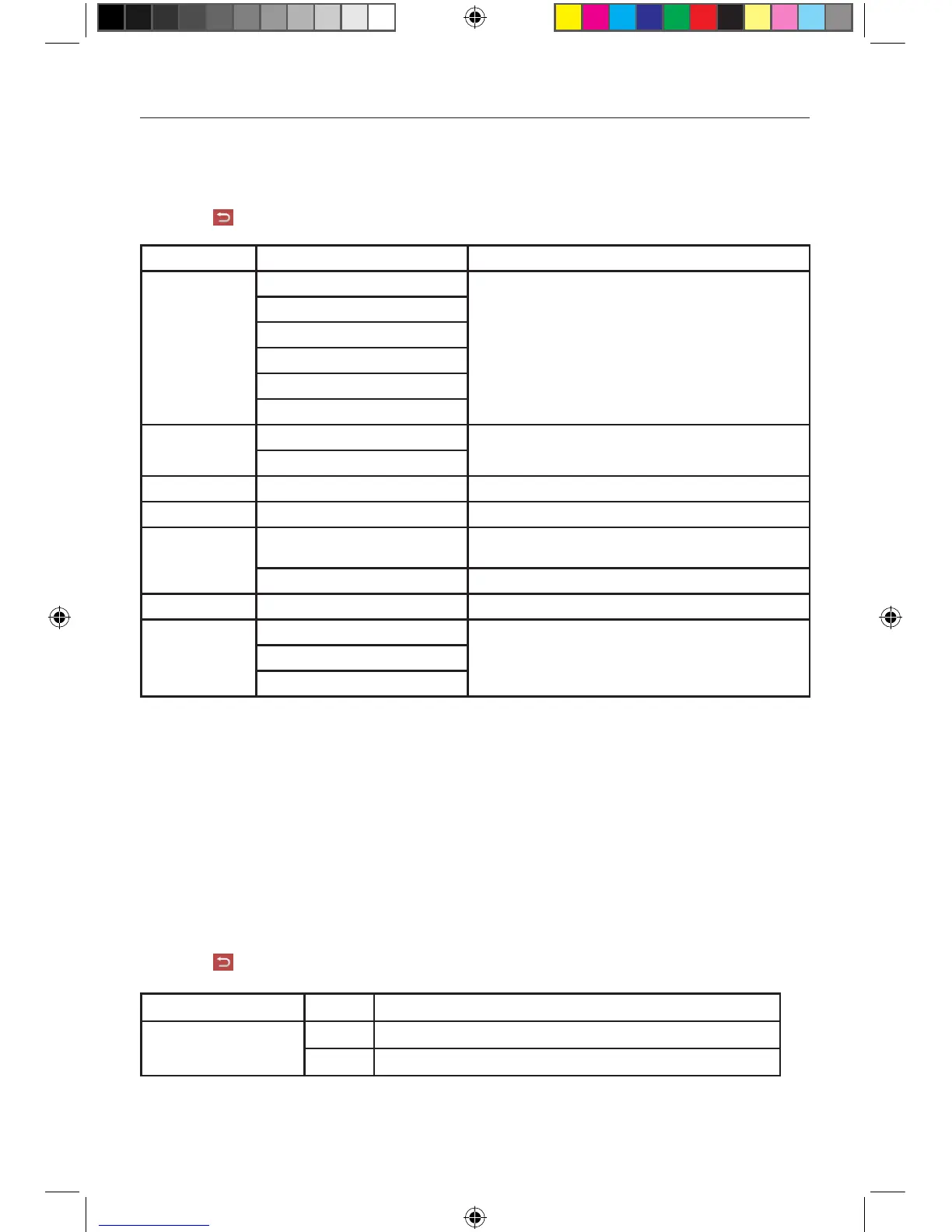
General settings Options Description
Radio region
USA
Select one that matches your location.
China
Japan
Europe
Europe (LW)
OIRT
Radio range
Local
Distance
Blackout Off/10s/20s
Dimmer mode Low/Medium/Normal/High Adjust the display brightness.
Beep
On
Turn on the beep sound. Each time you press a button, the unit
beeps.
Off Turn off the beep sound.
Calibration Start Calibrate the touch screen.
TFT Open
Auto ON
Select the desired mode for the opening screenAuto OFF
Manual
Calibration
When the touch operation is not sensitive or valid, you should calibrate the touch screen through
calibration setting function.
Adjust the response positions of the touch panel as followings:
1. Press the [ Calibration ] option on the setup menu to enter.
2. Touch [ Start ] to enter.
3. Aim at center of [ + ], follow the path as shown of the figure, after steps from 1 to 5, touch
anywhere on the screen to save and exit from calibration. Or wait for 30 seconds to exit without
making changes.
Video Settings
1. Touch [Video].
2. Touch an option repeatedly to select:
3. Touch [ ] or press the Menu button on the front panel to exit.
Video settings Options Description
Detect parking brake
On Disable video
Off Enable video
When detect parking brake is set to“On” , the screen will display [ Warning!!!” Video playback is
disabled for your safety. Engage parking brake to watch video] The above warning screen will
prevent the driver watching images.
Settings
M-DVD6560 User manual_ENG.indd 17 23/05/2014 14:36:38


 To Next Page