Trip
Planner
Exit POls
Current Location
Routing
to
a
POI
Alrianfood
Au!itntlianFood
Please refer to the User Manual
on
the CD-ROM for more
information
on
routing to POls.
Seltct Sub
uttgoty
(if
subcategories
are
available)
I
S.,dlPOlntsoflnwl'St
-+LtftStatRtstaurant
ChilElC
JiIys_G<~
Shopping
AIrports
~
~l
!:
~
\~-
Map
AddT~'
Int"''-':1
~
l""'"
.......
-
0>
II
•
;/
•
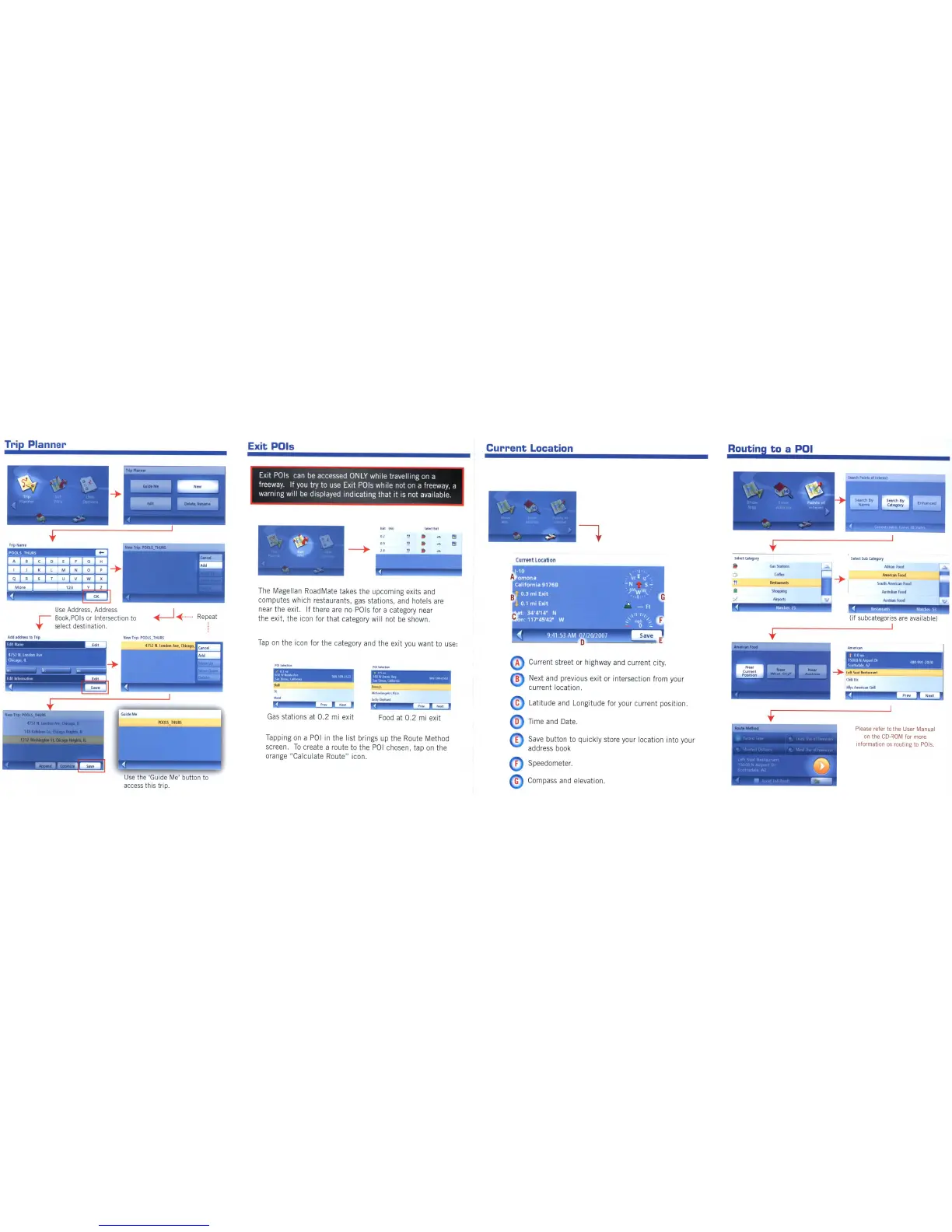
Latitude and Longitude for your current position.
Time and Date.
Save
button to quickly store your location into your
address book
Speedometer.
A Current street or highway and current city.
B Next and previous exit or intersection from your
current location.
Current Location
G Compass and elevation.
~..-;
~
~~
~hcw
Em.
Pomh
01
M.lIJ)
Addr.,
I"t
...
nt
~
..
,,I"
....:::.
Food
at
0.2
mi exit
II".
16
....
Gas
stations at
0.2
mi exit
Tapping
on
a
POI
in
the list brings up the Route Method
screen.
To
create a route to the
POI
chosen, tap
on
the
orange "Calculate Route" icon.
Tap
on
the icon for the category and the exit
you
want to use:
The
Magellan RoadMate takes the upcoming exits and
computes which restaurants,
gas
stations, and hotels
are
near the exit.
If
there
are
no
pals
for a category near
the exit, the icon for that category will not
be
shown.
EXit
pals
can
be
accessed
ONLY
while travelling
on
a
freeway.
If
you
try to use
EXit
pals
while not
on
a freeway, a
warning
Will
be
displayed indicating that It
IS
not available.
~~
Repeat
Use
the 'Guide Me' button to
access this trip.
NfWTrip:POOlS_THURS
4752
N.
london
A'If,Chk'igo,
Ontel
Use
Address, Address
I"
Book,POls or Intersection to
1'"
select desti nation.
~
'{.:
~
Trip •
,
,p
t
TnpName
A I 9 C I 0
ElF
I I J K I L
MIN
P
-+
Q I R
SiT
U I V
Add
ackhss
to
Trip
~-------
41S1NLondonAvp
Chlcago,ll




 To Next Page