
 Need help?
Do you have a question about the Magnavox 19MD359BF7OM and is the answer not in the manual?
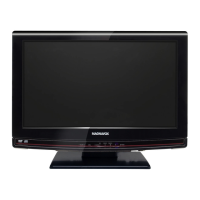
This document is a user manual for the Magnavox 19MD359B LCD TV/DVD combo unit, a versatile entertainment device designed for home use.
The Magnavox 19MD359B serves as both a television and a DVD player, offering a comprehensive entertainment solution. As a TV, it supports DTV, TV, and CATV signals, allowing users to access digital and analog broadcast channels, as well as cable TV channels. It features an autoprogram function for automatic channel scanning and memorization, simplifying setup. The unit includes a Child Lock feature to restrict access to inappropriate programs and a Closed Caption Decoder for displaying text from supported programs. The MTS/SAP Tuner allows for audio selection, and an Auto Shut Off function conserves energy by turning off the unit after 15 minutes of no signal input or operation. A Sleep Timer is also available for automatic power-off at a specified time. Users can select their preferred on-screen language (English, Spanish, or French) and customize picture and sound settings. Connectivity options include HDMI, Component Video, PC, S-video, and AV inputs, along with a Digital Audio Output.
As a DVD player, the 19MD359B supports various disc formats, including DVD-Video, DVD-RW, DVD-R, DVD+RW, DVD+R, CD-DA, CD-RW, and CD-R. It offers Dolby Digital multi-channel surround sound when connected to a compatible decoder. Playback modes include still pictures, fast forward/reverse, slow motion, and step frames. Users can display DVD menus in a desired language and utilize an Auto Power Off function for the DVD player. Parental Lock allows blocking of unsuitable DVD-video content. A Resume Playback feature enables users to continue watching from where they left off. Other features include Bit Rate Indication and DRC (dynamic range control) for sound volume adjustment. During playback, users can select subtitles, camera angles, zoom in on images, adjust black levels, and use search functions (chapter, title, track, time). The unit also supports marker functions for quick recall of specific disc parts, and repeat playback for chapters, titles, tracks, or A-B sections. In stop mode, it offers program playback and random playback for audio CDs.
The unit is designed for ease of use with a remote control that provides access to all major functions. The control panel on the unit itself offers basic controls for power, play, stop, eject, channel selection, menu access, and volume adjustment. The disc loading slot is conveniently located for front-facing disc insertion. The TV supports various display modes (Normal, 16:9, Movie Expand, Wide, Zoom, Full, Dot By Dot) to optimize viewing for different aspect ratios and input signals. The main menu provides access to settings for picture, sound, setup (autoprogram, channel list, add channels, antenna confirmation, language selection), features (closed caption, child lock, PC settings, energy saving mode, location, current software info), and DVD settings. The Child Lock feature allows setting PIN codes and blocking programs based on US Movie, US TV, and Canadian ratings. The DVD player offers language settings for subtitles, disc menus, and audio, as well as black level adjustment and marker setup for enhanced viewing control.
The manual provides guidelines for basic maintenance. It advises cleaning the cabinet and other exterior surfaces with a soft cloth dampened with water and mild detergent, avoiding solvents or abrasive cleaners. For disc handling, it recommends holding discs by the edges, cleaning with a soft, dry cloth from the center outwards, and never using solvents. The manual also includes a troubleshooting guide to help users resolve common issues related to no power, control button malfunction, no picture/sound, display problems, disc playback errors, and remote control issues. For more complex problems, users are directed to contact qualified service personnel. The manual also highlights the importance of registering the product for warranty service, product safety notifications, and additional benefits.
 General
| Brand | Magnavox |
|---|---|
| Model | 19MD359BF7OM |
| Category | TV DVD Combo |
| Language | English |



 To Next Page