Changing The On-Screen Display 35
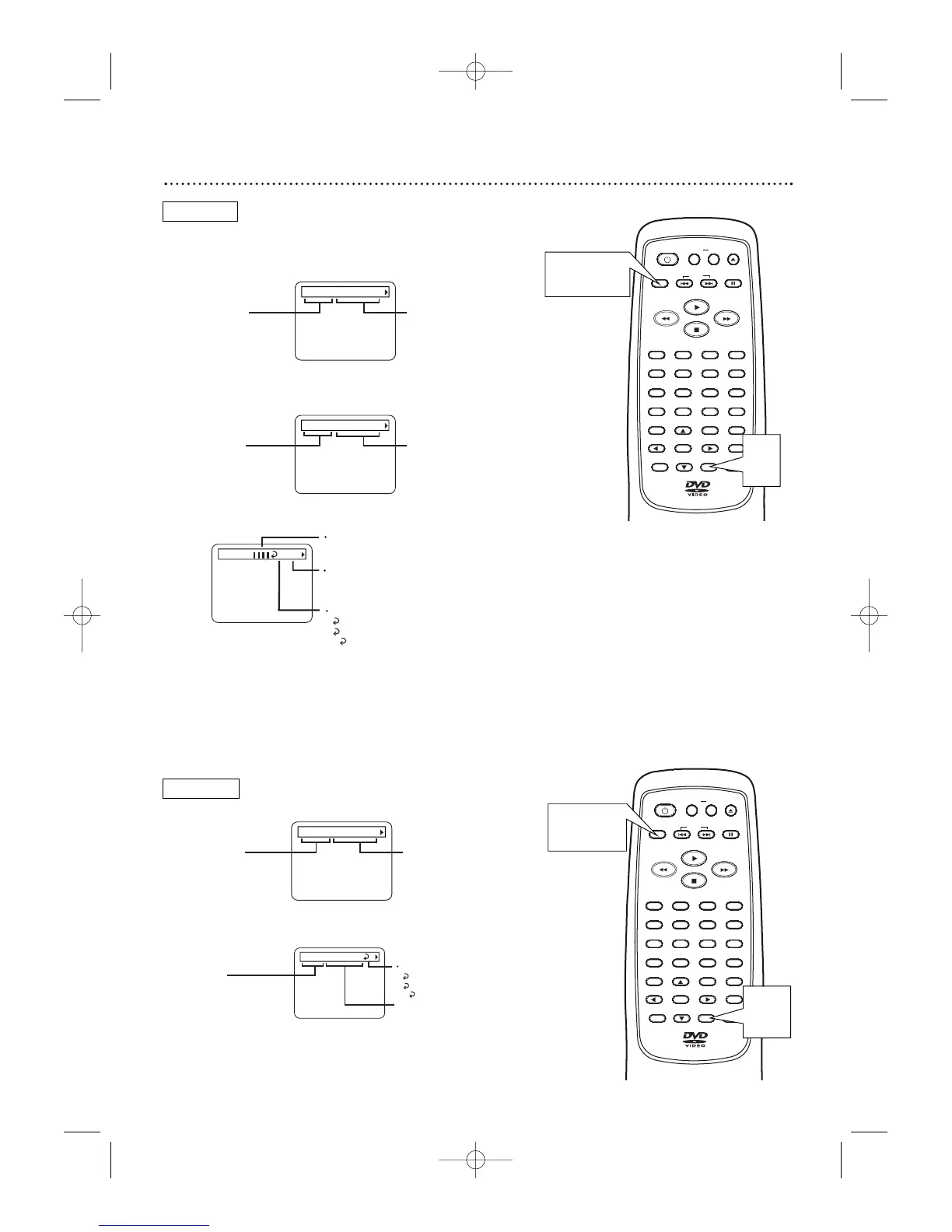
You can check information about the current Disc by press-
ing DISPLAY on the remote control.
1
Press DISPLAY during playback.
1
Press DISPLAY during playback.
2
Press DISPLAY again. If you want, you can press a
Number button now to start playing a specific Chapter.
2
Press DISPLAY again. If you want, you can press a
Number button now to start playing a specific Track.
3
Press DISPLAY again.
3
Press
DISPLAY or RETURN to remove the dis-
play.
4
Press DISPLAY or RETURN to remove the
display.
DVD
TT 1/2 0:00:00 - 1:23:45
TT (Title):
Current Title number
/ Total Titles
Elapsed playing time of the
current Title; remaining playing
time of the current Title
CH 7/49 0:01:46 - 0:03:27
CH (Chapter):
Current Chapter number
/ total Chapters
Elapsed playing time
of the current Chapter;
remaining playing time
of the current Chapter
BIT RATE
BIT RATE: The quantity of
information recorded on the DVD.
C
L0
Layer number, if applicable
L0: Layer 0 is playing
L1: Layer 1 is playing
Current Repeat setting, if active
C: Chapter repeat
T: Title repeat
A B: A-B repeat
TR 4/12 0:03:21 - 0:02:15
TR (Track):
Current Track number
/ total Tracks
Elapsed playing time
of the current Track;
remaining playing time
of the current Track
ALL 4/12 0:13:45 - 0:45:40
ALL:
Current track number
/ total Tracks
Elapsed playing time
of the current Audio CD;
remaining playing time of
the current Audio CD
T
Current Repeat setting, if active
T: Track repeat
A: All repeat
A B: A-B repeat
OPEN/
CLOSE
CLEAR
OK
RETURN
DISPLAY
TITLE
SEARCH
MODE
MODE
ZOOM
REPEAT
MARKER
SETUP
AUDIO
PAUSE
A-B
SUBTITLE
ANGLE
POWER
32
1
654
987
0
+
10
MENU
SKIP
OPEN/
CLOSE
CLEAR
OK
RETURN
DISPLAY
TITLE
SEARCH
MODE
MODE
ZOOM
REPEAT
MARKER
SETUP
AUDIO
PAUSE
A-B
SUBTITLE
ANGLE
POWER
32
1
654
987
0
+
10
MENU
SKIP
MDV410/430 2/7/02 11:18 AM Page 35



 To Next Page