Operation Manual
touchTymp MI 24
and
MI 34
Version
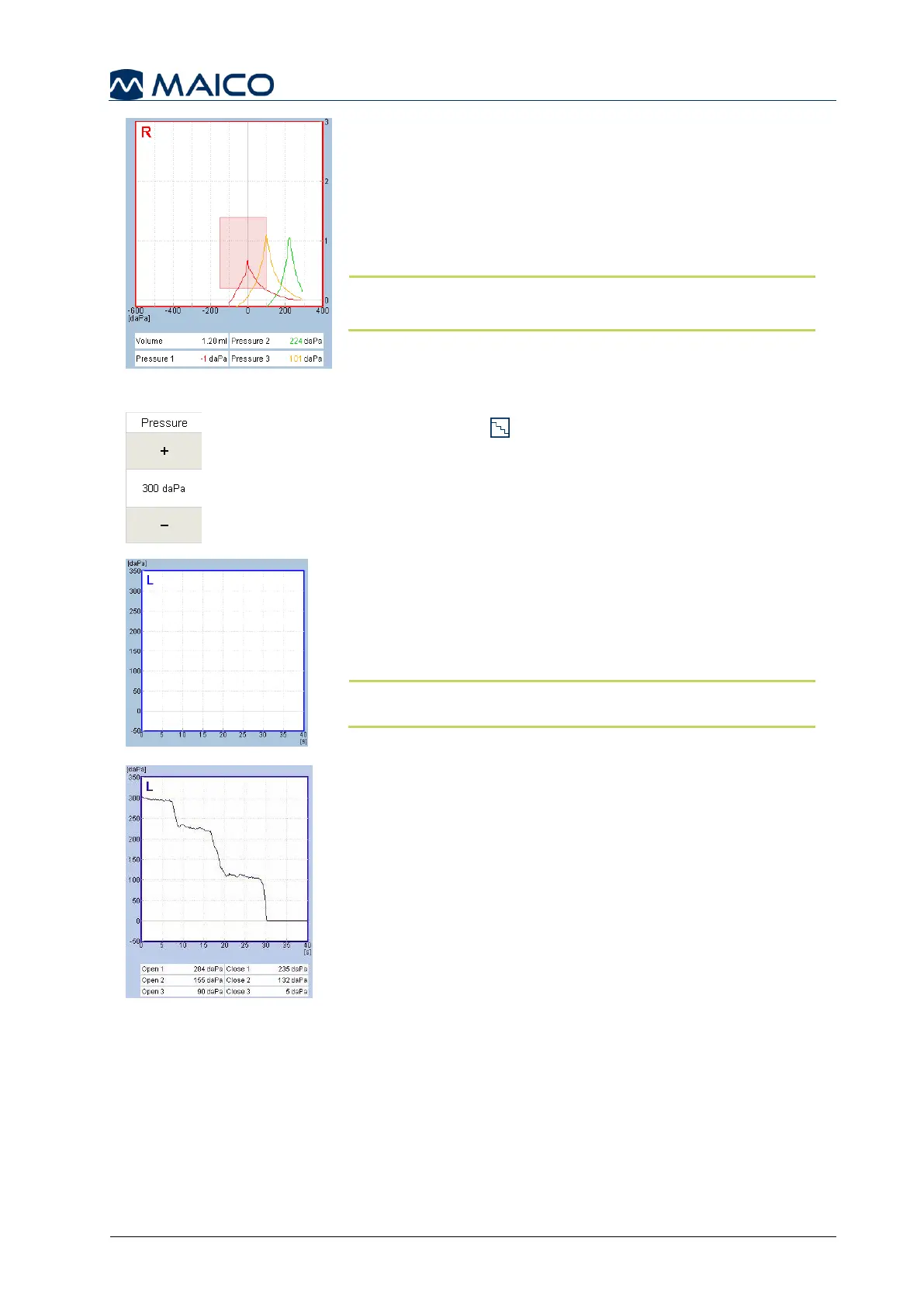
Compare the single tympanograms in the multilayered
tympanogram (Figure 72). Tympanograms displayed
include:
Red or Blue: represents test ear
Orange: represents “Swallow”
Green: represents “Valsalva maneuver”
NOTE: The order of instructions displayed can be
configured in the Settings, see section 5.6.13).
Performing an ETF Perforated Measurement
ETF Perforated determines if the patient can open
his/her Eustachian tube when the TM is perforated or an
open PE-tube is in place. ETF Perforated will put the
middle ear under a certain Start pressure based on the
default setting, but can be modified in 25 daPa steps by
the on screen pressure setting (Figure 73).
The graph displays the vertical axis as pressure, and the
horizontal axis as time (Figure 74).
Instruct the patient not to move or talk until the test is over.
When a seal is obtained, the device displays a message
to swallow as many times during the test duration.
NOTE: Automatic and manual mode are operated the same
for this ETF Perforated test as a start operation is required.
Pressure will increase to the predetermined setting.
Let the pressure run a few seconds at peak pressure to
verify a successful seal. Once the peak pressure has
been obtained ask the patient to swallow as many times
as they can while the test is running.
If the Eustachian tube opens, a drop in pressure will be
recorded. Repeated attempts to swallow will display a
downward stair step effect, or a complete drop to 0 daPa
(Figure 75).
Numerical results of the test are displayed below the
graph. Each time the device detects opening and closing
of the Eustachian tube, the results are recorded. An
open and close result is displayed up to three values.
The test will stop after the allotted time (i.e. 30 seconds)
as defined in the settings or the examiner manually
stops the test.


 To Next Page