RANGE
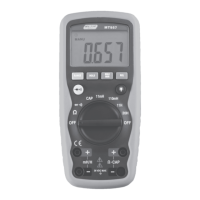
Press the RANGE key to activate the manual mode and to
disable the Auto range function. The symbol “AUTO” disappears
from the upper left part of the display. In manual mode, press
the RANGE key to change measuring range: the relevant decimal
point will change its position. The RANGE key is not active in
positions, , , , CAP, Hz%, Temp °C°F . In Auto range
mode, the instrument selects the most appropriate ratio for
carrying out measurement. If a reading is higher than the
maximum measurable value, the indication “OL” appears on the
display. Press and hold the RANGE key for more than 1 second
to exit the manual mode and restore the Auto range mode.
Automatic Power OFF
In order to conserve battery life, the meter will automatically
turn off after approximately 15 minutes. To turn the meter on
again, turn the rotary function switch to the OFF position and
then to the desired function range.
To cancel the auto power off function, press SELECT button and
turn on the power with the rotary switch at the same time. THE
“APO” symbol will disappear from the LCD display.
Maintenance
WARNING: To avoid electrical shock, disconnect the meter
from any circuit, remove the test leads from the input
terminals, and turn OFF the meter before opening the case.
Do not operate the meter with an open case.


 To Next Page