Cancel Next
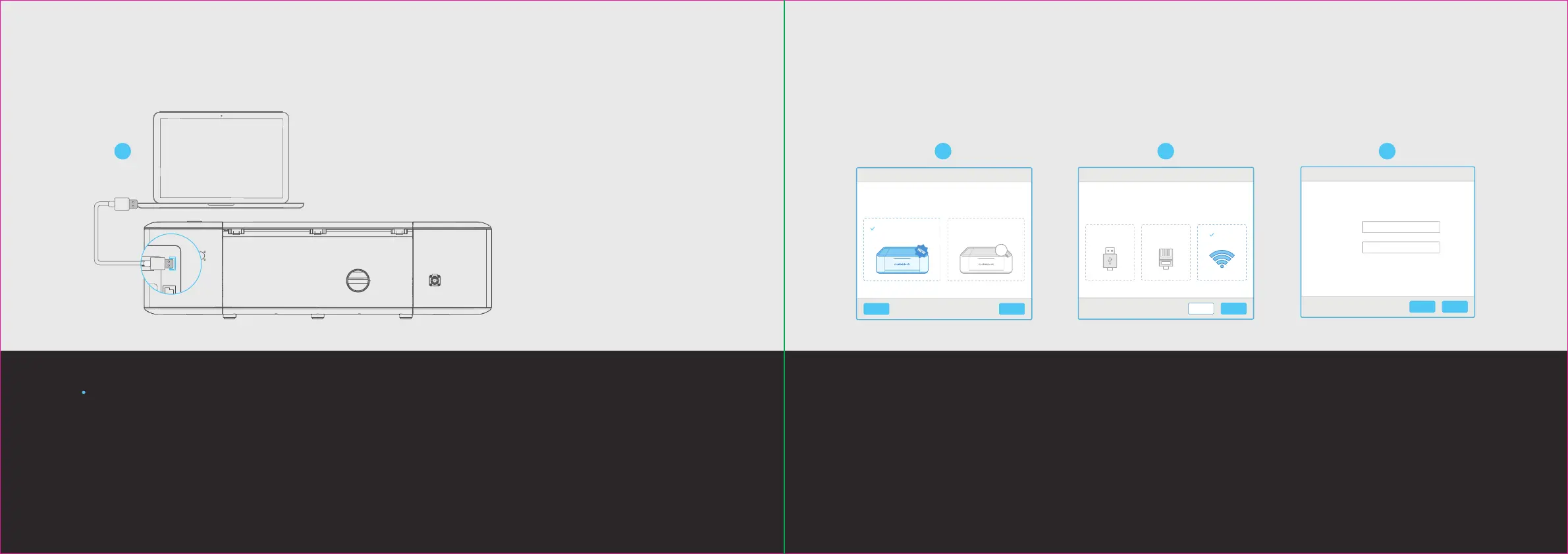
Select your preferred connection method.
Device connection
Connect to a new
LaserBox.
Connect to a networked
LaserBox.
Back Next
Connect to the LaserBox via Wi-Fi
Wi-Fi Name
Password
Back Next
Select your preferred connection mode.
Device connection
Wi-FiEthernetUSB
1. Connect a computer to the Laserbox with the USB cable. 2. Open the soware, select “Connect to a
new Laserbox” and click “Next”.
3. Select “Wi-Fi” and click “Next”. 4. Connect to the existing Wi-Fi network.
5. Aer successful connection, you can disconnect the
USB cable and wirelessly control the Laserbox.
Wi-Fi wireless connection
18
17
1
2 3 4


 To Next Page