Press and hold the
button for 5 seconds.
More Operations
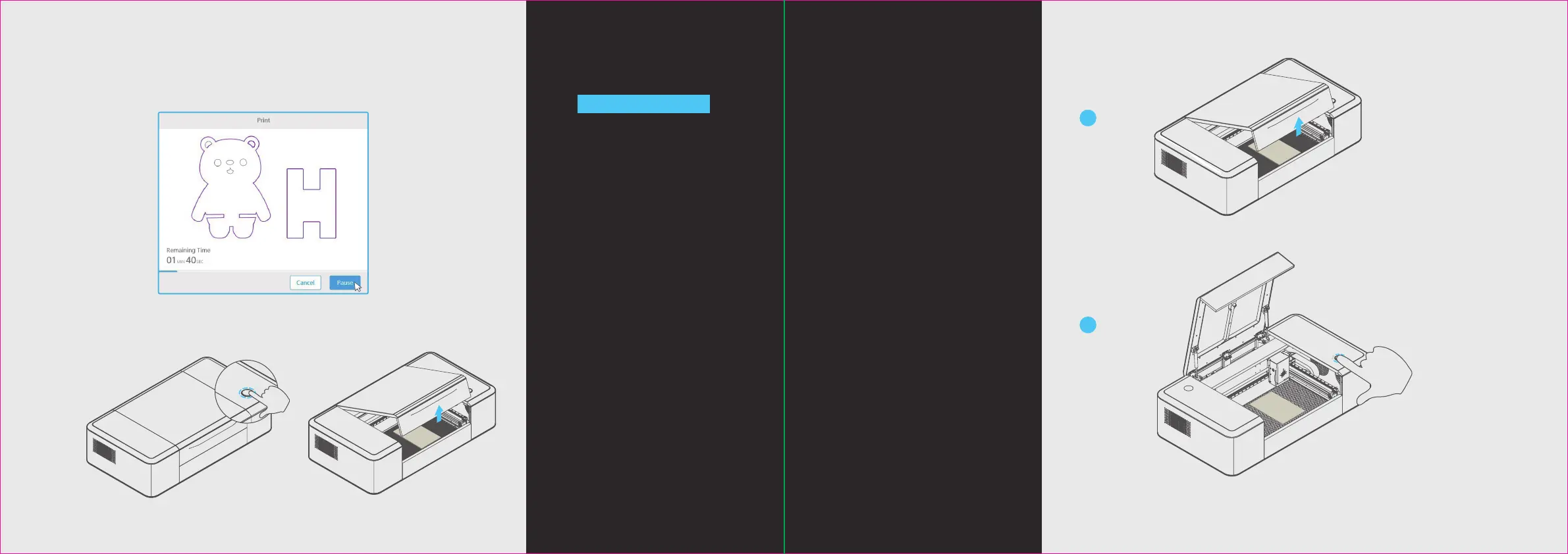
Pause the task
Method 1: Click “Pause” in the
soware interface to pause the task.
Method 2: Press the button on the
Laserbox to pause the task. Press
again to continue with the task.
Method 3: Open the lid to pause
the task. Close the lid and press
the button on the Laserbox to
continue with the task.
Cancel the task
1. Open the lid.
Note: Aer starting cutting/engraving, you can also cancel the task by
clicking “Pause -> Cancel” in the Laserbox soware interface.
23 24
1
2
2. Press and hold the button for 5
seconds. Aer the task is cancelled
successfully, you will hear a beep
sound and the annular indicator turns
from red to blue.
Method 1:
Method 2: Method 3:


 To Next Page