8
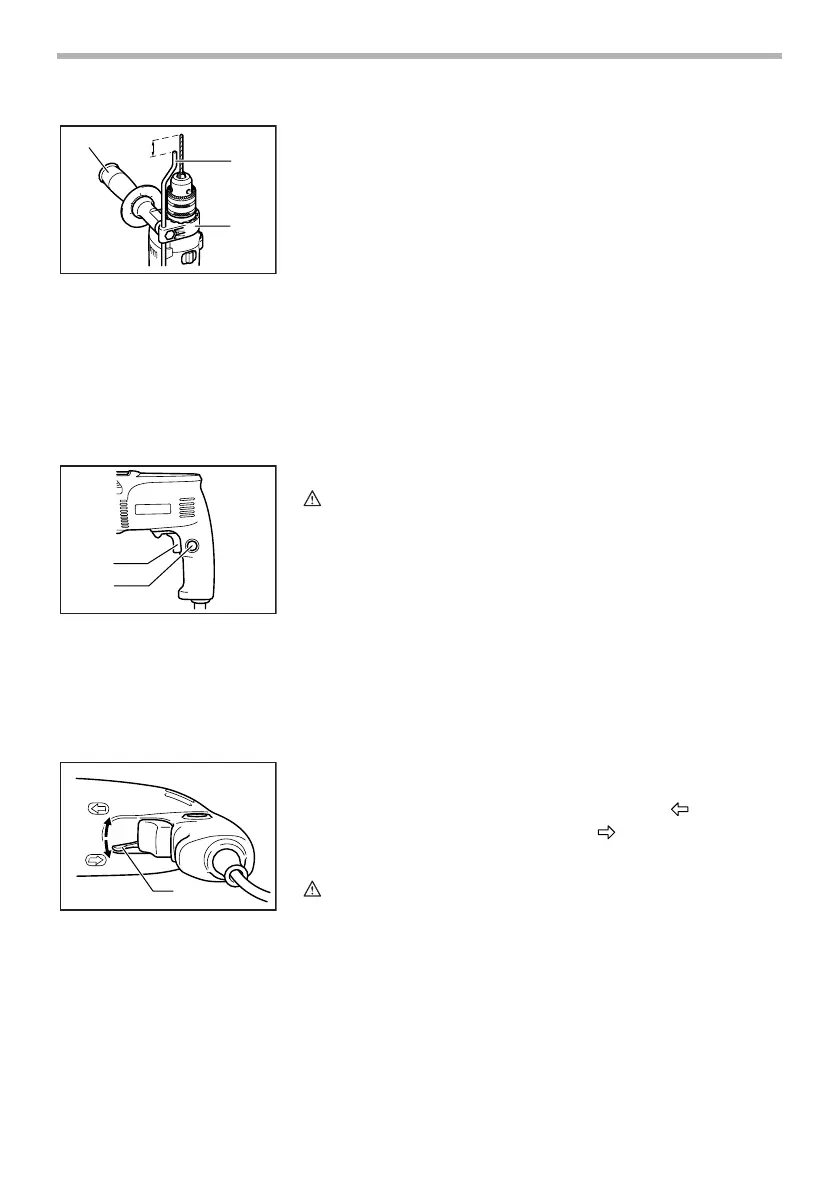
Depth gauge (optional accessory)
The depth gauge is convenient for drilling holes of uniform
depth. Loosen the side grip and insert the depth gauge into
the hole in the grip base. Adjust the depth gauge to the
desired depth and tighten the side grip.
NOTE:
The depth gauge cannot be used at the position where the
depth gauge strikes against the gear housing.
FUNCTIONAL
DESCRIPTION
Switch action
CAUTION:
• Before plugging in the tool, always check to see that the
switch trigger actuates properly and returns to the “OFF”
position when released.
To start the tool, simply pull the switch trigger. Tool speed is
increased by increasing pressure on the switch trigger.
Release the switch trigger to stop. For continuous operation,
pull the switch trigger and then push in the lock button. To
stop the tool from the locked position, pull the switch trigger
fully, then release it.
Reversing switch action
This tool has a reversing switch to change the direction of
rotation. Move the reversing switch lever to the position (A
side) for clockwise rotation or to the position (B side) for
counterclockwise rotation.
CAUTION:
• Always check the direction of rotation before operation.
• Use the reversing switch only after the tool comes to a
complete stop. Changing the direction of rotation before
the tool stops may damage the tool.
1. Side grip
2. Depth gauge
3. Grip base
1
2
3
001693
1. Switch trigger
2. Lock button
1
2
001694
1. Reversing switch lever
1
A
B
001695


 To Next Page