9
Selecting the action mode
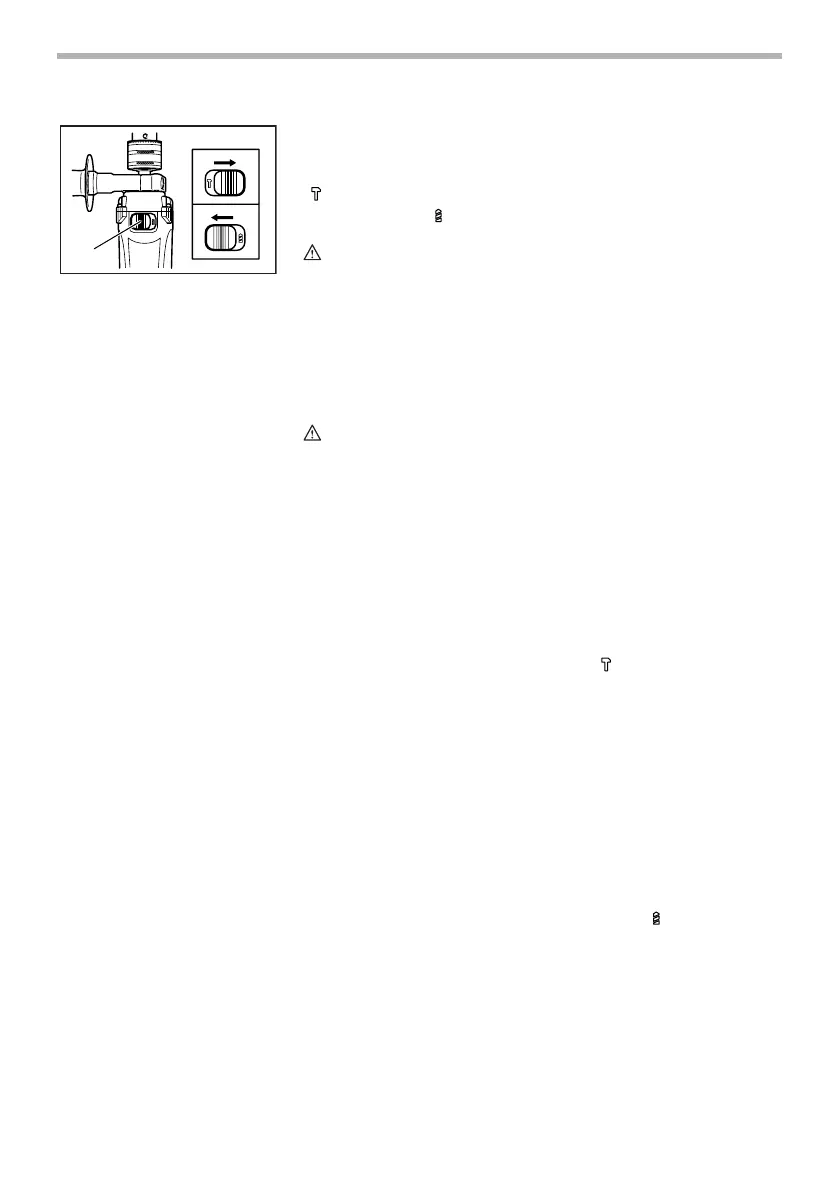
This tool has an action mode change lever. For rotation with
hammering, slide the action mode change lever to the right
( symbol). For rotation only, slide the action mode change
lever to the left ( symbol).
CAUTION:
• Always slide the action mode change lever all the way to
your desired mode position. If you operate the tool with
the lever positioned halfway between the mode symbols,
the tool may be damaged.
OPERATION
Hammer drilling operation
CAUTION:
• There is tremendous and sudden twisting force exerted
on the tool/bit at the time of hole break-through, when
the hole becomes clogged with chips and particles, or
when striking reinforcing rods embedded in the
concrete. Always use the side grip (auxiliary handle) and
firmly hold the tool by both side grip and switch handle
during operations. Failure to do so may result in the loss
of control of the toll and potentially serve injury.
When drilling in concrete, granite, tile, etc., slide the action
mode change lever to the position of symbol to use “rota-
tion with hammering” action. Be sure to use a tungsten-car-
bide tipped bit. Do not apply more pressure when the hole
becomes clogged with chips or particles. Instead, run the
tool at an idle, then remove the bit partially from the hole. By
repeating this several times, the hole will be cleaned out.
After drilling the hole, use the blow-out bulb to clean the dust
out of the hole.
Drilling operation
When drilling in wood, metal or plastic materials, slide the
action mode change lever to the position of symbol to use
“rotation only” action.
Drilling in wood
When drilling in wood, the best results are obtained with
wood drills equipped with a guide screw. The guide screw
makes drilling easier by pulling the bit into the workpiece.
1. Action mode changing lever
1
001696


 To Next Page