www.malags.com
20
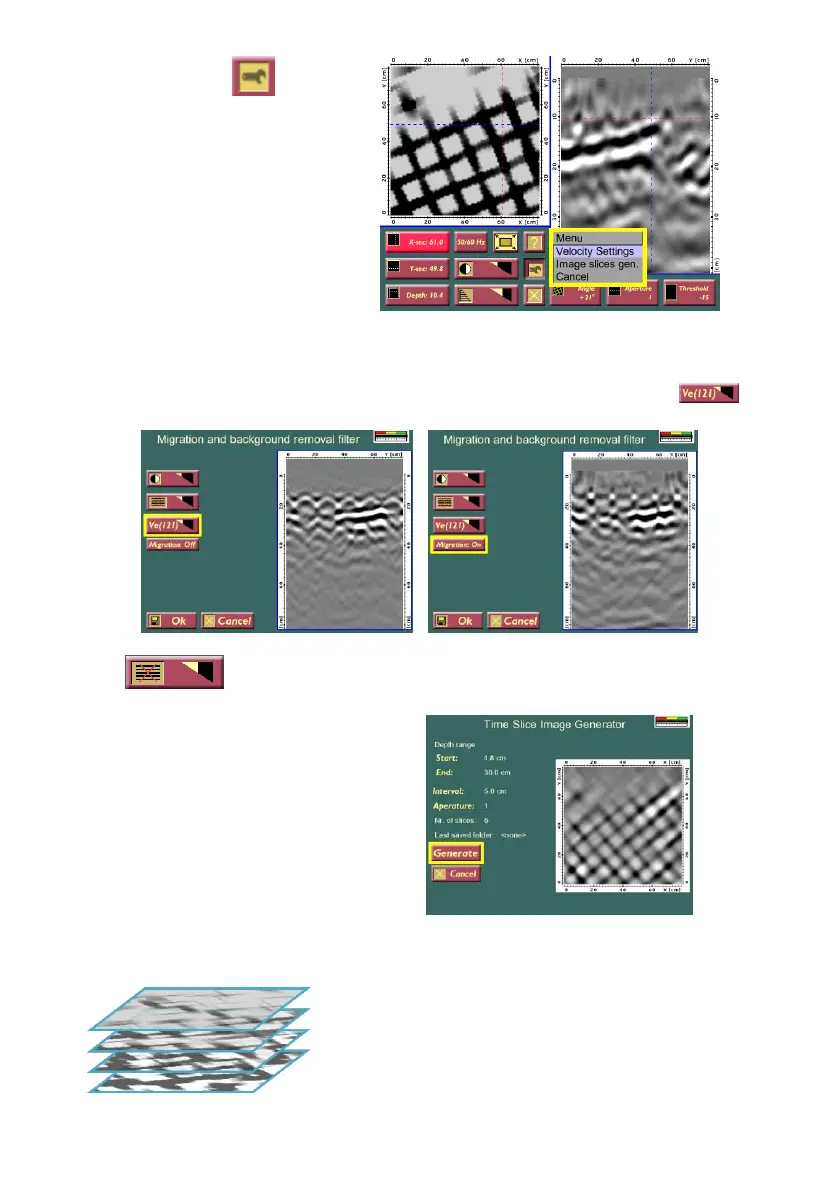
By pressing the button, it
is possible to change the
Velocity settings (Migration) or
to create Image Slices.
Note! Make sure that a well-
defined hyperbola is visible in
the right hand screen before
entering the Velocity Settings
(Migration window).
Migration is a processing scheme which can significantly sharpen the
radar image, especially when seen in the top view. Using this option, an
appropriate velocity for the migration can be selected, by changing .
The is also a background removal filter for 3D project.
With the Image Slice Generator
images can be generated in freely
set depth ranges. See example
below.
The distance is given as the dist-
ance between the individual slices
created within the depth range.
The pictures are saved in an own catalogue, named as:
ProjectName_S0001, where 0001 will be a unique sequence number.
Example of how images can be saved.


 To Next Page