www.malags.com
26
7 GPS Functionality
__________________________________________________
The CX system is available with a positioning system, GPS, which can be
used with 2D and Object Mapper measurements. To activate this
functionality an activation code is needed (contact your local sales
representative for more information). The GPS is connected to the CX main
unit via the USB port. When a GPS is connected the system immediately
start to log the positioning data with x, y and z-coordinates. The coordinates
are saved in a file (*.cor) and can be transferred to a PC according to
Chapter 8 File Manager.
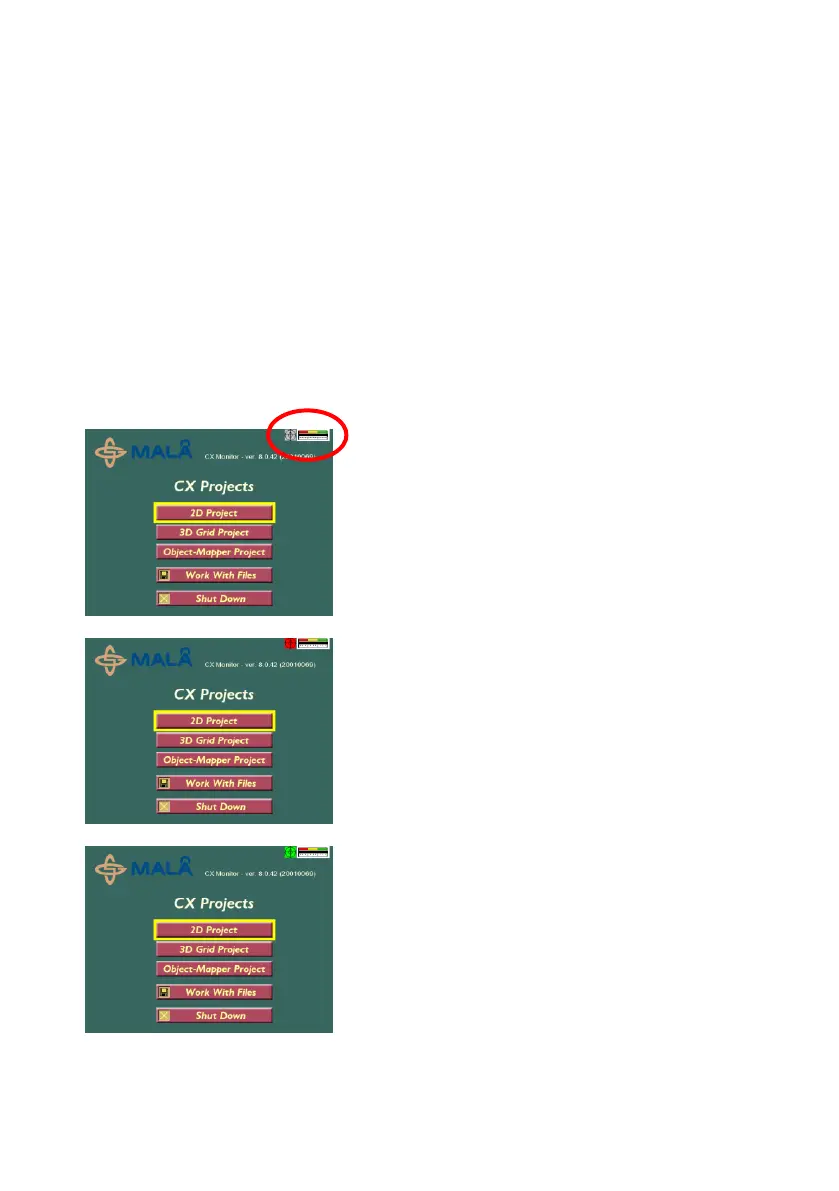
The status of the GPS is shown in the Main menu, as follows:
Gray: GPS functionality enabled, but no
GPS-device is connected.
Red: GPS functionality enabled, GPS-
device connected but no position can be
received by the GPS-device.
Green: GPS functionality enabled, and
positioning information is received from the
GPS-device.


 To Next Page