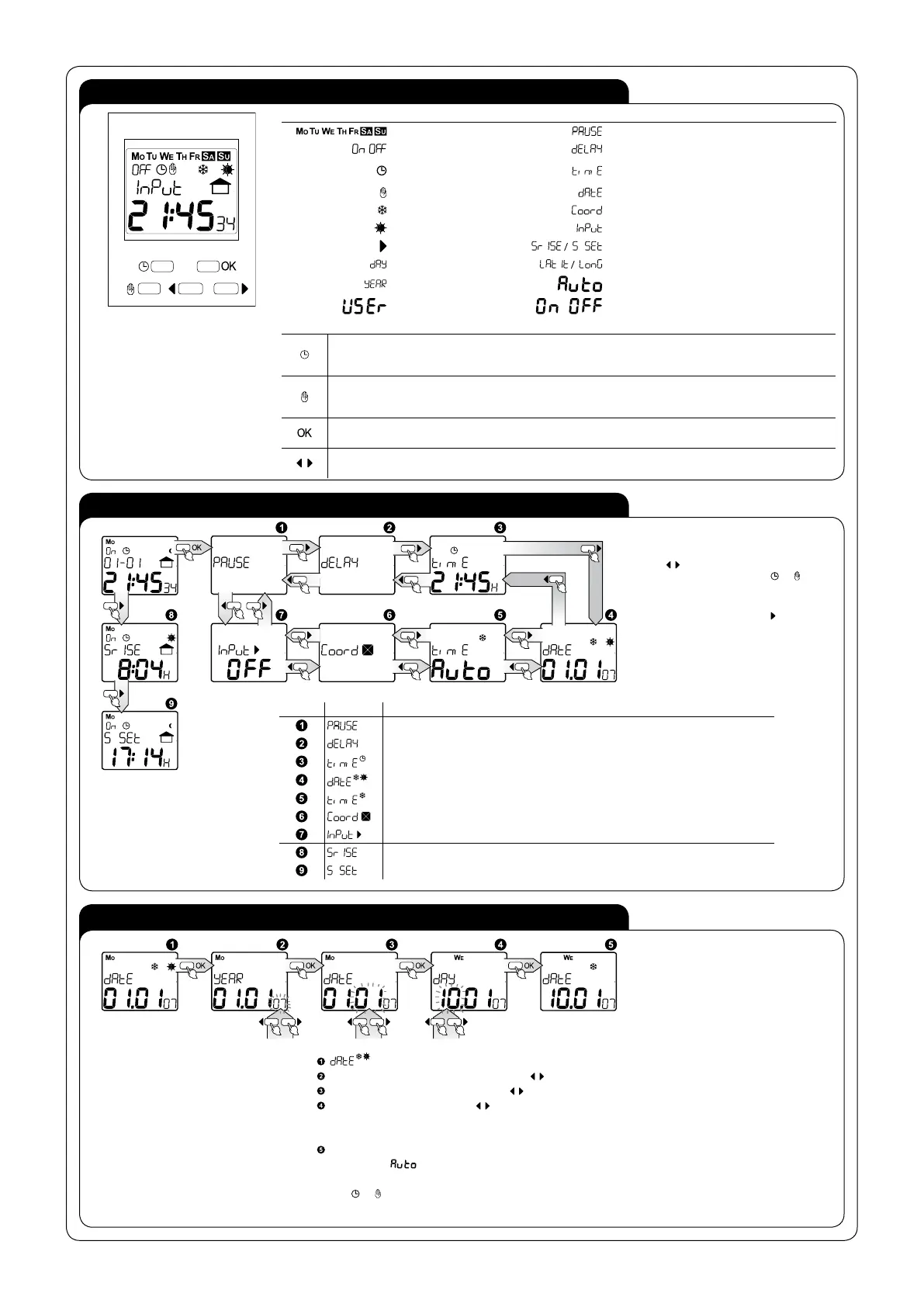
Description of elements and messages displayed
days of week impulse mode setting
transmitter's status time correction setting
automatic mode
current time setting and summer/winter time
shift
manual mode current date setting
winter time geographical position setting
summer time
extenal input setting
external input
sunrise time / sunset time
day latitude/ longitude
year automatic
user on/off
Buttons descriptions
• In the main window - entry to manual mode or change of transmitter status if the clock is already in the
manual mode;
• In other windows- one level up exit without saving the introduced data;
• In the main window - entry to manual mode or change of transmitter status if the clock is already in the
manual mode;
• In other windows- one level up exit without saving the introduced data;
• In the main window - entry to main menu;
• In other windows - entry to sub- menu or confirmation of the parameter being set;
• Shifting windows /menu options or increasing/ decreasing of the parameter being set;
• Right cursor in the main window- displaying a time of sunrise and sunset.
Function Description
NIGHT BREAK SETTING
CORRECTION OF TIME SETTING (SUNRISE/ SUNSET TIME)
CURRENT TIME SETTING
CURRENT DATE SETTING
TIME SETTING (SUMMER/WINTER SEASON)
GEOGRAPHICAL POSITION AND TIME ZONE SETTING
EXTERNAL INPUT SETTING
CALCULATED SUNRISE TIME
CALCULATED SUNSET TIME
DESCRIPTION
MAIN MENU
DATE SETTING
Enter the menu from the main window
by choosing OK; move inside menu using
cursors
. Return to the main window is
possible after pressing button
or .
You can enter the windows of displaying
calculated sunrise/sunset time from the
main window by using cursor
. Automatic
return after 10 s.
- Current date setting; entry after pressing OK;
YEAR - choose adequate year with cursors confirm with OK, range of years: 2000÷2099;
MONTH - choose month with cursors confirm with OK;
DAY - choose day with cursors , confirm with OK; the system has a protection against introducing
incorrect parameter of a day for a given month (it takes into account leap years and it automatically
calculates the day of the week on the basis of an arranged date);
Confirmation causes movement to a date setting window and set-up of current summer/ winter time -
if the option
is arranged.
It is possible to exit every sub- menu window in any moment without saving settings by pressing the
button
or .


 To Next Page
 Loading...