MJ-JZ-200722
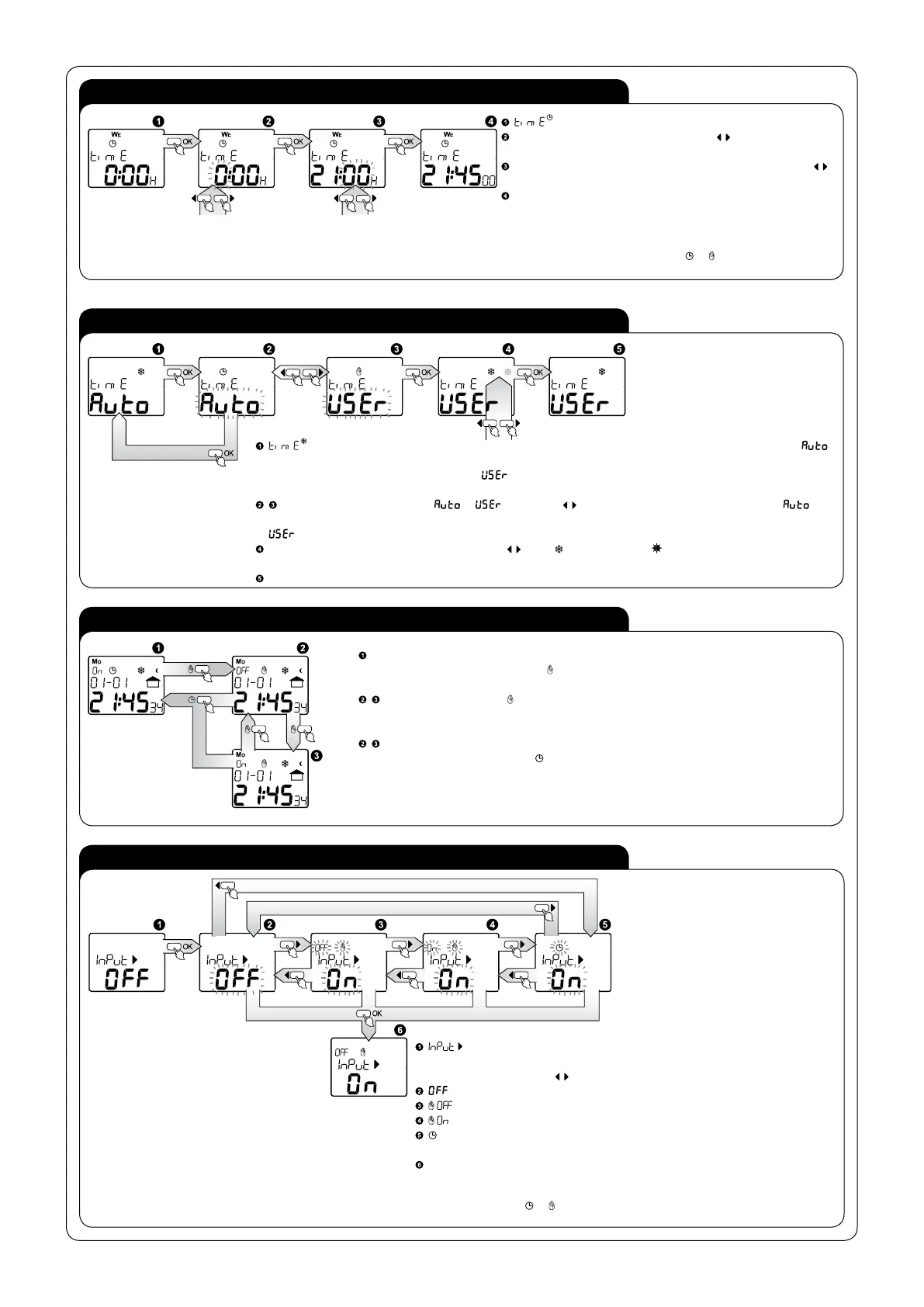
TIME SETTING
WINTER / SUMMER TIME SETTING
EXTERNAL INPUT SETTING
CHANGE OF MODE OF WORK (AUTOMATIC, MANUAL)
- setting the current clock time; entry after pressing OK;
HOUR – choose adequate hour with cursor which you can set in
1-24 or 1-12 (AM) and 1-12 (PM)format; confirm with OK;
MINUTES – choose adequate parameter of minutes with cursors
confirm with OK;
Confirmation of the parameter of minutes causes simultaneous
nullification of the parameter of seconds and movement to the
window of time setting.
It is possible to exit every sub- menu window in any moment without
saving settings by pressing the button
or .
- choice of one of the two modes in which switching between winter and summer season time will occur.
- switching will take place in an automatic way, on the last Sunday of March, at 2.00 (for summer time) and on the last
Sunday of October, at 3.00 (for winter time),
- a user chooses between winter/ summer time, entry after pressing
OK;
setting the mode - choose mode or with cursors , confirm with OK; after choosing the mode , the
clock automatically sets the time as winter or summer one, depending on the arranged date; after choosing the mode
you go to another window;
Choose time for winter/ summer one with cursors where is winter time and is summer time, if change of marker
has happened the system will change the current time by adding or subtracting 1 hour, confirm the operation with OK;
After choosing the system moves to winter/ summer time shift window.
CHANGE OF MODE INTO MANUAL - if the system is situated in the main window and it is in the
automatic mode, pressing the button
will cause a shift of the system from the manual mode with
simultaneous change of transmitter status;
Tämänjälkeiset painikkeen will cause switching transmitter to the opposite status without
change of work mode;
CHANGE OF MODE INTO AUTOMATIC - if the system is placed in the main menu and it is in
the manual mode, pressing button
will cause automatic shift to the automatic mode, with
simultaneous updating transmitter status.
- setting the mode in which the system should operate after releasing the
external input IN; entry to edition after pressing OK, choose adequate mode for
external input with cursors
, remember at the same time that:
- the function of external input is switched off;
- manual mode with permanent switching the transmitter off;
- manual mode with permanent switching the transmitter on;
- automatic mode, the system switches the transmitter on/off according to the
arranged programmes;
Confirm with OK the choice of a given mode; confirmation will cause a movement to
the settings window of the external input.
It is possible to exit every sub- menu window in any moment without saving settings
by pressing the button
or .


 To Next Page
 Loading...