TIME CORRECTION SETTING
NIGHT BREAK SETTING
GEOGRAPHICAL POSITION SETTING
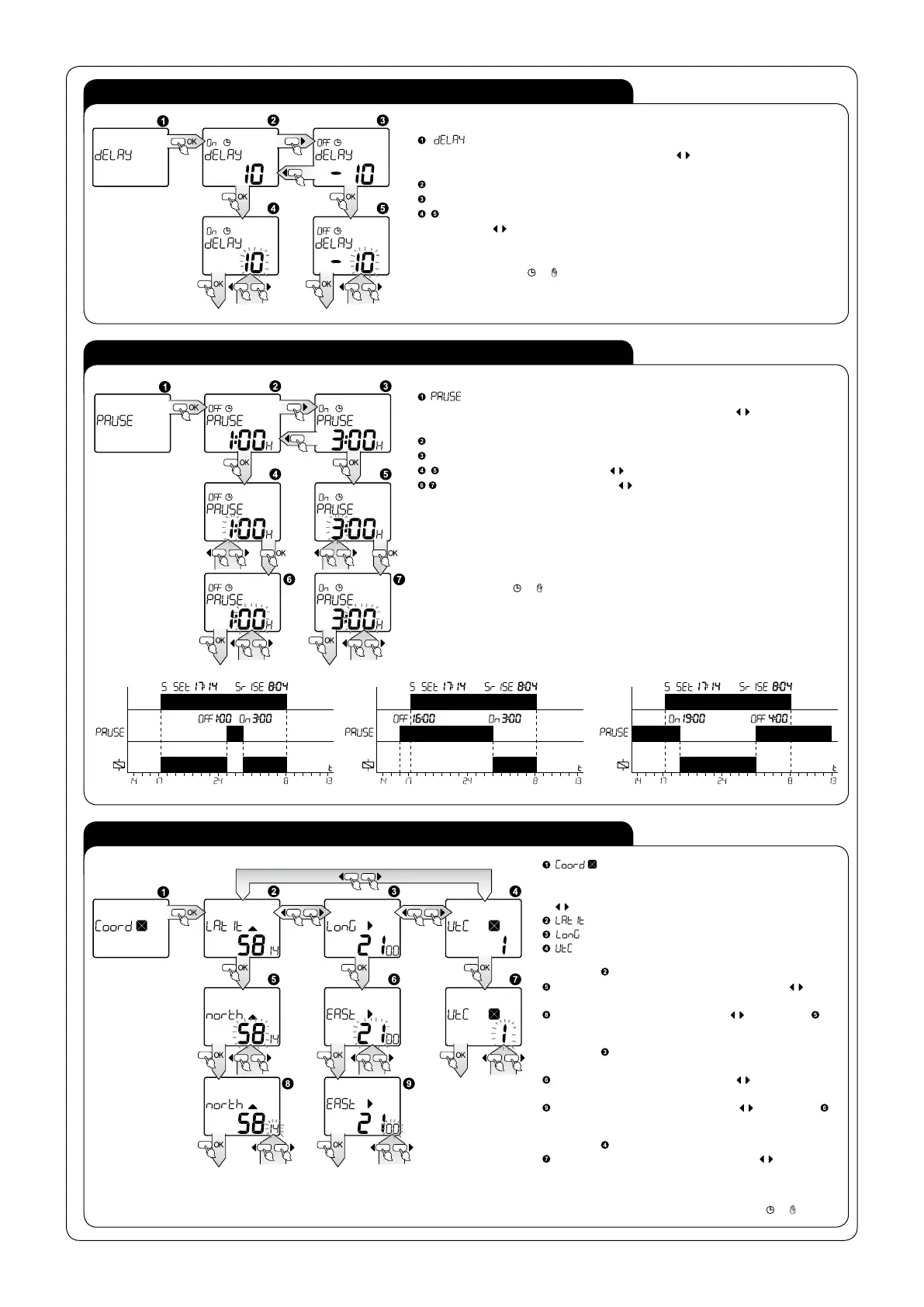
- setting the time correction; entry to review of settings after pressing OK;
Choose time which you should change with cursors
, remember at the same time
that:
Correction of dusk time; press OK, in order to move to edition:
Correction of dawn time; press OK, in order to move to edition:
Correct the time within a range of -120 ÷ 120 min., choose an adequate parameter
with cursors
, confirm the choice with OK.
It is possible to exit every sub- menu window in any moment without saving settings
by pressing the button
or .
- setting the duration time of a night break; entry to reviewing the settings after
pressing OK; Choose time which you should change with cursors
, remember at the
same time that:
Time of commencement of a night break; press OK in order to move to edition;
Time of ending of a night break; press OK in order to move to edition;
Choose adequate hour with cursors , confirm the choice with OK;
Choose adequate minute with cursors , confirm the choice with OK;
ATTENTION!
The clock will work without a night break, if the times of night break beginning and
ending are the same.
It is possible to exit every sub- menu window in any moment without saving settings by
pressing the button
or .
-setting longitude, latitude and a time zone; entry
to reviewing and edition of settings after pressing OK,
choose parameters which should be changed with cursors
remember at the same time that:
- latitude;
- longitude;
- time zone in relation to UTC time;
For window
(latitude); press OK, so as to move to edition:
Choose latitude parameters (degrees) with cursors
(within range 90 South ÷ 90 North); confirm with OK;
Choose latitude minutes with cursors (if in the step
90 latitude was chosen, this step is omitted).
For window
(longitude); press OK, in order to move to
edition:
Choose longitude degrees with cursors (within range 180
West ÷ 180 East); confirm the choice with OK.
Choose longitude minutes with cursors (if in the step
longitude was chosen, this step is omitted).
For window
(time zone); press OK, so as to move to edition:
Choose hour shift of time zone with cursors (within a
range -12 ÷ 12); confirm your choice with OK.
It is possible to exit every sub- menu window in any moment
without saving settings by pressing the button
or .


 To Next Page
 Loading...