20
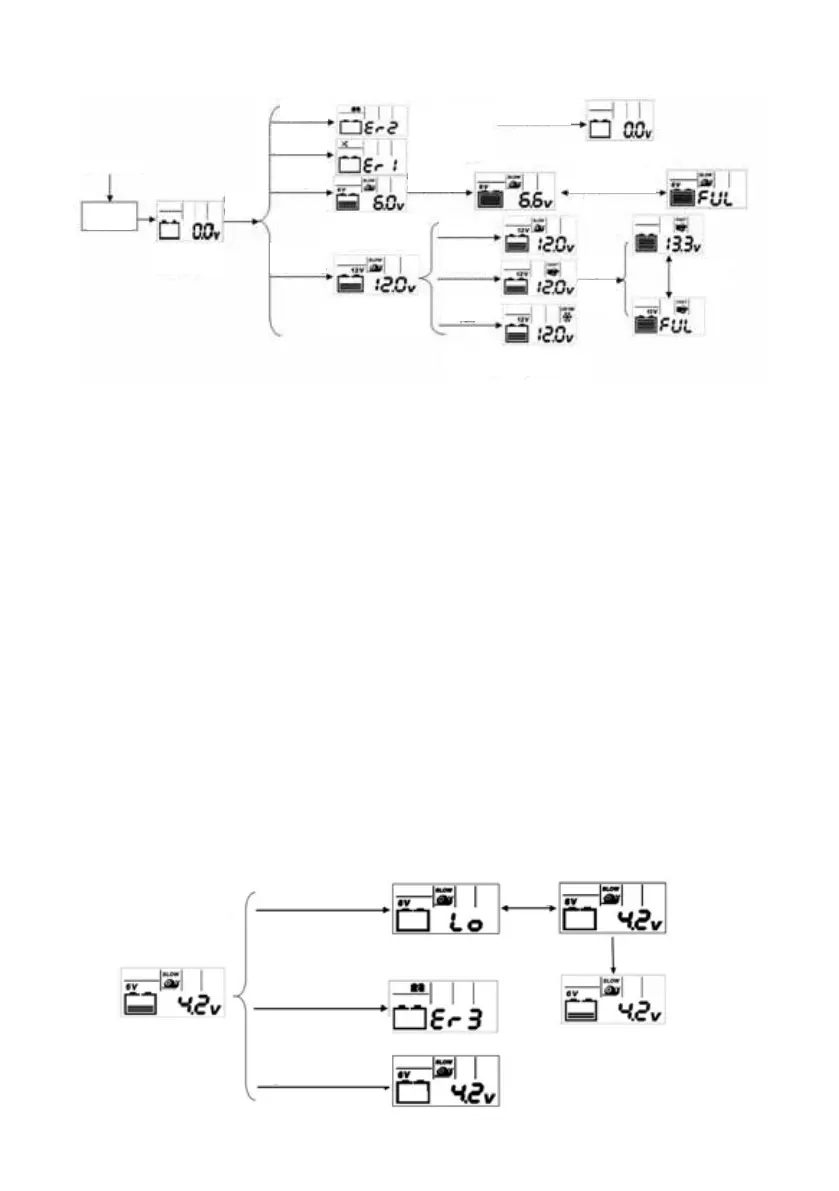
The specific LCD states are shown in Fig. 3 below:
Remark:
• 6V: When the battery voltage is between 3.5V–5V, the charger will work at 6V/Slow
mode. LCD flashes the real time battery voltage and the battery icon scrolls. Press the
button to pause/resume the charging process. The battery icon stops scrolling when
it is “pause”. After charging the battery by 2 minutes, if battery voltage is still <4.5V,
LCD flash to display “Lo” and real time voltage alternatively. Red LED light keeps
“ON”
• 12V: When the battery voltage is between 7.4V and 10V. The charger will work at
12V/Slow mode. Press the button and change the mode to “Fast”, “Low Temp” or
“Pause” the charging process respectively. The battery icon stops scrolling when it is
“pause”. After charger the battery by 2 minutes, if battery voltage is still <9V, LCD
flash to display “Lo” and real time voltage alternatively. Red LED light keeps “ON”
In these 2 cases, please press the button to check the battery status and start the charging
process again. There is no need to disconnect the AC power and battery cable clamps.
Keep charging the battery 4 hours (6V mode)/9 hours (12V mode) and the battery volt-
age is still below the correct level, LCD displays Er3. Red LED light keeps “ON”. If this
happens you must disconnect the battery cable clamp or power. Please refer to Fig. 4 and
Fig. 5 below.
Fig. 3 LCD Charging Block Diagram
230V/50Hz AC
Charger
Initialization
interface
Clamp
battery
a. Wrong
battery
b. Reverse
polarity
d. 6V
battery
e. 12V
battery
Identify as 12V
battery and start
charging automati-
cally
12V/Low
Temp
12V/Low
Temp
12V/Fast
12V/Slow
Default mode
Battery is
fully charged
Fault (red) LED
flashes
Fault (red) LED
is normally on
c. Short circuit
protection
Return to initialization
interface
Display alternately
Battery is
fully
charged
Display alternately
Press the button to select the charging mode when
the backlight is "On"
Identify as 6V battery
and start charging
automatically
6V/Slow mode for
battery voltage
between 3.5V-5V
Process will be stopped if
the voltage is <4.5V after
2 mins charging
If the voltage is still <5V
after 4 hours charge
display error message
Press button to pause.
Battery icon stops scroll-
ing and voltage flash,
press again to resume.
Press the button to
restart the process
Flash at
1Hz alter-
nately



 To Next Page