Chapter 3 Software features
Page 3-2 MAN 0385
3
Manually controlling the dispersion unit
To control the dispersion unit manually, either select Configure-Accessory or,
when making a manual measurement, click the Accessory button in the Meas-
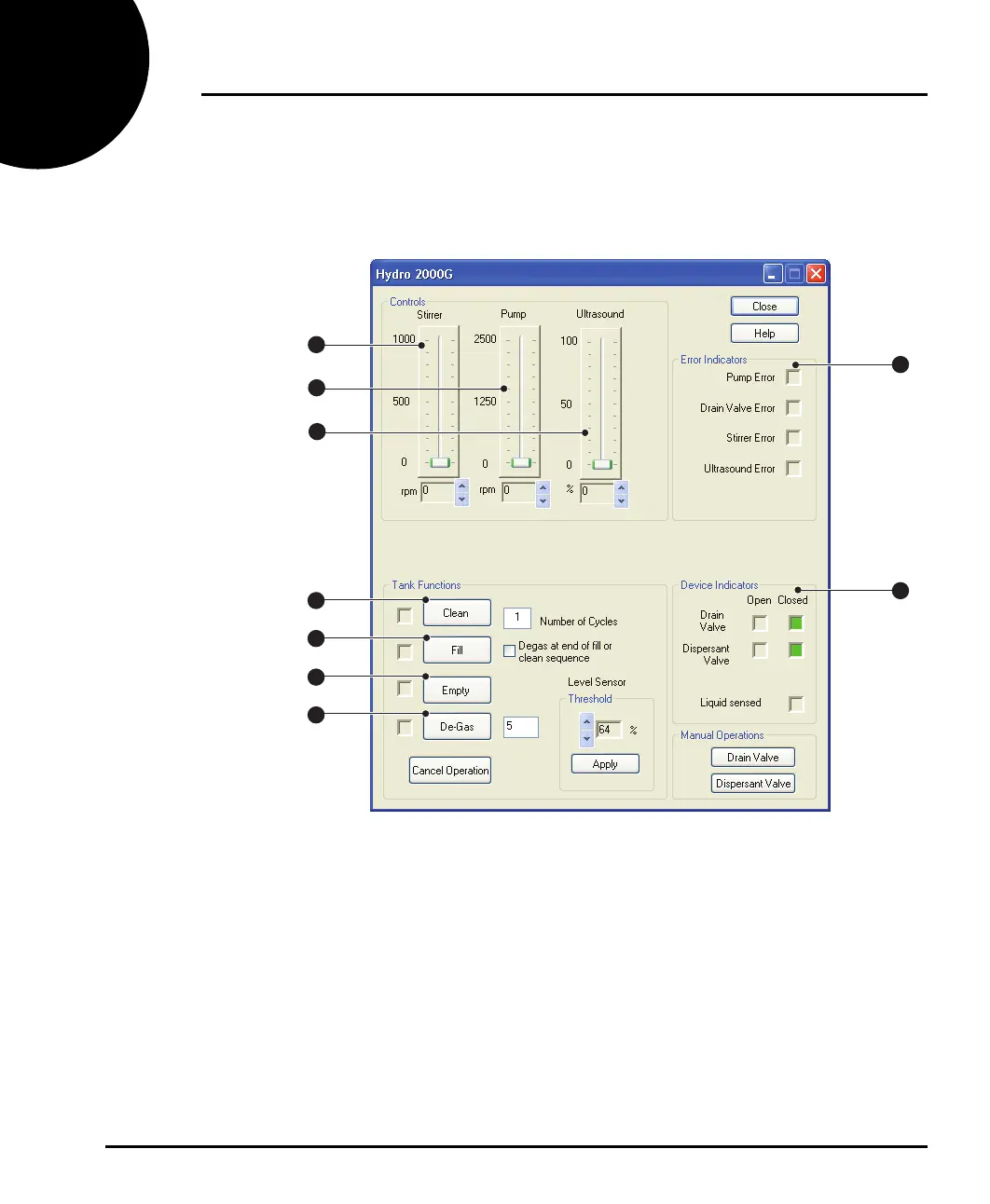
urement Display window. The accessory control dialogue shown below appears:
ill 7757
The contents of this dialogue change depending on the dispersion unit connected.
It allows the user to alter the pump speed, stirrer speed and ultrasonic power by
moving the relevant Controls slider bar.
This dialogue also allows the user to fill and drain the tank by pressing the relevant
Tank Functions buttons. Status indicators give information such as whether the
drain valve is open/closed, and whether the level sensor has been triggered (the
tank is full), as well as reporting any errors within the dispersion unit.
The features change depending on which dispersion unit is connected, but are:
Stirrer control
The speed of the stirrer is altered by moving the slider. Use the up and down
arrows under the slider for fine adjustment of the stirrer speed.
1
2
3
4
5
6
7
8
9
MAN0385-1.0 Hydro 2000G-S.book Page 2 Friday, March 16, 2007 4:02 PM



 To Next Page