Chapter 3 Software features
Page 3-6 MAN 0385
All systems the SOP is distributed to must have the dispersion unit connected.
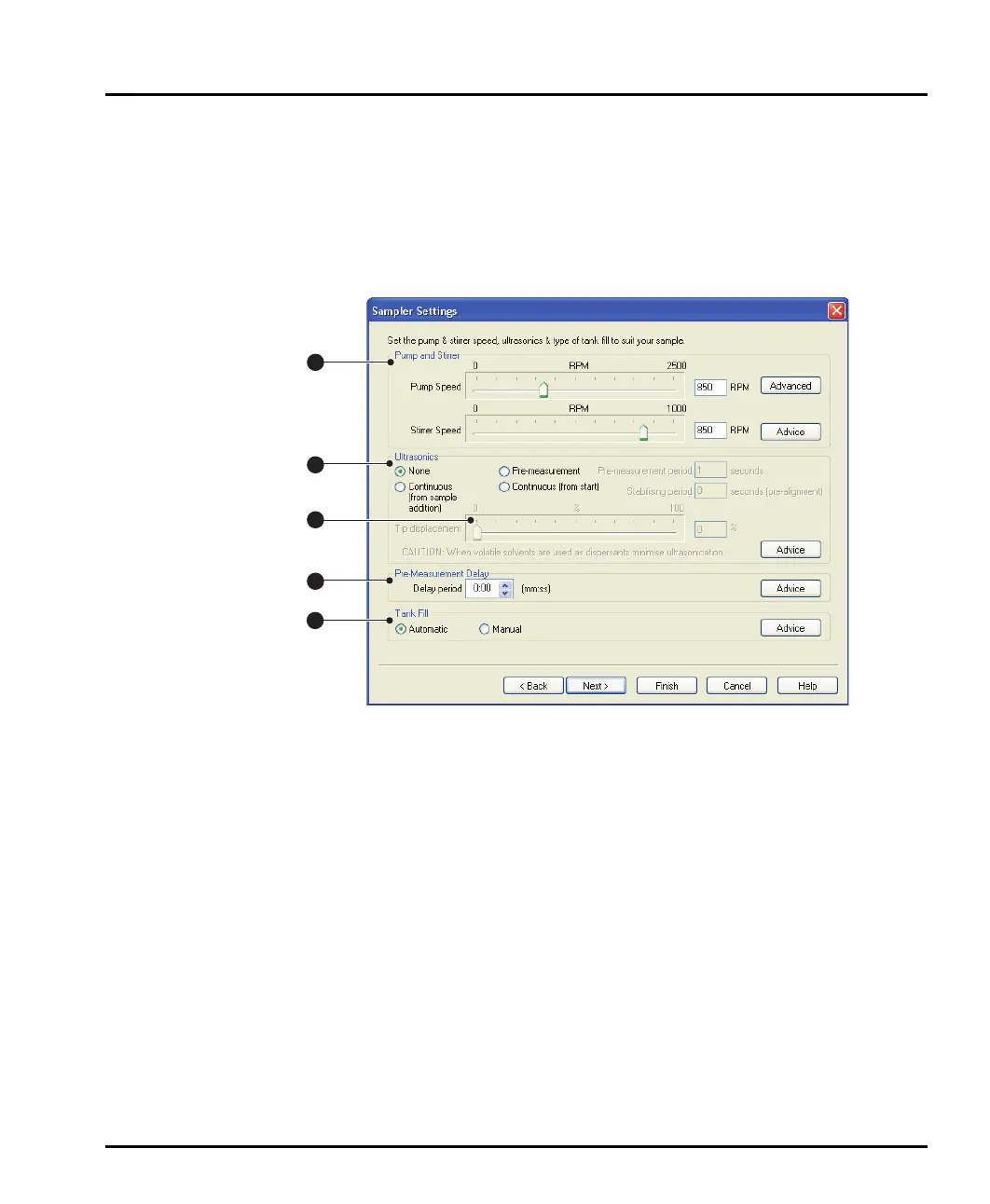
Sampler Settings dialogue
The Sampler Settings dialogue controls the pump, stirrer and ultrasonic settings
for the dispersion unit. This dialogue changes depending on the dispersion unit
selected in the Sampler Selection dialogue. This is the dialogue for the Hydro
2000G:
ill 7759
Its components are:
Pump and stirrer settings
The speed of the pump and stirrer is altered by moving the relevant slider. This tab
will show a single control for the pump/stirrer if the Hydro 2000S is selected in the
Sampler selection dialogue. The Advanced button allows the vari-flow options
to be set; these are described below.
Ultrasonics selection
The ultrasonics selection radio buttons enable the ultrasonics. The options are:
None – no ultrasound.
Continuous (from sample addition) – ultrasound is activated after sample
is added and will run continuously.
Pre-measurement – activates ultrasound for a set time before measurement.
Type the required duration in seconds in the Pre-measurement period box.
1
2
3
4
5
MAN0385-1.0 Hydro 2000G-S.book Page 6 Friday, March 16, 2007 4:02 PM



 To Next Page