EasyManua.ls Logo

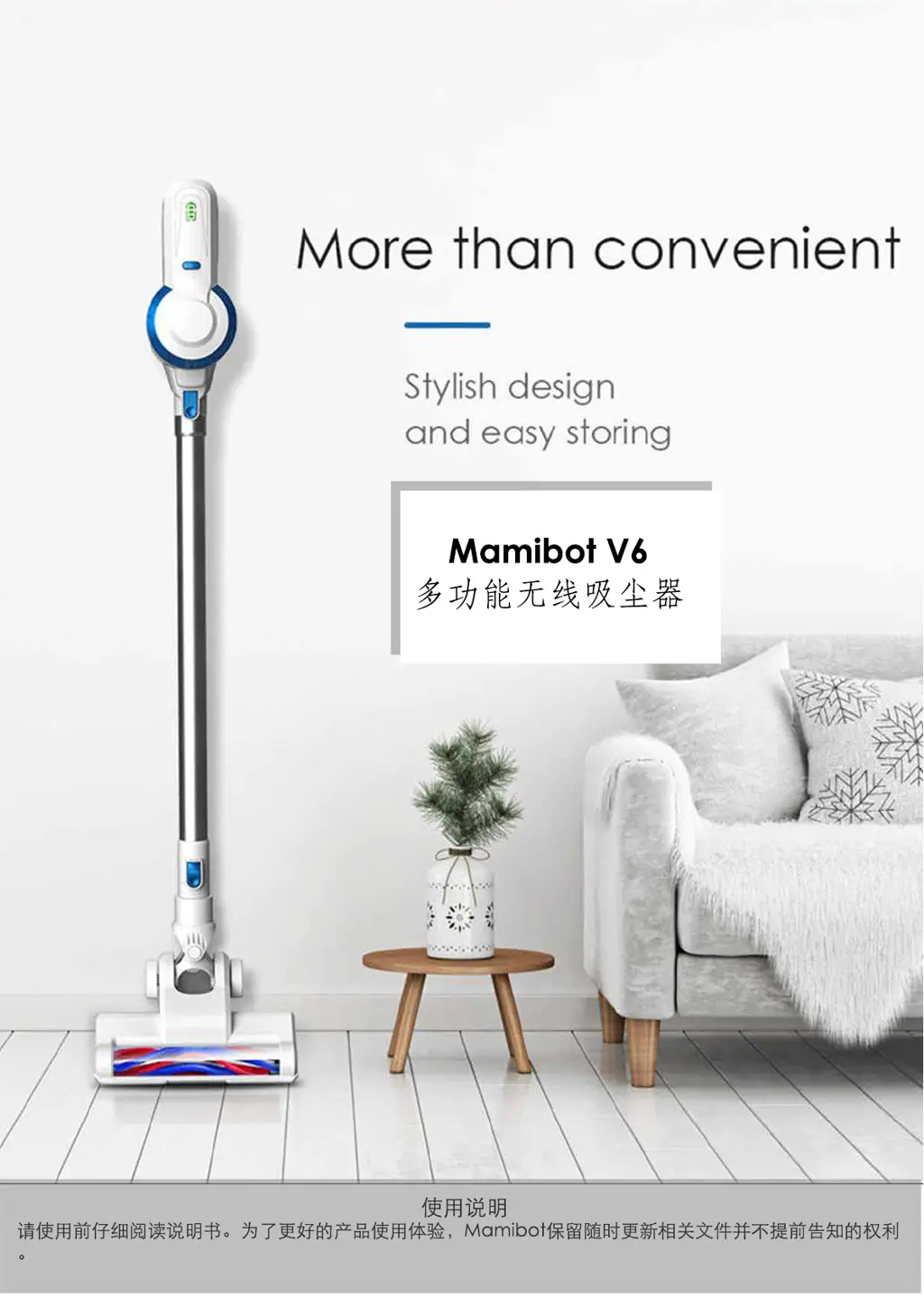
mamibot V6 - User Manual

mamibot V6
23 pages
Print Icon
To Next Page IconTo Next Page
Loading...

Questions and Answers

  • K
    Karen MooreAug 15, 2025
    Why is my mamibot V6 losing suction power?
    • A
      Anne HansonAug 15, 2025
      Several factors can cause weaker vacuuming power in your mamibot Vacuum Cleaner. The dust box might be overfilled, so empty it. The stainless or HEPA filters could be blocked, so clean them promptly, ensuring they are thoroughly dried after washing. A blocked air channel could also be the culprit; inspect it and remove any debris.
  • D
    Donna JohnsonAug 18, 2025
    What to do if my mamibot V6's battery runs out quickly?
    • L
      Lisa ThorntonAug 18, 2025
      If your mamibot Vacuum Cleaner has a shorter running time, the battery pack might be aged and need replacement. The battery could also be overheated or overcooled; allow it to cool down and restart. Ensure the battery pack is fully charged.
  • B
    Brian JohnsonAug 21, 2025
    How to fix a mamibot Vacuum Cleaner brush bar that stopped working?
    • R
      Ryan SchneiderAug 21, 2025
      If the motorized brush bar on your mamibot Vacuum Cleaner fails, it's likely tangled with cable, hair, or other debris. Clean the brush bar to resolve this.
  • P
    Paul ThomasAug 25, 2025
    What to do if my mamibot V6 Vacuum Cleaner won't charge and the middle LED is flashing?
    • A
      Amanda ColonAug 26, 2025
      If the middle LED light flashes and your mamibot Vacuum Cleaner won’t charge, the battery is either overheated or overcooled. Keep the cleaner cooled down, then restart it for regular use.
  • X
    xloganAug 28, 2025
    What does it mean if three LED lights flash on my mamibot V6?
    • C
      charlesaguirreAug 28, 2025
      If three LED lights flash on your mamibot Vacuum Cleaner and the vacuum motor doesn’t work, the cleaner is in over-current protection mode. Check if the brush bar or aluminum tube are blocked and clear any blockage.
  • K
    Kayla TaylorSep 1, 2025
    What does it mean if the middle LED light flashes on my mamibot V6 Vacuum Cleaner?
    • M
      Michelle MeyerSep 1, 2025
      If the middle LED light flashes on your mamibot Vacuum Cleaner and the vacuum motor doesn’t work, the battery pack is either overheated or overcooled. Move the cleaner to an indoor location with a regular temperature (0-35 ?) and allow it to cool down before restarting.
  • D
    Douglas MillerSep 3, 2025
    What does it mean if the first LED light flashes on my mamibot V6?
    • B
      bschmidtSep 4, 2025
      If the first LED light flashes and the vacuum motor doesn’t work on your mamibot Vacuum Cleaner, it indicates a low battery. Charge the battery.
  • A
    Alicia HarveySep 7, 2025
    Why is my mamibot Vacuum Cleaner battery leaking?
    • A
      Amanda PeckSep 7, 2025
      Battery leakage in your mamibot Vacuum Cleaner usually indicates that the battery has reached its lifespan or has not been in use for a long time. Replace the battery.
  • E
    Elizabeth LopezSep 12, 2025
    Why is there no LED indicator when charging my mamibot Vacuum Cleaner?
    • V
      Valerie SmithSep 12, 2025
      If there's no LED indicator or flashing when charging your mamibot Vacuum Cleaner, the adapter might not be plugged in properly. Check the adapter connection at both the power supply and the charging port to ensure they are securely connected.

Summary

Important Safety Instructions and Warnings

Storage Precautions

Handle with care, avoid high temperatures and extreme climates for storage.

Pre-Operation Checks

Check adapter, fully charge, ensure filters are installed properly before operation.

In-Use Safety Guidelines

Avoid flammable conditions, liquids, debris; prevent blockage, ensure dust bin is in place.

Maintenance and Cleaning Procedures

Use dry cloth, turn off before cleaning, empty dust box and clean filters regularly.

Power Adapter and Cord Safety

Use only supplied adapter, ensure proper connection, avoid damage to cords.

1. Product Introduction

Main Unit Components and Diagram

Diagram and list of parts for the main vacuum cleaner unit.

Brush Head Types and Uses

Description of different brush types for various cleaning tasks.

Vacuuming Power Modes Explained

Explains Standard and SUPER power modes with runtime.

2. Product Operation

Powering On;Off and Mode Switching

Instructions for turning the device on, off, and changing power modes.

Attaching and Switching Brush Heads

Details on using and switching between various vacuum cleaner attachments.

Device Charging Procedure

Steps for charging the battery, indicator lights, and important notes.

3. Product Maintenance

Battery Pack Installation Guide

Guide on how to properly attach the battery pack to the handle.

Battery Pack Removal Instructions

Instructions for safely removing the battery pack from the handle.

Handle Installation Steps

Steps for attaching the handle to the dust box assembly.

Handle Detachment Procedure

Instructions for detaching the handle from the main unit.

Dust Bin Emptying Guide

Procedure for emptying the dust bin, with safety notes.

Dust Box Separation Method

How to detach the dust box from the main unit for cleaning.

HEPA Filter Removal Guide

Guide on removing the HEPA filter for cleaning or replacement.

Extension Tube Detachment Guide

Steps for detaching the aluminum extension tube.

Motorized Brush Head Cleaning Guide

How to remove and clean the main motorized brush head.

Wall Mount Installation Instructions

Instructions for mounting the charging cradle on the wall.

Mattress Brush Head Detachment Guide

How to detach the specialized mattress cleaning brush head.

4. Technical Specifications

5. Package Contents

Included Accessories List

List of all components and accessories included in the package.

6. Troubleshooting Guide

Common Issues and Resolutions

Table addressing common issues like brush bar tangles, low battery, and weak suction.

1. Product Description

1.1 The Main Frame of the Product

Diagram and labeled components of the vacuum cleaner's main body.

2. Operation

1.2 Introduction of Brush Sets

Details on the purpose and use of various brush attachments.

1.3 Vacuuming Power Modes

Explanation of Standard and SUPER modes, including power and runtime.

2.1 Switch On;Off and Vacuuming Mode Options

Instructions for powering the device and selecting suction modes.

2.2 Introduction and Switching of Other Brush Sets

Overview of additional brush sets and how to attach/detach them.

2.3 Charging

Procedure for charging the battery, indicator lights, and important notes.

3. Maintenance

3.1 Battery Pack Installation

Step-by-step guide for installing the battery pack.

3.2 Disassemble Battery Pack

Instructions on how to remove the battery pack.

3.3 Handle Installation

Guide for attaching the handle to the main unit.

3.4 Disassemble Handle

Procedure for detaching the handle.

3.5 Empty Dust Box

How to empty the dust bin, with a note to turn off the device first.

3.6 Disassemble Dust Box

Steps to separate the dust box from the motor unit.

3.7 Disassemble HEPA Filter

Instructions for removing the HEPA filter.

3.8 Disassemble Aluminum Tube

Guide on removing the extension tube.

3.9 Disassemble and Clean the Motorized Brush Set

How to take apart and clean the main motorized brush.

3.10 Cradle Installation

Instructions for mounting the wall cradle.

3.11 Disassemble B-Mattress Brush Set

How to detach the mattress cleaning brush head.

4. Parameters

5. Whats in the Box

Included Accessories List

List of all components and accessories included in the package.

6. Troubleshooting

Common Issues and Resolutions

Table addressing common issues like brush bar tangles, low battery, and weak suction.

mamibot V6 Specifications

General IconGeneral
Brandmamibot
ModelV6
CategoryVacuum Cleaner
LanguageEnglish

Related product manuals