EasyManua.ls Logo

Mamiya C33 Professional - Film Loading; Opening the Backlid; Setting Filmstop Selector; Aligning Start Marks

Mamiya C33 Professional
20 pages
Print Icon
To Next Page IconTo Next Page
To Previous Page IconTo Previous Page
Loading...
FIIM
TOADING
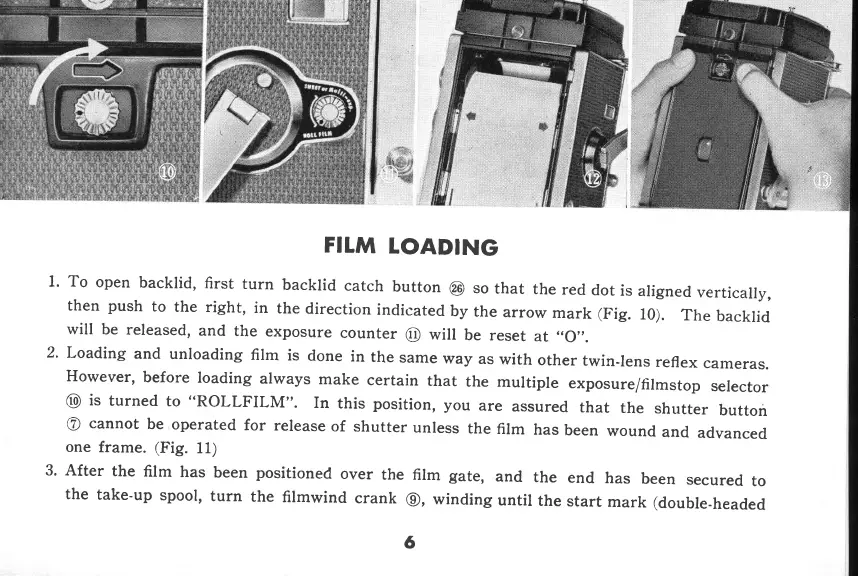
1. To
open
backlid,
first
turn
backlid
catch
button
@
so
that
the
red
dot
is
then
push
to
the
right,
in
the
direction
indicated
by
the
arrow
mark
(Fig.
will
be
released,
and
the
exposure
counter
@
will
be
reset
at
.,O,,.
2' Loading
and
unloading
film
is done
in
the
same
way
as
with
other
twin-lens
reflex
cameras.
However,
before
loading
always
make
certain
that
the
multiple
exposure/filmstop
selector
@
is
turned
to
"ROLLFILM".
In
this
position,
you
are
assured
that
the
shutter
button
@
cannot
be
operated
for
release
of shutter
unless
the
film
has
been
wound
and
advanced
one frame.
(Fig.
11)
3' After
the
film
has been positioned
over
the
film
gate,
and
the
end
has
been
secured
to
the
take'up
spool,
turn
the
filmwind
crank
@,
winding
until
the
start
mark
(double-headed
aligned
vertically,
10).
The
backlid
6
www.orphancameras.com

Related product manuals