10
COLD ZONE OPERATION
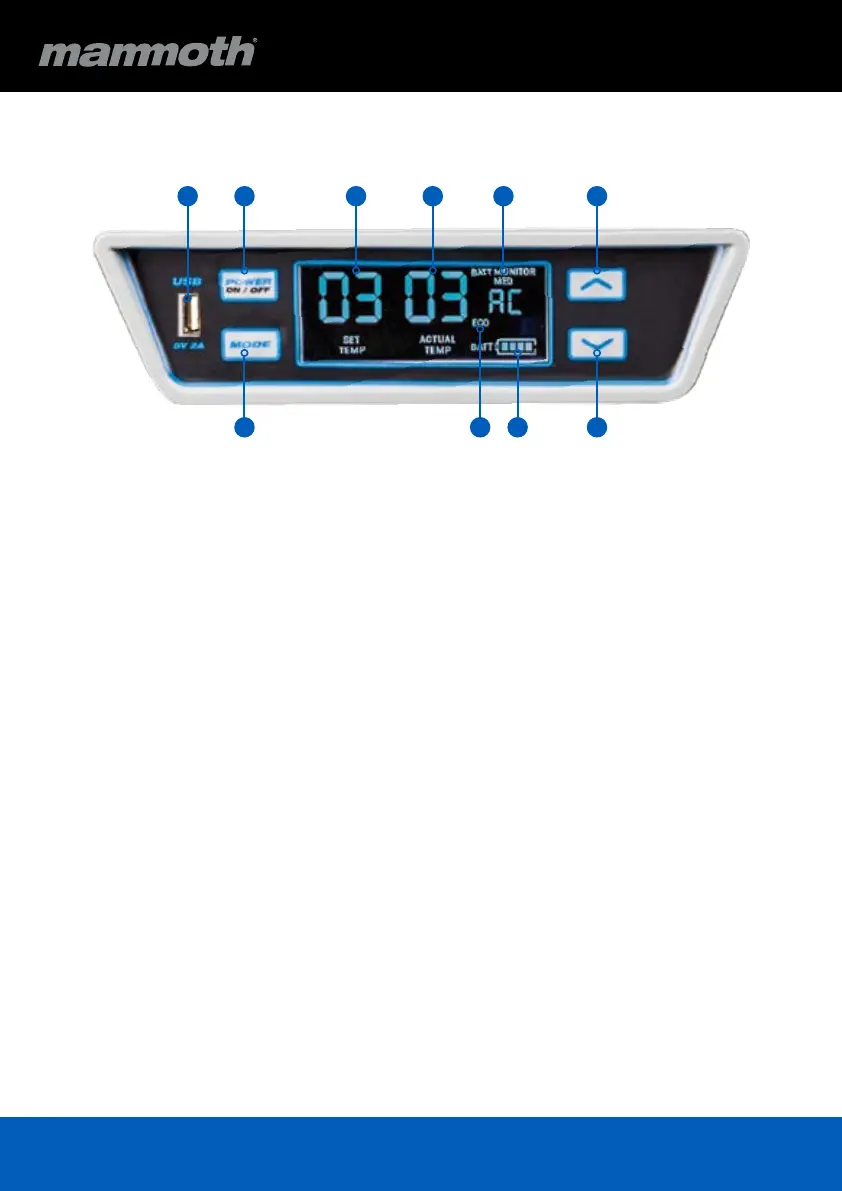
1. USB Outlet
2. Power On/Off Button
3. Mode Button
4. Set Temperature Display
5. Actul Temperature Display
6. Battery Monitor Display
7. Compressor Speed
8. Battery Display
9. Up Button
10. Down Button
POWER
1. Press & Hold POWER button for 3 seconds to
turn fridge ON
2. Press & Hold POWER button for 3 seconds to
turn fridge OFF
TEMPERATURE SETTING
1. Press MODE once and display FLASHES current
temperature setting
2. Press Up / Down to set temperature
3. Display FLASHES for 3 seconds then returns to
display ACTUAL temperature
BATTERY MONITOR
1. Press MODE two times and current setting ashes
2. Press Up / Down to select setting
3. Display FLASHES for 3 seconds and displays
new setting
COMPRESSOR SPEED
1. Press MODE three times and current setting
ashes
2. Press Up / Down to select setting
3. Display FLASHES for 3 seconds and displays
new setting
DIMMING
1. Press and HOLD Mode and push the Up button
2. Display will cycle through the ve brightness levels
21 4 5 6 9
10873



 To Next Page