11
FLEXI ZONE OPERATION
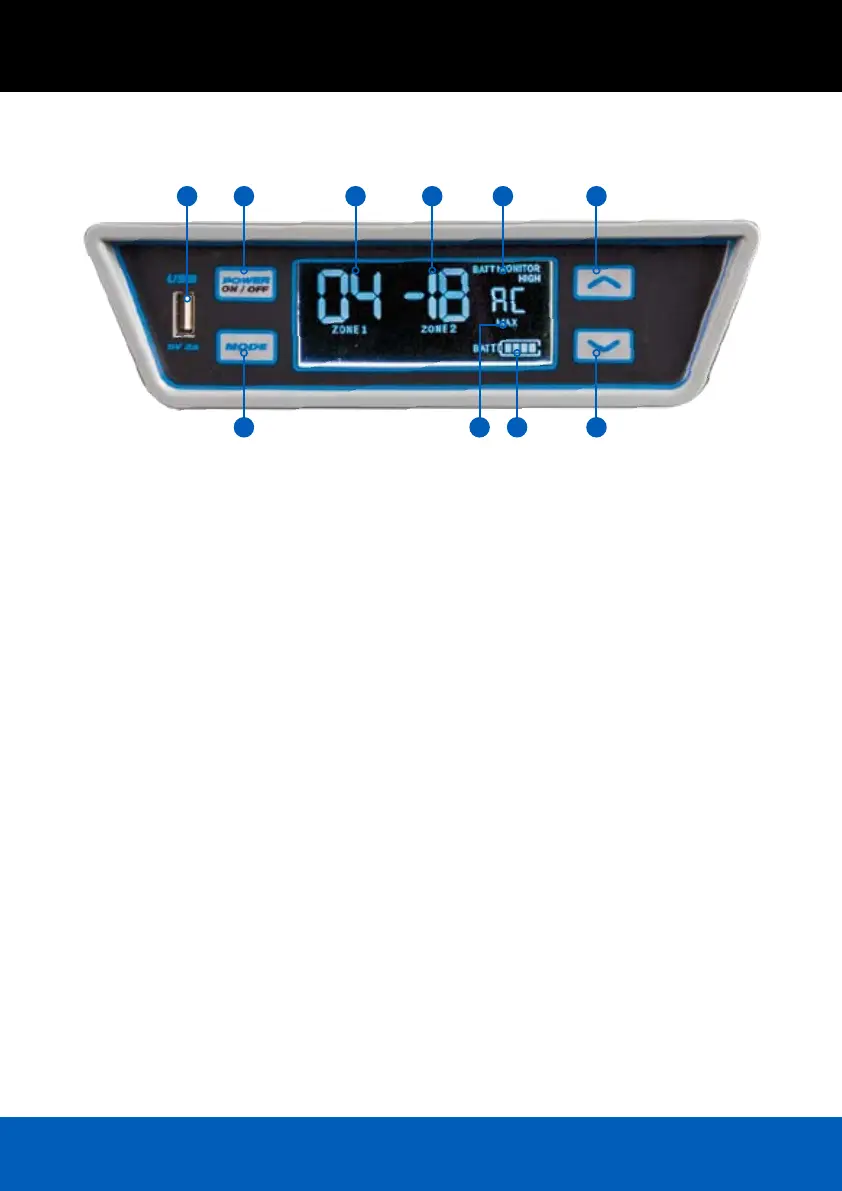
1. USB Outlet
2. Power On/Off Button
3. Mode Button
4. Zone 1 Temperature Display
5. Zone 2 Temperature Display
6. Battery Monitor Display
7. Compressor Speed
8. Battery Display
9. Up Button
10. Down Button
POWER
1. Press & Hold POWER button for 3 seconds to
turn fridge ON
2. Press & Hold POWER button for 3 seconds to
turn fridge OFF
TEMPERATURE SETTING – ZONE 1
1. Press MODE once to select Zone 1
2. Display FLASHES current temperature setting
3. Press Up / Down to set temperature
4. Display FLASHES for 3 seconds then returns to
display ACTUAL temperature
TEMPERATURE SETTING – ZONE 2
1. Press MODE twice to select Zone 2
2. Display FLASHES current temperature setting
3. Press Up / Down to set temperature
4. Display FLASHES for 3 seconds then returns to
display ACTUAL temperature
BATTERY MONITOR
1. Press MODE three times and current setting ashes
2. Press Up / Down to select setting
3. Display FLASHES for 3 seconds and displays
new setting
COMPRESSOR SPEED
1. Press MODE four times and current setting
ashes
2. Press Up / Down to select setting
3. Display FLASHES for 3 seconds and displays
new setting
21 4 5 6 9
10873



 To Next Page