EasyManua.ls Logo

Manhattan T2-R - Remote Control Operations; Remote Control Button Functions

Manhattan T2-R
16 pages
To Next Page IconTo Next Page
To Previous Page IconTo Previous Page
Loading...
12
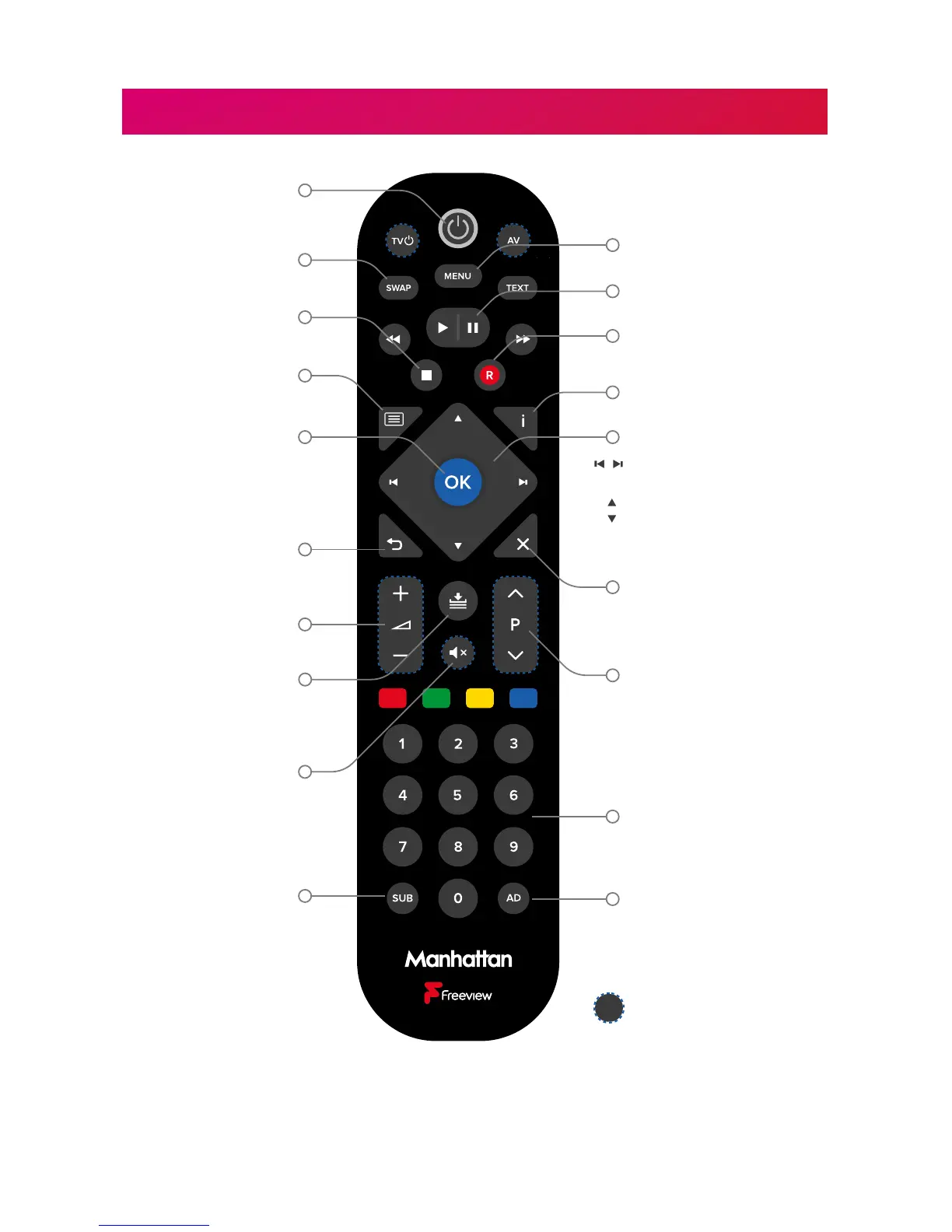
YOUR REMOTE
INFO
BACK
RECORDINGS
EXIT
GUIDE
Volume up/down
Open the TV Guide
Mute
Subtitles on/off Audio Description
on/off
Enter a channel number
Next/previous channel
when watching TV
Page up/down the TV
Guide & other menus
Open the Recordings
menu
Back to previous menu
or to watching TV
Exit all menus & watch TV
Stop Playback or Live Pause
Navigate menus
Skip forwards/backwards
during playback
Display Channel Browser
when watching TV
Select options & perform
on-screen actions
Display Channel Browser
when watching TV
Open the main menu
Swap to the last
channel viewed
Stop Playback or
Live Pause
Set recordings & display
record options
Pause Live TV/Playback
Display programme information
Standby on/off
Programmable buttons
Change Blink Mode
By default, the LED on your Manhattan Remote blinks when a button is pressed. Toggle
this o or on by holding the SUB and ‘1’ buttons for 3 seconds until the LED blinks.

Other manuals for Manhattan T2-R

Related product manuals