12 HMI5000L Installation Guide
1010-1018 Rev 12 www.maplesystems.com
Maintenance
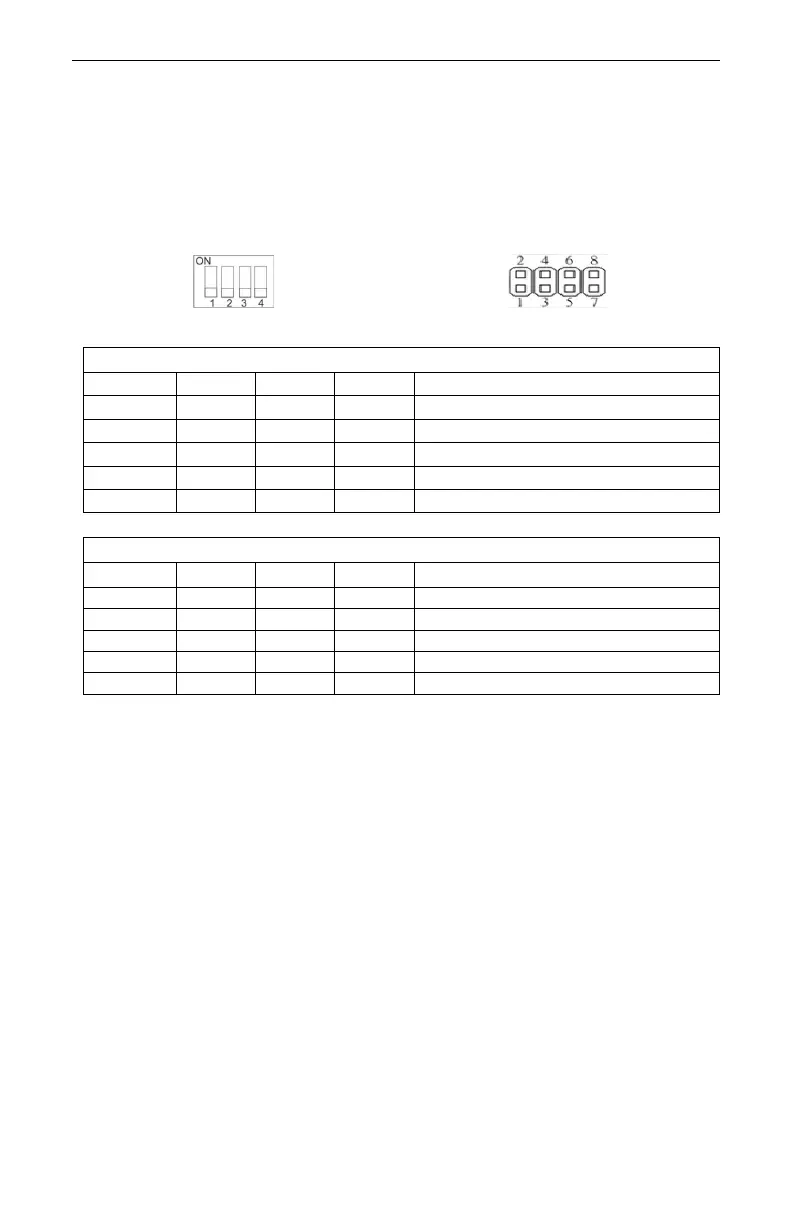
Some HMIs feature DIP switches, others have an 8-pin header for
jumpers. Instructions on each type can be found below.
DIP switches shown in the off position
Jumpers shown in the open position
Touchscreen Calibration mode
Touchscreen Calibration mode
Note: Place a jumper cap between the respective header pins to set
the jumper mode. HMI Power must be cycled to enable the selected
DIP switch or jumper mode.
Touchscreen Calibration mode: This mode allows calibration of the
touchscreen. This mode can also be entered by pressing anywhere on
the screen for several seconds during HMI powerup.
Hide System Toolbar: Hides the arrow in the bottom-right corner of the
screen that accesses the System Settings menu.
Boot Loader mode: This mode is used when replacing or reinstalling
the operating system and is intended for use by qualified repair
personnel only. Improper use by setting to ON may damage the HMI.
Contact Maple Systems for more information.



 To Next Page