16 HMI5000L Installation Guide
1010-1018 Rev 12 www.maplesystems.com
Dual Ethernet Port Information and Network Configuration
The HMI5043DL, HMI5070DL, and HMI5097DXL feature two Ethernet
ports. In order to utilize both ports, they need to be configured properly.
Default settings:
Port LAN1 is configured as a DHCP Client (Dynamic IP).
Port LAN2 is configured as follows:
IP Address: 192.168.100.1
Subnet Mask: 255.255.255.0
Configuration:
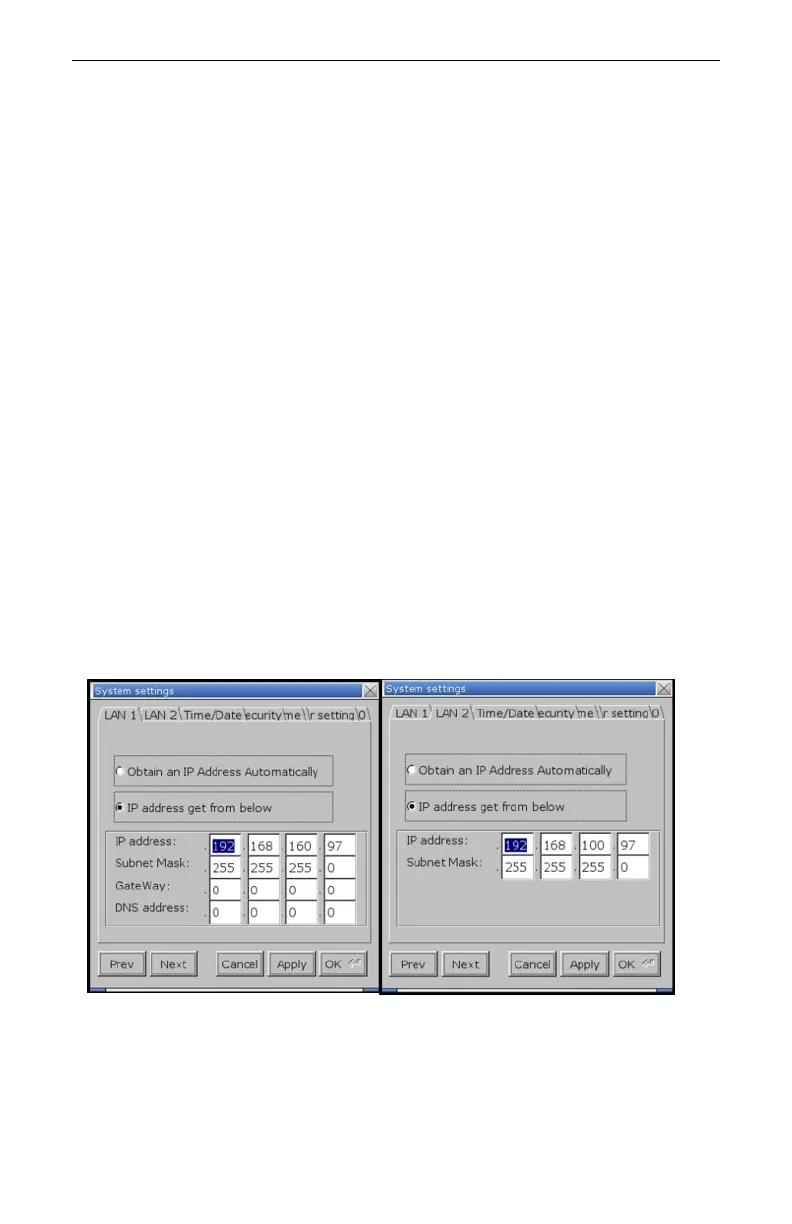
1. Enter the System Settings menu.
2. Navigate to the LAN1 tab.
3. Enter the desired IP address, or select Obtain an IP Address
Automatically to enable DHCP.
4. Navigate to the LAN2 tab.
5. Enter the desired IP address, or select Obtain an IP Address
Automatically to enable DHCP.
Note: LAN1 and LAN2 must be on separate subnets in order for
both ports to operate simultaneously.
6. Click Apply to save the changes, and OK to exit the system settings
menu.
7. The updated IP addressing will appear in the system information
window, also accessed via the arrow icon.
Notice in the above figure LAN1 is on the 192.168.160.xxx subnetwork,
while LAN2 is on the 192.168.100.xxx subnetwork. For both ports to
operate simultaneously, they must be assigned to different subnetworks.



 To Next Page