EasyManua.ls Logo

Marantz 5010 - Page 8

Marantz 5010
48 pages
Print Icon
To Next Page IconTo Next Page
To Previous Page IconTo Previous Page
Loading...
&
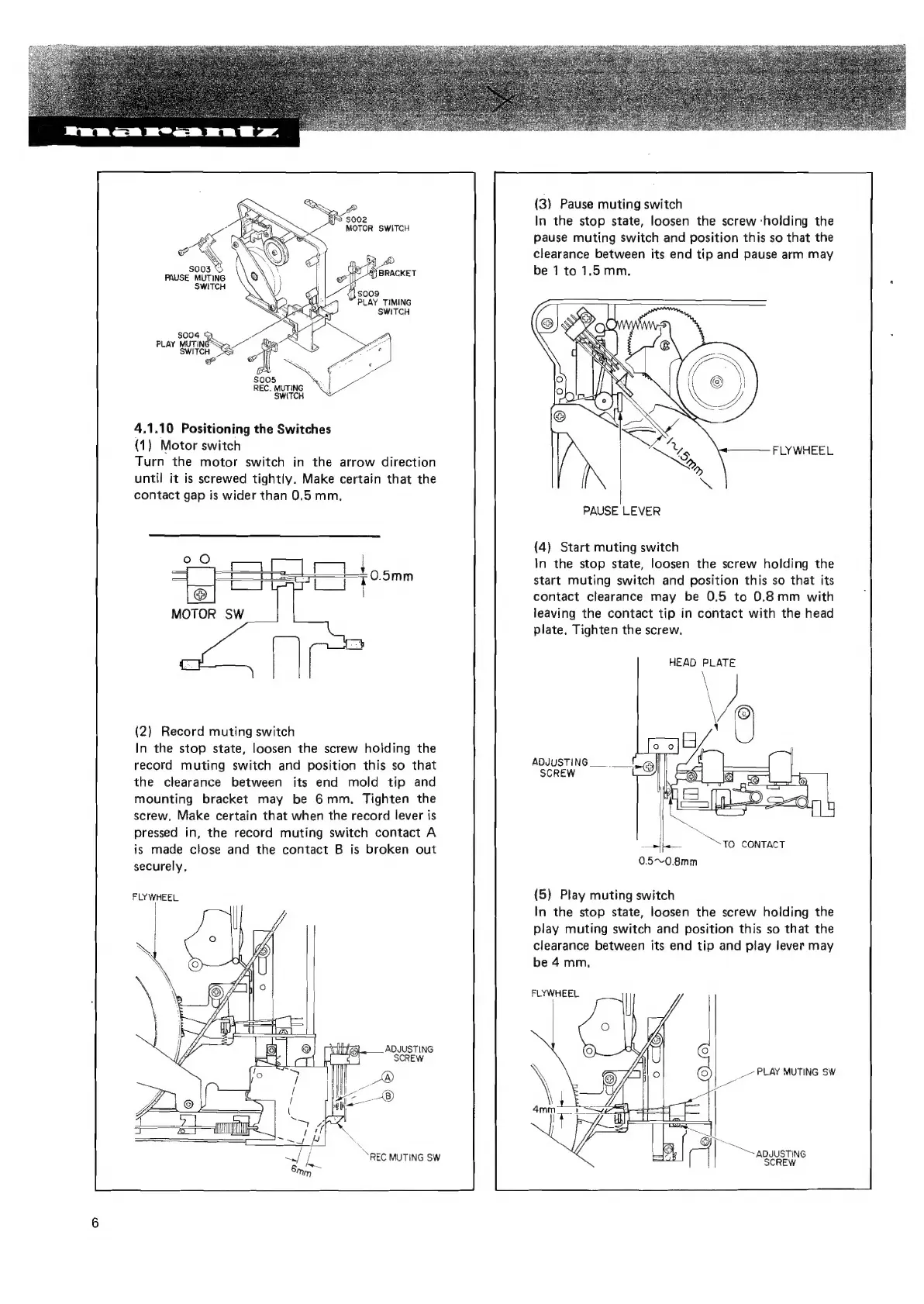
S002
MOTOR
SWITCH
BRACKET
$003
<
PAUSE
MUTING
\
[
SWITCH
4
$009
PLAY
TIMING
SWITCH
$004
:
PLAY
MINE
SWITCH
S
Da
a
$005
REC.
MUTING
SWITCH
4.1.10
Positioning
the
Switches
(1)
Motor
switch
Turn
the
motor
switch
in
the
arrow
direction
until
it is
screwed
tightly.
Make
certain
that
the
contact
gap
is
wider
than
0.5
mm.
MOTOR
SW
(2)
Record
muting
switch
In
the
stop
state,
loosen
the
screw
holding
the
record
muting
switch
and
position
this
so
that
the
clearance
between
its
end
mold
tip
and
mounting
bracket
may
be
6mm,
Tighten
the
screw,
Make
certain
that
when
the
record
lever
is
pressed
in,
the
record
muting
switch
contact
A
is
made
close
and
the
contact
B
is
broken
out
securely,
FLYWHEEL
ADJUSTING
SCREW
REC
MUTING
SW
(3)
Pause
muting
switch
In
the
stop
state,
loosen
the
screw
‘holding
the
pause
muting
switch
and
position
this
so
that
the
clearance
between
its
end
tip
and
pause
arm
may
be
1
to
1.5mm.
FLYWHEEL
\
PAUSE
LEVER
(4)
Start
muting
switch
In
the
stop
state,
loosen
the
screw
holding
the
start
muting
switch
and
position
this
so
that
its
contact
clearance
may
be
0.5
to
0.8mm
with
leaving
the
contact
tip
in
contact
with
the
head
plate,
Tighten
the
screw.
HEAD
PLATE
ADJUSTING
SCREW
Pn
“TO
CONTACT
0.5~0.8mm
(5)
Play
muting
switch
In
the
stop
state,
loosen
the
screw
holding
the
play
muting
switch
and
position
this
so
that
the
clearance
between
its
end
tip
and
play
lever
may
be
4mm,
FLYWHEEL
7”
PLAY
MUTING
SW
oe
“ADJUSTING
SCREW

Related product manuals