Marantz 661 – MkIII (new model)
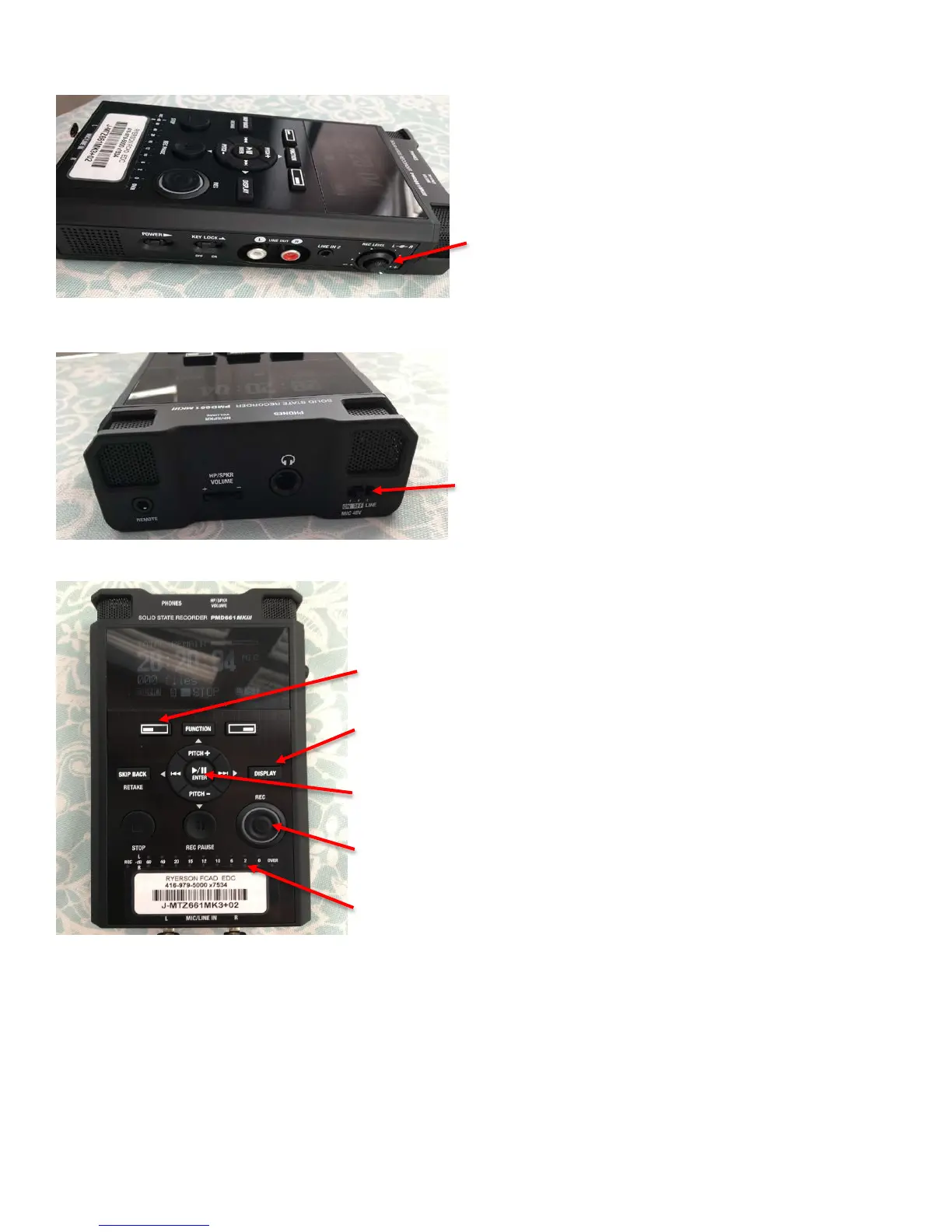
The recording level (Rec Level) dial is on the right side.
Make sure the two white lines (representing the left and
right channels) stay together while adjusting the levels.
The phantom power switch (On/Off/Line) is on the top
beside the headphone jack. It should always be set to off.
The main display on the front is the same.
Menu: accesses the menu functions for the device, including
formatting an SD card and setting recording functions
Display: push to see what the current device settings are, battery
power and recording time.
Play/Pause/Enter: plays and pauses the recording and is also the
‘Enter’ button when in the menu.
Record: Press when you’re ready to record. Is lit up red while
recording, flashing red if paused.
VU meter: to monitor the strength of the incoming audio in decibels.
Troubleshooting:
● Make sure your SD card is in the machine before powering on. If you insert your card after powering on
it won’t recognize it. Turn the machine off, put your SD card in and turn it on again.
● I have programmed the recorders to default to a created preset. It appears it isn’t saving to the firmware
on all the new machines as it did to the old ones. The easiest way to check is to look at the display. You
should see mic in the top right corner. If you hit the ‘Display’ button it will show you all the current
settings for the recorder. If you don’t see ‘Mic’ follow the steps below.



 To Next Page