EasyManua.ls Logo

Marantz 74PM66 - Page 4

Marantz 74PM66
14 pages
Print Icon
To Next Page IconTo Next Page
To Previous Page IconTo Previous Page
Loading...
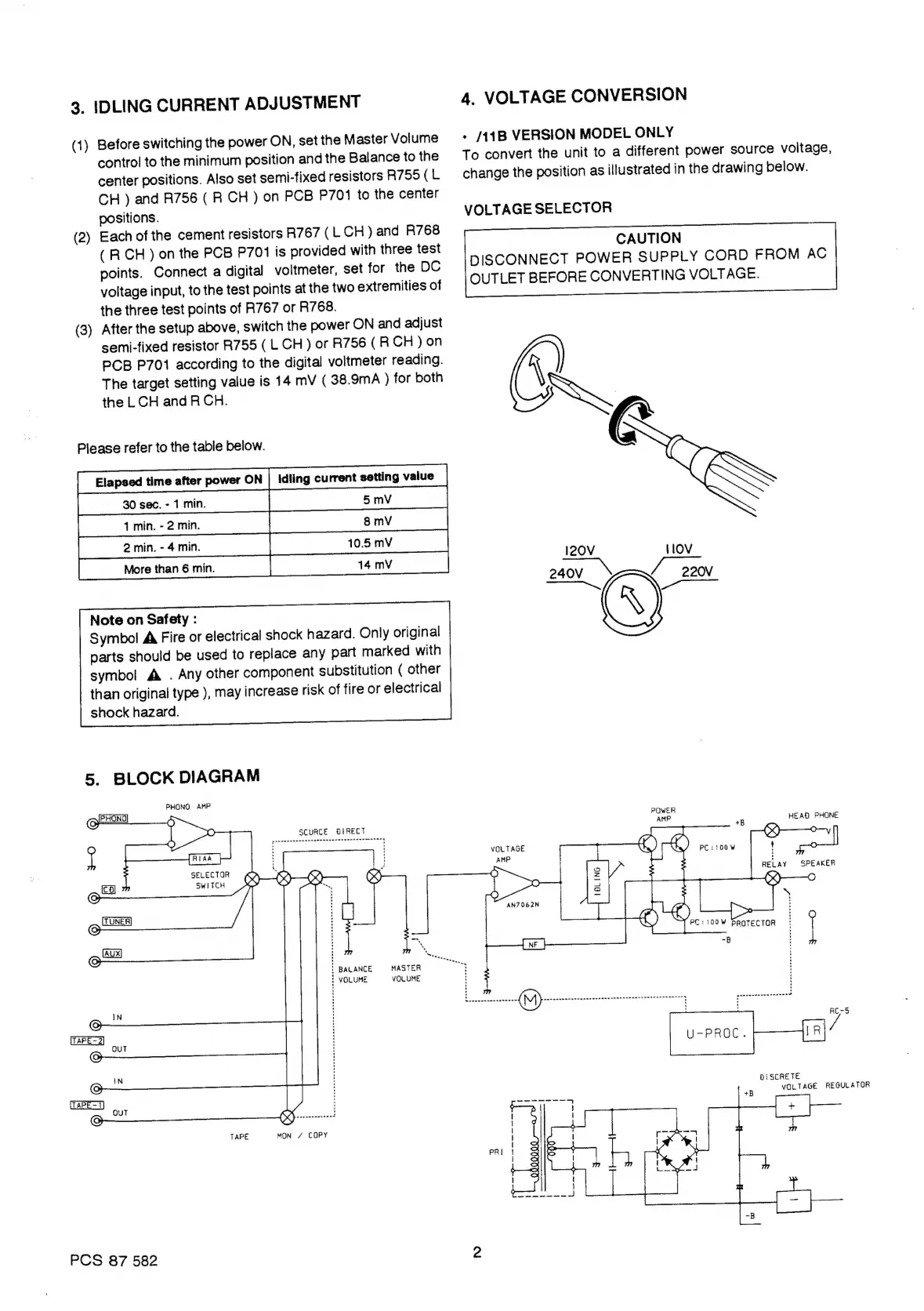
3.
IDLING
CURRENT
ADJUSTMENT
4.
VOLTAGE
CONVERSION
(1)
Before
switching
the
power
ON,
setthe
Master
Volume
°
/141B
VERSION
MODEL
ONLY
control
to
the
minimum
position
and
the
Balance
to
the
To
convert
the
unit
to
a
different
power
source
voitage,
center
positions.
Also
set
semi-fixed
resistors
R755(L
change
the
position
as
illustrated
in
the
drawing
below.
CH
)
and
R756
(
R
CH
)
on
PCB
P7011
to
the
center
positions.
VOLTAGE
SELECTOR
(2)
Each
of
the
cement
resistors
R767
(LCH)
and
R768
(RCH)
on
the
PCB
P701
is
provided
with
three
test
points.
Connect
a
digital
voltmeter,
set
for
the
DC
voltage
input,
to
the
test
points
at
the
two
extremities
of
the
three
test
points
of
R767
or
R768.
(3)
After
the
setup
above,
switch
the
power
ON
and
adjust
semi-fixed
resistor
R755
(L.CH
)
or
R756
(R
CH
)on
PCB
P701
according
to
the
digital
voltmeter
reading.
The
target
setting
value
is
14
mV
(
38.9mA
)
for
both
‘\
the
LCH
and
RCH.
WN
Please
refer
to
the
table
below.
Elapsed
time
after
power
ON
Idling
current
setting
value
[
Morethanémin
[|
my
240V
4
=
220NV
Note
on
Safety
:
(A)
Symbol!
A
Fire
or
electrical
shock
hazard.
Only
original
parts
should
be
used
to
replace
any
part
marked
with
CAUTION
DISCONNECT
POWER
SUPPLY
CORD
FROM
AC
OUTLET
BEFORE
CONVERTING
VOLTAGE.
symbol
A
.
Any
other
component
substitution
(
other
than
original
type
),
may
increase
risk
of
fire
or
electrical
shock
hazard.
5.
BLOCK
DIAGRAM
PHONO
AMP
(GPEHONO
5
eo
H
0
SCURCE
8tRECT
AMP
HEAD
PHONE
OO
Pear
ester
yrs
fy’
(yv
O
uf
rm
en
VOLTAGE
|
AMP
4
Py
'
SELECTOR
KAD
@,
4
RELAY
SPEAKER
i
eo
oe
&)
TUNER
z
©
©
oe
il
{
BALANCE
MASTER
i
VOLUME
VOLUME
Cc
;
DISCRETE
!
VOLTAGE
REGULATOR
TAPE
MON
/
COPY
PCS
87
582
2