.
A
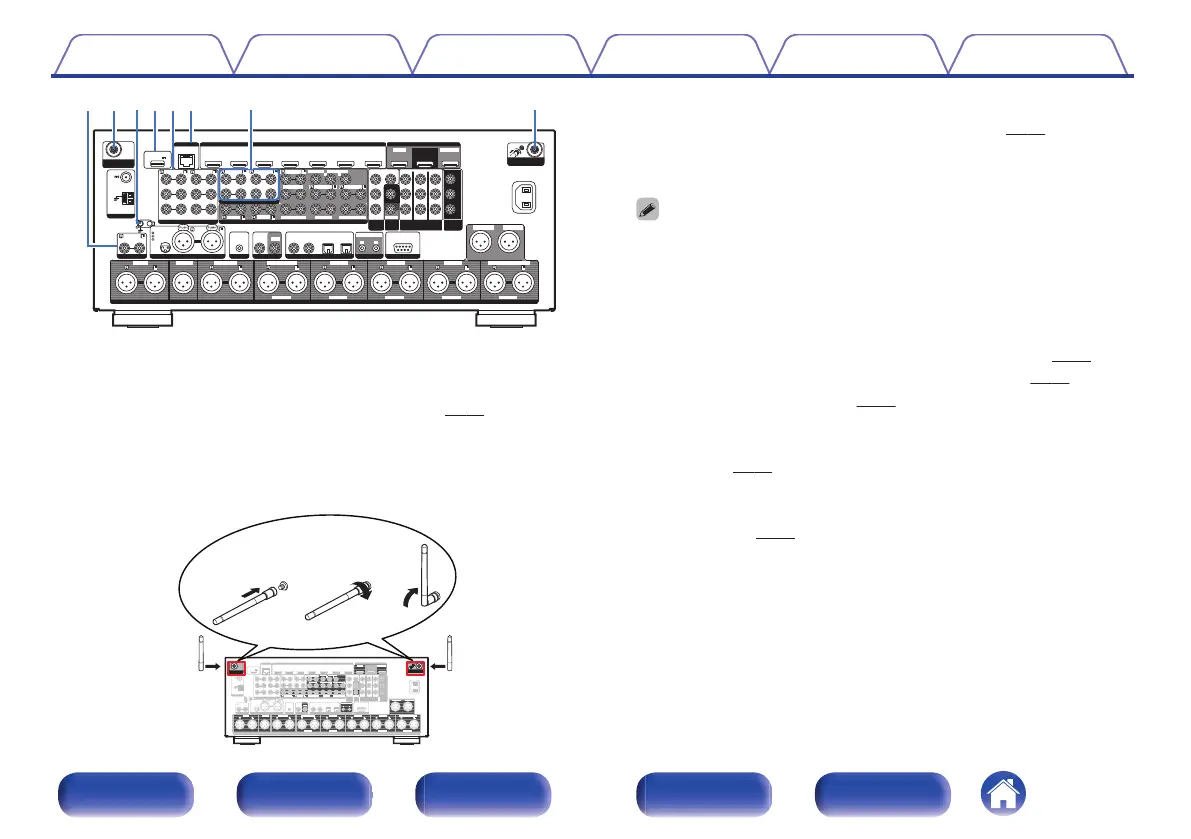
Bluetooth/wireless LAN antenna connectors
Used to connect the included external antennas for Bluetooth/wireless
connectivity when connecting to a network via wireless LAN, or when
connecting to a handheld device via Bluetooth. (v p. 96)
A
Place the external antennas for Bluetooth/wireless connectivity
evenly over the screw terminal of rear.
B
Turn clockwise until the antennas is fully connected.
C
Rotate the antenna upwards for best reception.
.
1 CBL/SAT1 CBL/SAT
PHONOPHONO
2 DVD2 DVD
2 DVD2 DVD
1 CBL/SAT1 CBL/SAT
3 Blu-ray3 Blu-ray 6 AUX26 AUX2
7 CD7 CD
2 CD2 CD
1 TV 1 TV
AUDIOAUDIO
5 MEDIA PLAYER5 MEDIA PLAYER
4 GAME4 GAME
5 MEDIA PLAYER 5 MEDIA PLAYER
2 DVD2 DVD
3 Blu-ray3 Blu-ray 6 CD6 CD
4 GAME4 GAME
1 CBL/SAT1 CBL/SAT
1 CBL/SAT1 CBL/SAT
2 DVD2 DVD
2 DVD2 DVD
3 Blu-ray3 Blu-ray
4 GAME4 GAME
RS-232CRS-232C
7.1CH IN7.1CH IN
REMOTE CONTROLREMOTE CONTROL
DC OUTDC OUT
UNBALANCED PRE OUTUNBALANCED PRE OUT
(ASSIGNABLE)(ASSIGNABLE)
(A(ASSIGNABLNABLE)E) (A(ASSIGNABLNABLE)E)
VIDEOVIDEO
ININ
COMPONENT VIDEOCOMPONENT VIDEO
ININ
VIDEOVIDEO
OUTOUT
COMPONENTCOMPONENT
VIDEO OUTVIDEO OUT
ARCARC
MONITOR1MONITOR1
MONITORMONITOR
MONITOR/ZONE3MONITOR/ZONE3
ZONE2ZONE2
ZONE2ZONE2
3 Blu-ray3 Blu-ray
MONITOR2MONITOR2
COAXIALCOAXIAL
OPTICALOPTICAL
STRAIGHT CABLESTRAIGHT CABLE
I
N
I
N
I
R
I
R
I
N
I
N
O
U
T
O
U
T
DC12V 150mA MAX.DC12V 150mA MAX.
1 2
ZONE2ZONE2
ZONE3ZONE3
FRONTFRONTFRONTFRONT
SURROUNDSURROUND
SURROUNDSURROUND
CENTERCENTER
SUBWOOFERSUBWOOFER
SURROUND BACKSURROUND BACK
CENTERCENTER
SURROUND BACKSURROUND BACK
HEIGHT2HEIGHT2
HEIGHT4/FRONT WIDEHEIGHT4/FRONT WIDE
HEIGHT1HEIGHT1
SIGNALSIGNAL
GNDGND
AUDIO INAUDIO IN
(ASSIGNABLE)(ASSIGNABLE)
(ASSIGNABLE)(ASSIGNABLE)
(ASSIGNABLE)(ASSIGNABLE)
ASSIGNABLEASSIGNABLE ASSIGNABLEASSIGNABLE ASSIGNABLEASSIGNABLE ASSIGNABLEASSIGNABLE ASSIGNABLEASSIGNABLE
(ASSIGNABLE)(ASSIGNABLE)
HDMI IN 4K / HDCP2.2HDMI IN 4K / HDCP2.2 HDMI OUT 4K / HDCP2.2HDMI OUT 4K / HDCP2.2
AUDIO INAUDIO IN BALANCED XLR INBALANCED XLR IN
BALANCED XLR PRE OUTBALANCED XLR PRE OUT
FLASHERFLASHER DIGITAL AUDIO INDIGITAL AUDIO IN
1 CBL/SAT1 CBL/SAT
AC INAC IN
NETWORKNETWORK
Y
P
B/
C
B
PR/
C
R
POWER SUPPLYPOWER SUPPLY
5V/1.5A5V/1.5A
CONNECTIONCONNECTION
GNDGND
HOT(+)HOT(+)
COLD(-)COLD(-)
HEIGHT3HEIGHT3
F
R
O
N
T
F
R
O
N
T
C
E
N
T
E
R
C
E
N
T
E
R
S
U
R
R
O
U
N
D
S
U
R
R
O
U
N
D
S
U
R
R
O
U
N
D
B
A
C
K
S
U
R
R
O
U
N
D
B
A
C
K
H
E
I
G
H
T
1
H
E
I
G
H
T
1
H
E
I
G
H
T
2
H
E
I
G
H
T
2
H
E
I
G
H
T
3
H
E
I
G
H
T
3
H
E
I
G
H
T
4
/
F
R
O
N
T
W
I
D
E
H
E
I
G
H
T
4
/
F
R
O
N
T
WI
D
E
S
U
B
W
O
O
F
E
R
1
S
U
B
W
O
O
F
E
R
1
S
U
B
W
O
O
F
E
R
2
S
U
B
W
O
O
F
E
R
2
AMAM
FMFM
1 2
SUBWOOFERSUBWOOFER
ANTENNAANTENNA
BluetoothBluetooth
/
Wi-FiWi-Fi
ANTENNAANTENNA
BluetoothBluetooth
/
Wi-FiWi-Fi
ANTENNA ANTENNA
qwe
B
SIGNAL GND terminal
Used to connect a ground wire for the turntable. (v
p. 90)
C
USB port (POWER SUPPLY)
Can be used to power streaming media players, etc.
0
Use a device’s supplied AC adapter when a power supply of 5 V/1.5 A or more
is required.
0
Connect to the USB port on the front panel to play content from a USB
memory device.
D
Analog audio connectors (AUDIO)
Used to connect devices equipped with analog audio connectors.
0
“Connecting a set-top box (Satellite tuner/cable TV)” (v
p. 87)
0
“Connecting a DVD player or Blu-ray Disc player” (v
p. 88)
0
“Connecting a turntable” (v p. 90)
E
NETWORK connector
Used to connect to a LAN cable when connecting to a wired LAN
network. (v
p. 95)
F
7.1-channel input connectors (7.1CH IN)
Used to connect to a device that has multi-channel audio output
connectors. (v
p. 91)
Contents
Connections Playback Settings Tips Appendix
28
Front panel Display Rear panel Remote Index


 To Next Page
 Loading...











