23
ENGLISH
Playback Playback
ENGLISH
Introduction Connections Playback Function Setup Others
You can check information about the current disc by pressing
[DISPLAY].
To call the On-Screen Display, press [DISPLAY] during playback.
Each time you press [DISPLAY], the information changes.
Depending on the media, available information varies.
OFF A Title/Chapter information A Title information (elapsed
time) A Title information (remaining time) A HDMI information
A OFF
OFF A Chapter information (elapsed time)
A Chapter information (remaining time) A Title information
(elapsed time) A Title information (remaining time)
A Bit rate information A HDMI information A OFF
OFF (Track information (elapsed time)) A Track information
(remaining time) A Disc information* (elapsed time)
A Disc information* (remaining time) A OFF (Track information
(elapsed time))
(* not available during the program/random playback)
OFF A File information (elapsed time) A File information
(remaining time) A File name information A HDMI information
A OFF
OFF (File information (elapsed time)) A File name information
A OFF (File information (elapsed time))
OFF (File information (elapsed time)) A File name information
A Tag information (title name) A Tag information (artist name)
A OFF (File information (elapsed time))
OFF A File information A File name information A OFF
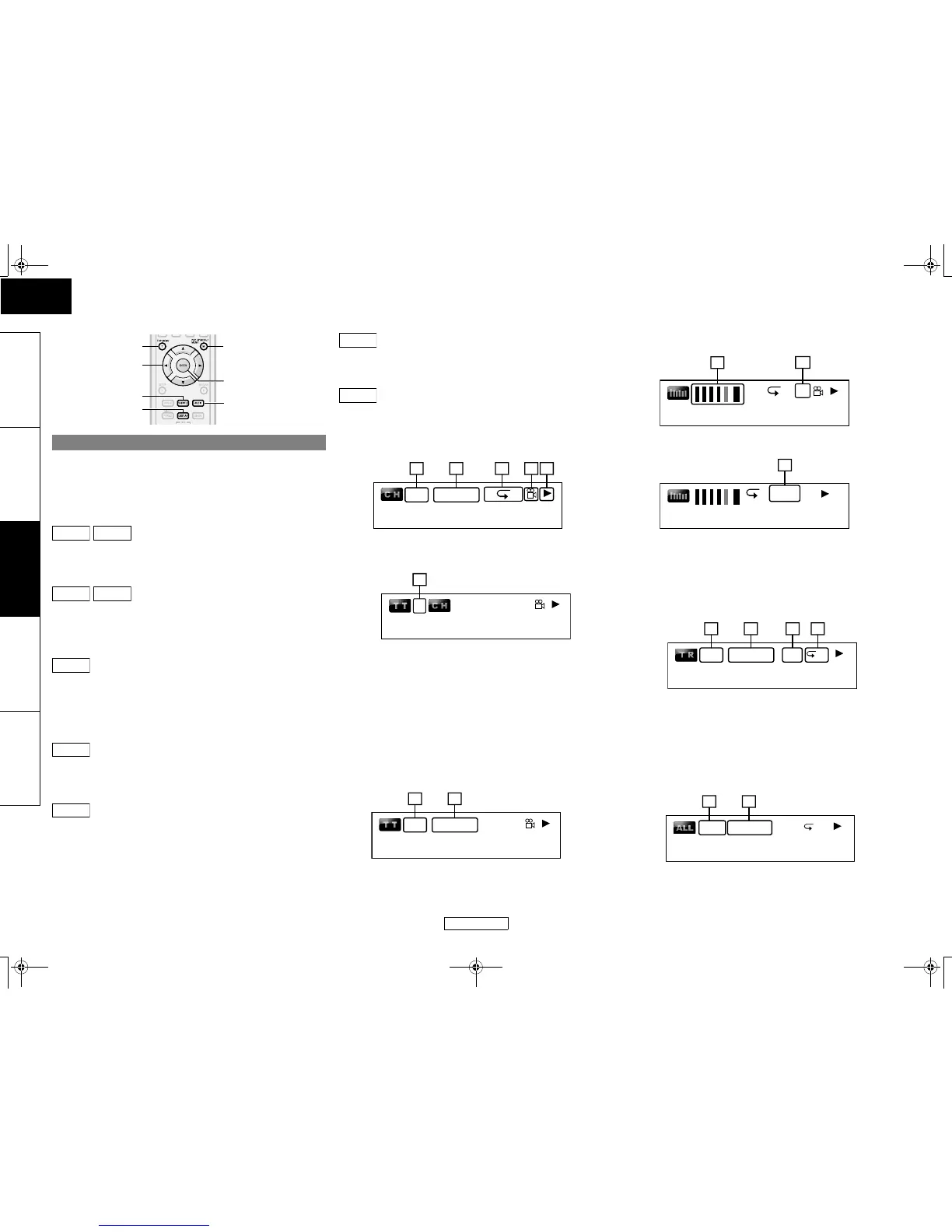
䡵 Chapter information
<Title / Chapter information for BD/AVCHD>
A Current chapter number/total number of chapters
B Elapsed time/remaining time of the current chapter
C Current repeat setting (Only when repeat setting is active)
(C: Chapter repeat, T: Title repeat, AB : A-B repeat)
D Indicates that the multi camera angle images are available
on the scene
E Current playback status
F Current title number
䡵 Title information
G Current title number/total number of titles
H Elapsed time/remaining time of the current title
䡵 Bit rate information
<For VR mode DVD-RW/-R>
I Bit rate (the amount of video data currently being read)
J Layer number (Only for 2-layered discs)
(L0: Layer 0 is played back. L1: Layer 1 is played back)
K Type of title (ORG: original, PL: playlist)
䡵 Track/File information
L Current track (file) number/total number of track (file)
M Elapsed time/remaining time of the current track (file)
N Indication of SD Memory Card playback
O Current repeat setting (Only when repeat setting is active)
(T: Track/file repeat, G: Group repeat, A: All repeat)
䡵 Disc information
P Current track number/Total number of tracks
Q Elapsed time/remaining time of the current disc
On-Screen Display
[AUDIO]
[TOP MENU]
[U / V / Y / Z]
[ENTER]
[DISPLAY]
[POP UP MENU /
MENU]
[SUBTITLE]
BD-V
AVCHD
DVD-V
DVD-VR
CD
DivX
®
MP3
WMA
JPEG
2/5 0:00:00
1 43 5
AB
2
1
6
2/5
1/10
0:04:00
7 8
AB
L1
9
10
A ORG
11
T
2/5 0:00:00 SD
12 13 1514
A
1/10 0:04:00
16 17
E5KB1UD_v2 _EN.book Page 23 Tuesday, June 30, 2009 11:18 AM



 To Next Page