EasyManua.ls Logo

Marantz CD-17 - Page 7

Marantz CD-17
16 pages
Print Icon
To Next Page IconTo Next Page
To Previous Page IconTo Previous Page
Loading...
NORMAL
PLAYBACK
(Hay
otce
«so
tora=—s
new
me
procraw
(EDT)
™=
69
99:96
@
stop
Bl
Pause
nawoom
(BEAK)
nepeaTt
{A) (B}
POWER
@
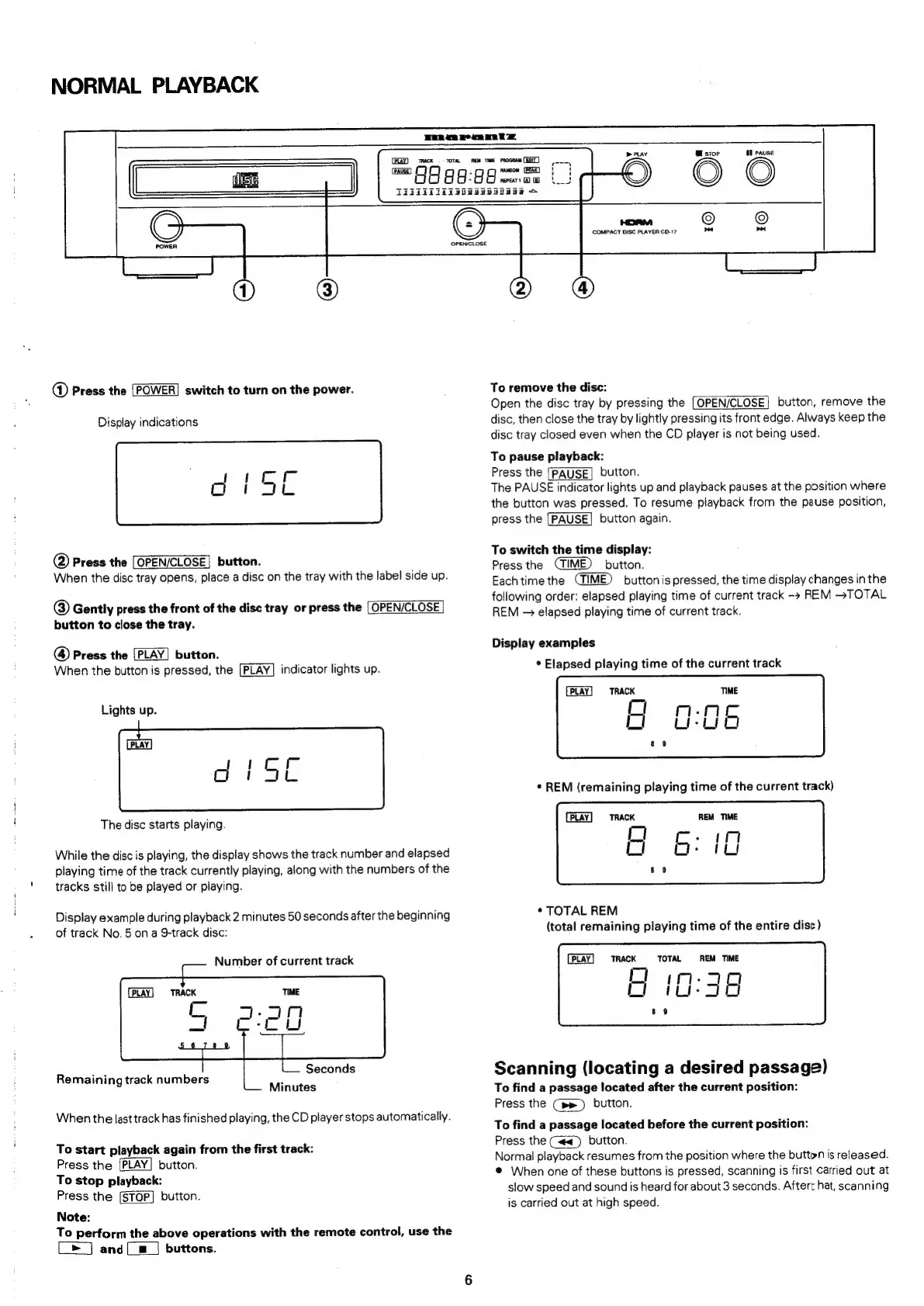
Press
the
switch
to
turn
on
the
power.
Display
indications
op
peer
oor
age
@
Press
the
[OPEN/CLOSE]
button.
When
the
disc
tray
opens,
place
a
disc
on
the
tray
with
the
label
side
up.
@)
Gently
press
the
front
of
the
disc
tray
or
press
the
[OPEN/CLOSE
button
to
close
the
tray.
@
Press
the
button.
When
the
button
is
pressed,
the
[PLAY]
indicator
lights
up.
Lights
up.
eg
45e
The
disc
starts
playing.
While
the
disc
is
playing,
the
display
shows
the
track
number
and
elapsed
playing
time
of
the
track
currently
playing,
along
with
the
numbers
of
the
tracks
still
to
be
played
or
playing.
Display
example
during
playback
2
minutes
50
seconds
after
the
beginning
of
track
No.
5
on
a
9-track
disc:
Number
of
current
track
TRACK
Seconds
Remaining
track
numbers
:
9
Minutes
When
the
last
track
has
finished
playing,
the
CD
player
stops
automatically.
To
start
playback
again
from
the
first
track:
Press
the
[PLAY]
button.
To
stop
playback:
Press
the
button.
Note:
To
perform
the
above
operations
with
the
remote
control,
use
the
[>]
and
[__]
buttons.
OPEN/CLOSE
2
o
COMPACT
DISC
PLAYER
CD-17
To
remove
the
disc:
Open
the
disc
tray
by
pressing
the
[OPEN/CLOSE}
button,
remove
the
disc,
then
close
the
tray
by
lightly
pressing
its
front
edge.
Always
keep
the
disc
tray
closed
even
when
the
CD
player
is
not
being
used.
To
pause
playback:
Press
the
[PAUSE]
button.
The
PAUSE
indicator
lights
up
and
playback
pauses
at
the
position
where
the
button
was
pressed.
To
resume
playback
from
the
pause
position,
press
the
[PAUSE]
button
again.
To
switch
the
time
display:
Press
the
button.
Each
time
the
button
is
pressed,
the
time
display
changes
in
the
following
order:
elapsed
playing
time
of
current
track
REM
~TOTAL
REM
=
elapsed
playing
time
of
current
track.
Display
examples
*
Elapsed
playing
time
of
the
current
track
TRACK
PLAY
TRACK
*
TOTAL
REM
(total
remaining
playing
time
of
the
entire
disc)
PLAY
TRACK
CI
TOTAL
iO:
REM
TIME
dj
cy
Scanning
(locating
a
desired
passage)
To
find
a
passage
located
after
the
current
position:
Press
the
Cpe)
button.
To
find
a
passage
located
before
the
current
position:
Press
the
(<<)
button.
Normal
playback
resumes
from
the
position
where
the
button
is
released.
®
When
one
of
these
buttons
is
pressed,
scanning
is
first
Carried
out
at
slow
speed
and
sound
is
heard
for
about
3
seconds.
Aftert
hat,
scanning
is
carried
out
at
high
speed.

Related product manuals