EasyManua.ls Logo

Marantz CD-17 - Random Play

Marantz CD-17
16 pages
Print Icon
To Next Page IconTo Next Page
To Previous Page IconTo Previous Page
Loading...
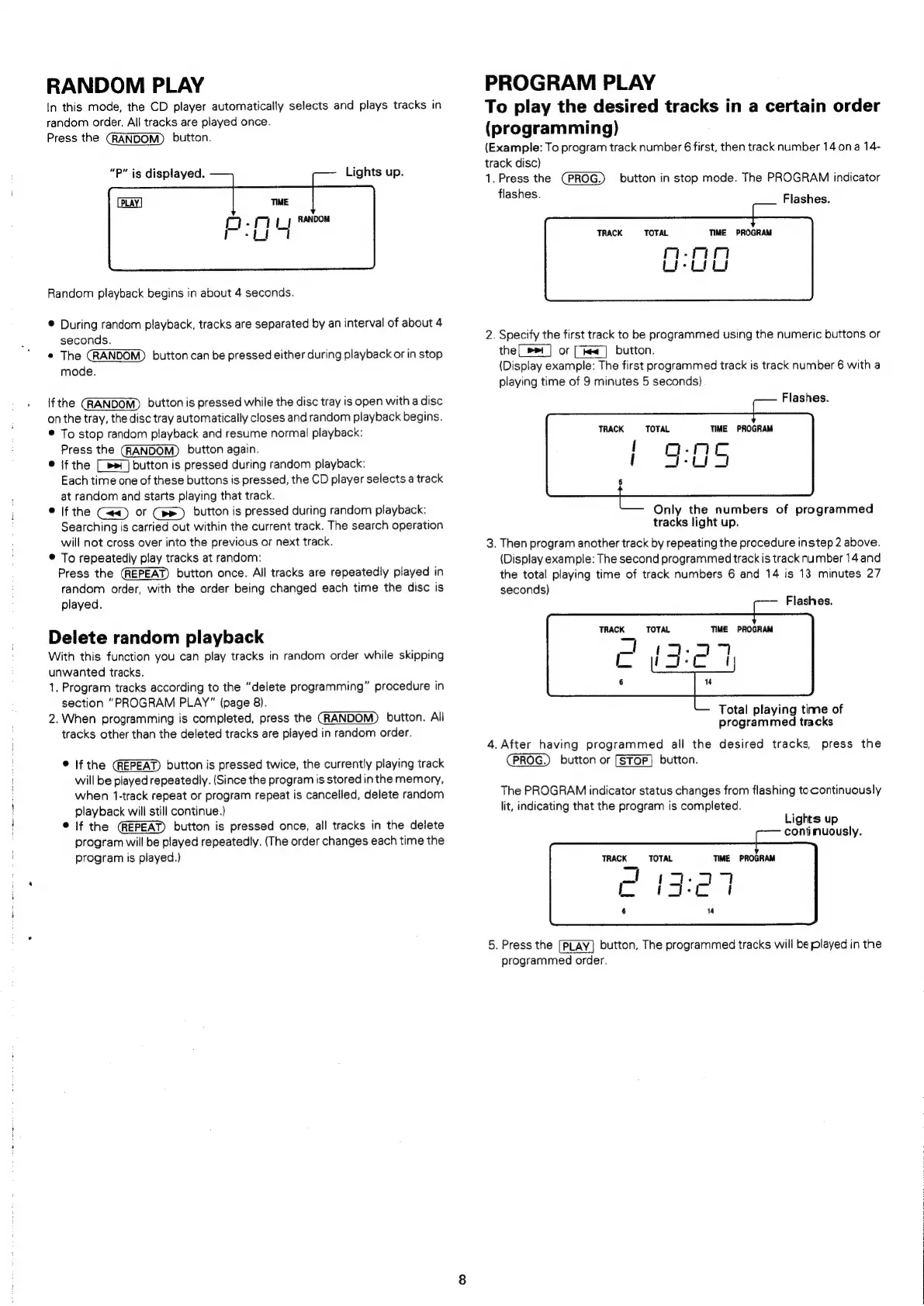
RANDOM
PLAY
In
this
mode,
the
CD
player
automatically
selects
and
plays
tracks
in
random
order.
All
tracks
are
played
once.
Press
the
(RANDOM)
button.
“P”
is
displayed.
Lights
up.
Random
playback
begins
in
about
4
seconds.
®
During
random
playback,
tracks
are
separated
by
an
interval
of
about
4
seconds.
°
The
button
can
be
pressed
either
during
playback
or
in
stop
mode.
If
the
button
is
pressed
while
the
disc
tray
is
open
with
a
disc
onthe
tray,
the
disc
tray
automatically
closes
and
random
playback
begins.
®
To
stop
random
playback
and
resume
normal
playback:
Press
the
button
again.
©
if
the
[ps1]
button
is
pressed
during
random
playback:
Each
time
one
of
these
buttons
is
pressed,
the
CD
player
selects
a
track
at
random
and
starts
playing
that
track.
©
Ifthe
Gea)
or
Cee)
button
is
pressed
during
random
playback:
Searching
is
carried
out
within
the
current
track.
The
search
operation
will
not
cross
over
into
the
previous
or
next
track.
©
To
repeatedly
play
tracks
at
random:
Press
the
button
once.
All
tracks
are
repeatedly
played
in
random
order,
with
the
order
being
changed
each
time
the
disc
is
played.
Delete
random
playback
With
this
function
you
can
play
tracks
in
random
order
while
skipping
unwanted
tracks.
1.
Program
tracks
according
to
the
“delete
programming”
procedure
in
section
“PROGRAM
PLAY"
(page
8).
2.
When
programming
is
completed,
press
the
button.
All
tracks
other
than
the
deleted
tracks
are
played
in
random
order.
®
If
the
button
is
pressed
twice,
the
currently
playing
track
will
be
played
repeatedly.
(Since
the
program
is
stored
in
the
memory,
when
1-track
repeat
or
program
repeat
is
cancelled,
delete
random
playback
will
still
continue.)
©
If
the
button
is
pressed
once,
all
tracks
in
the
delete
program
will
be
played
repeatedly.
(The
order
changes
each
time
the
program
is
played.)
PROGRAM
PLAY
To
play
the
desired
tracks
in
a
certain
order
(programming)
(Example:
To
program
track
number
6
first,
then
track
number
14
ona
14-
track
disc)
1.
Press
the
button
in
stop
mode.
The
PROGRAM
indicator
flashes.
Flashes.
TRACK
TOTAL
TIME
PROGRAM
man
Liebe
iy
2.
Specify
the
first
track
to
be
programmed
using
the
numeric
buttons
or
the[_»>»_]
or
[<a]
button.
(Display
example:
The
first
programmed
track
is
track
number
6
with
a
playing
time
of
9
minutes
5
seconds)
Flashes.
TRACK
TOTAL
TIME
PROGRAM
Only
the
numbers
of
programmed
tracks
light
up.
3.
Then
program
another
track
by
repeating
the
procedure
instep
2
above.
{Display
example:
The
second
programmed
track
is
track
number
14
and
the
total
playing
time
of
track
numbers
6
and
14
is
13
minutes
27
seconds)
Flashes.
TRACK
TOTAL
TIME
PROGRAM
Total
playing
time
of
programmed
tracks
4.
After
having
programmed
all
the
desired
tracks,
press
the
PROG.)
button
or
button.
The
PROGRAM
indicator
status
changes
from
flashing
to
continuously
lit,
indicating
that
the
program
is
completed.
Lights
up
contimuously.
TRACK
TOTAL
TIME
PROGRAM
_I
t-
5.
Press
the
[PLAY]
button,
The
programmed
tracks
will
be
played
in
the
programmed
order.

Related product manuals