EasyManua.ls Logo

Marantz CD-17 - Repeat Play

Marantz CD-17
16 pages
Print Icon
To Next Page IconTo Next Page
To Previous Page IconTo Previous Page
Loading...
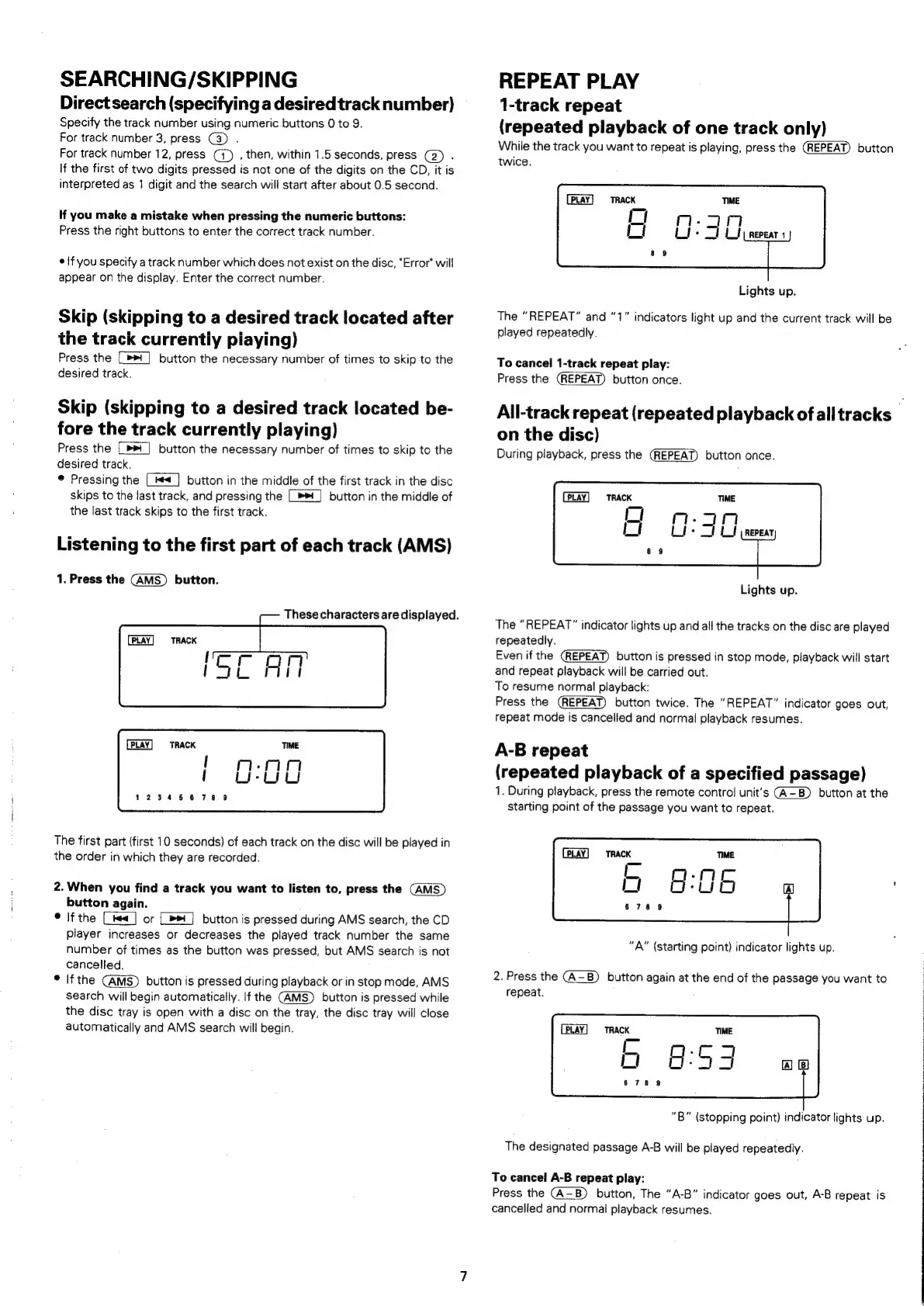
SEARCHING/SKIPPING
Direct
search
(specifying
a
desired
track
number)
Specify
the
track
number
using
numeric.buttons
0
to
9.
For
track
number
3,
press
(3)
.
For
track
number
12,
press
(4)
,
then,
within
1.5
seconds,
press
(2)
.
\f
the
first
of
two
digits
pressed
is
not
one
of
the
digits
on
the
CD,
it
is
interpreted
as
1
digit
and
the
search
will
start
after
about
0.5
second.
If
you
make
a
mistake
when
pressing
the
numeric
buttons:
Press
the
right
buttons
to
enter
the
correct
track
number.
¢
!f
you
specify
a
track
number
which
does
not
exist
on
the
disc,
“Error
will
appear
on
the
display.
Enter
the
correct
number.
Skip
(skipping
to
a
desired
track
located
after
the
track
currentiy
piaying)
Press
the
_»*
|
button
the
necessary
number
of
times
to
skip
to
the
desired
track,
Skip
(skipping
to
a
desired
track
located
be-
fore
the
track
currently
playing)
Press
the
[>]
button
the
necessary
number
of
times
to
skip
to
the
desired
track.
®
Pressing
the
|__|
button
in
the
middle
of
the
first
track
in
the
disc
skips
to
the
last
track,
and
pressing
the
[>]
button
in
the
middle
of
the
last
track
skips
to
the
first
track.
Listening
to
the
first
part
of
each
track
(AMS)
1.
Press
the
button.
PLAY
TRACK
PLAY
TRACK
{
mrin
'
UU
123456789
The
first
part
(first
10
seconds)
of
each
track
on
the
disc
will
be
played
in
the
order
in
which
they
are
recorded.
2.
When
you
find
a
track
you
want
to
listen
to,
press
the
button
again.
©
Ifthe
(<]
or
[»*]
button
is
pressed
during
AMS
search,
the
CD
player
increases
or
decreases
the
played
track
number
the
same
number
of
times
as
the
button
was
pressed,
but
AMS
search
is
not
cancelled.
®
if
the
button
is
pressed
during
playback
or
in
stop
mode,
AMS
search
will
begin
automatically.
If
the
button
is
pressed
while
the
disc
tray
is
open
with
a
disc
on
the
tray,
the
disc
tray
will
close
automatically
and
AMS
search
will
begin.
These
characters
are
displayed.
REPEAT
PLAY
1-track
repeat
(repeated
playback
of
one
track
only)
While
the
track
you
want
to
repeat
is
playing,
press
the
(REPEAT)
button
twice.
[PLAY]
TRACK
i)
Li
Lights
up.
The
“REPEAT”
and
“1”
indicators
light
up
and
the
current
track
will
be
played
repeatedly.
To
cancel
1-track
repeat
play:
Press
the
(REPEAT)
button
once.
All-track
repeat
(repeated
playback
ofalltracks
-
on
the
disc)
During
playback,
press
the
button
once.
TRACK
Lights
up.
The
“REPEAT”
indicator
lights
up
and
all
the
tracks
on
the
disc
are
played
repeatedly.
Even
if
the
button
is
pressed
in
stop
mode,
playback
will
start
and
repeat
playback
will
be
carried
out.
To
resume
normal
playback:
Press
the
button
twice.
The
“REPEAT”
indicator
goes
out,
repeat
mode
is
cancelled
and
normal
playback
resumes.
A-B
repeat
(repeated
playback
of
a
specified
passage)
1.
During
playback,
press
the
remote
contro!
unit’s
button
at
the
starting
point
of
the
passage
you
want
to
repeat.
"A"
(starting
point)
indicator
lights
up.
2.
Press
the
button
again
at
the
end
of
the
passage
you
want
to
repeat.
TRACK
TIME
6
8:93
678
9
“B”
(stopping
point)
indicator
lights
up.
The
designated
passage
A-B
will
be
played
repeatedly.
To
cancel
A-B
repeat
play:
Press
the
button,
The
“A-B”
indicator
goes
out,
AB
repeat
is
cancelled
and
normal
playback
resumes.

Related product manuals