13
NAMES AND
FUNCTIONS
BASIC
CONNECTIONS
BASIC
OPERATIONS
ADVANCED
CONNECTIONS
ADVANCED
OPERATIONS
TROUBLESHOOTING
OTHERS
ADVANCED
CONNECTIONS
ENGLISH
ADVANCED CONNECTIONS
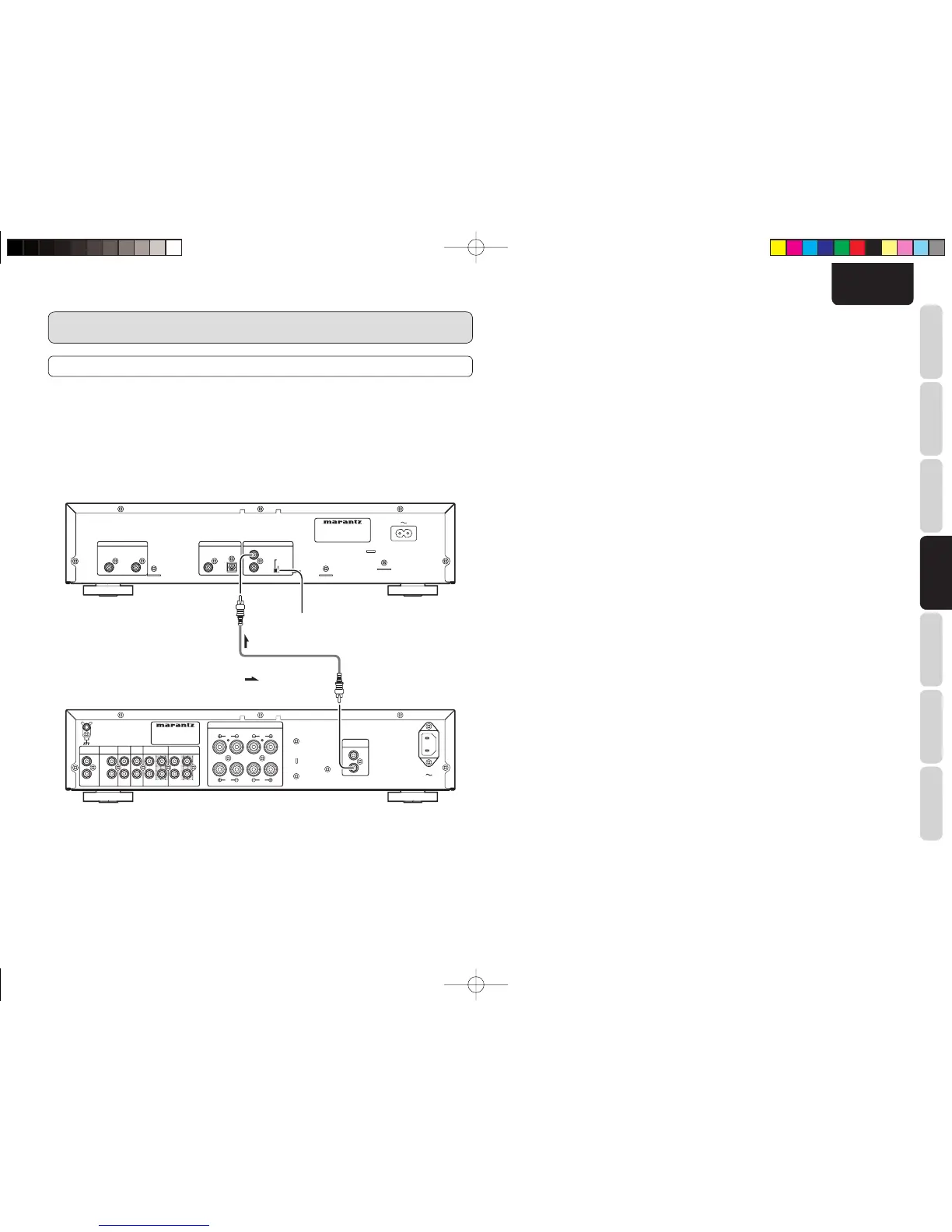
REMOTE CONTROL CONNECTION
By using the remote control cord provided, connecting this player to additional Marantz audio equipment
enables the connected equipment to be remote controlled as a single audio system.
• When connecting equipment incorporating a remote sensor, connect the “remote control out” connector
of the equipment to the “remote control in” jack of the CD player.
When doing this, set this player’s switch to “EXTERNAL.” This will stop its remote control IR receiver
from operating and the player can now be controlled via the remote control IR receiver of the attached
equipment.
• When using this CD player alone, set the switch to “INTERNAL.”
SPEAKER SYSTEMS
:
Signal fl ow
Amplifi er
Remote connector cord (supplied)
Set to “EXTERNAL.”
CD5003N01ENG.indd13CD5003N01ENG.indd13 08.6.199:00:56AM08.6.199:00:56AM



 To Next Page