- 17 -
How to Play
How to Play a CD (basics)
How to play
BASS
MID
TREBLE
TEXT PHANTOM PROG REPEAT
MENU/STORE
DISP SINGLE
A-B
CANCEL/DELETE
REC MODE
ERASE FINALIZE
REC
SELECT
PUSH ENTER
POWER STANDBY
CD RECORDER CDR300
PROFESSIONAL
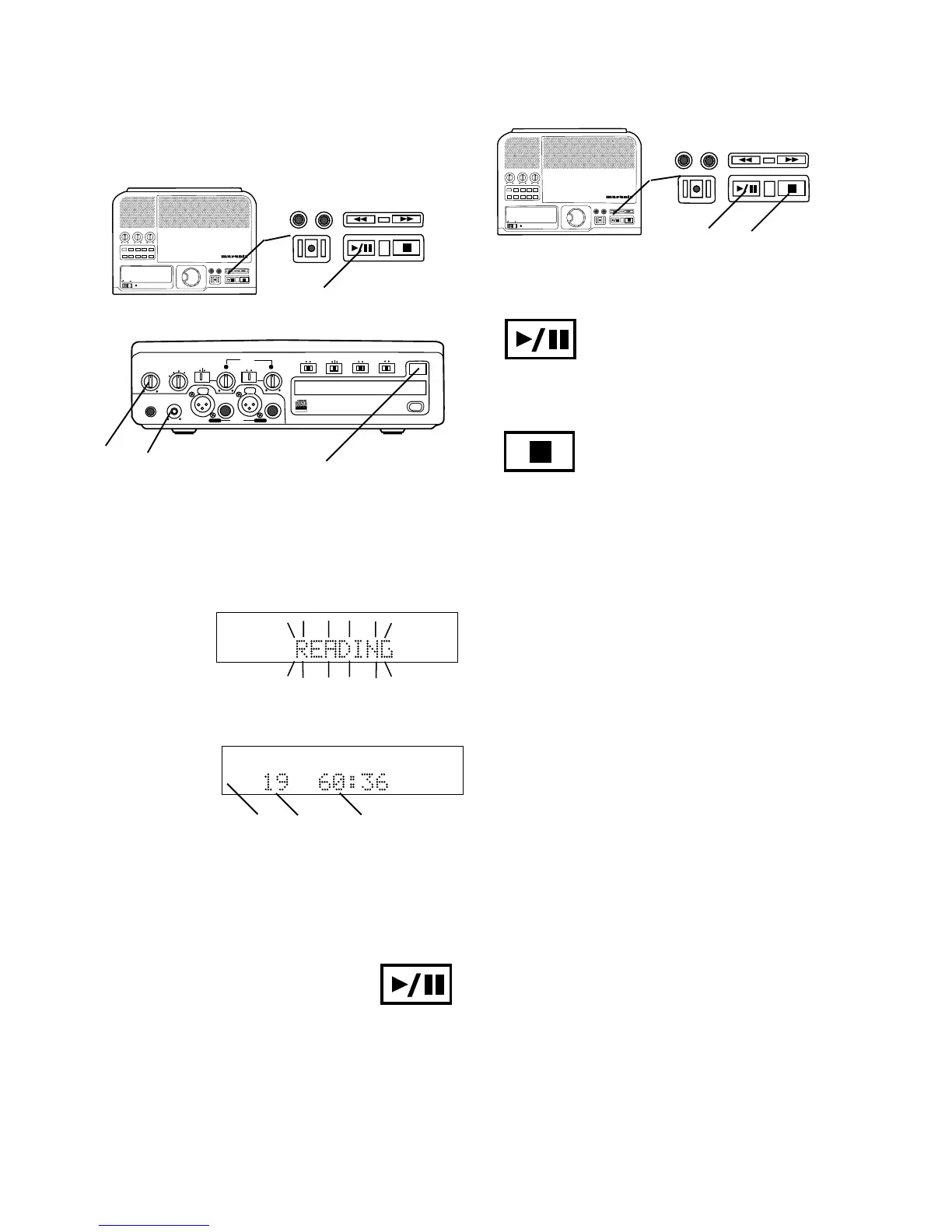
1 Connect and turn on the CDR300, see Connections
(basic) on page 7.
2 Push and release the OPEN/CLOSE switch to
open the CDR drive. "OPEN" is displayed.
Insert your CD and push OPEN/CLOSE to close the
CDR drive. "CLOSE" is displayed.
Then READING
will flash on the
display.
R
L
dB-50 -30 -22 -16 -12 -8 -4 0
If CD text is available the CD title/artist will scroll
across the display.
Then the display
will show disc
information
(example shown).
TOTAL TRACK
CD
R
L
dB-50 -30 -22 -16 -12 -8 -4 0
CD
a b c
a The type of disc (CD, CD TEXT, CD-R or CD-RW)
is shown.
b The number of tracks on the disc.
c The total playing time of the disc.
PHONE/SPEAKER
LEVEL
PHONES
LINE OUT
ReWritable
Recordable
CD PLAY / RECORD
OPEN/CLOSE
DIGITAL
ANALOG
INPUT
ONOFF
SPEAKER
PHONE SELECTOR
MIC/LINE
MIX OUT
LINE OUT
AUX
L R
L + R
L/R
MIC/LINE
PUSH
MIC/LINE RIGHT
PUSH
LEFT
INT
LINE
MIC
LIMITERALC
REC LEVEL
MANUAL
ON
OFF
MIC/LINE ATT
d e
2
ERASE FINALIZE
REC
3
BASS
MID
TREBLE
TEXT PHANTOM PROG REPEAT
MENU/STORE
DISP SINGLE
A-B
CANCEL/DELETE
REC MODE
ERASE FINALIZE
REC
SELECT
PUSH ENTER
POWER STANDBY
CD RECORDER CDR300
PROFESSIONAL
ERASE FINALIZE
REC
1 2 3b
Push and release the Play/Pause
button (1) to Pause. When paused,
push and release to continue play from
the same point.
Push and release the Stop button (2) to
Stop. When Play/Pause is next
pushed, play starts from the beginning
of the disc.
How to Pause
How to Stop
3 Play Push the Play/Pause button to
begin play. The CD will play to the end
and stop.
Adjust internal speaker or headphone volume with the
PHONE/SPEAKER level control d.
Adjust the LINE OUT level with the control e and your
amplifier's volume controls if using an external ampli-
fier.














 To Next Page