SPECIAL MODE
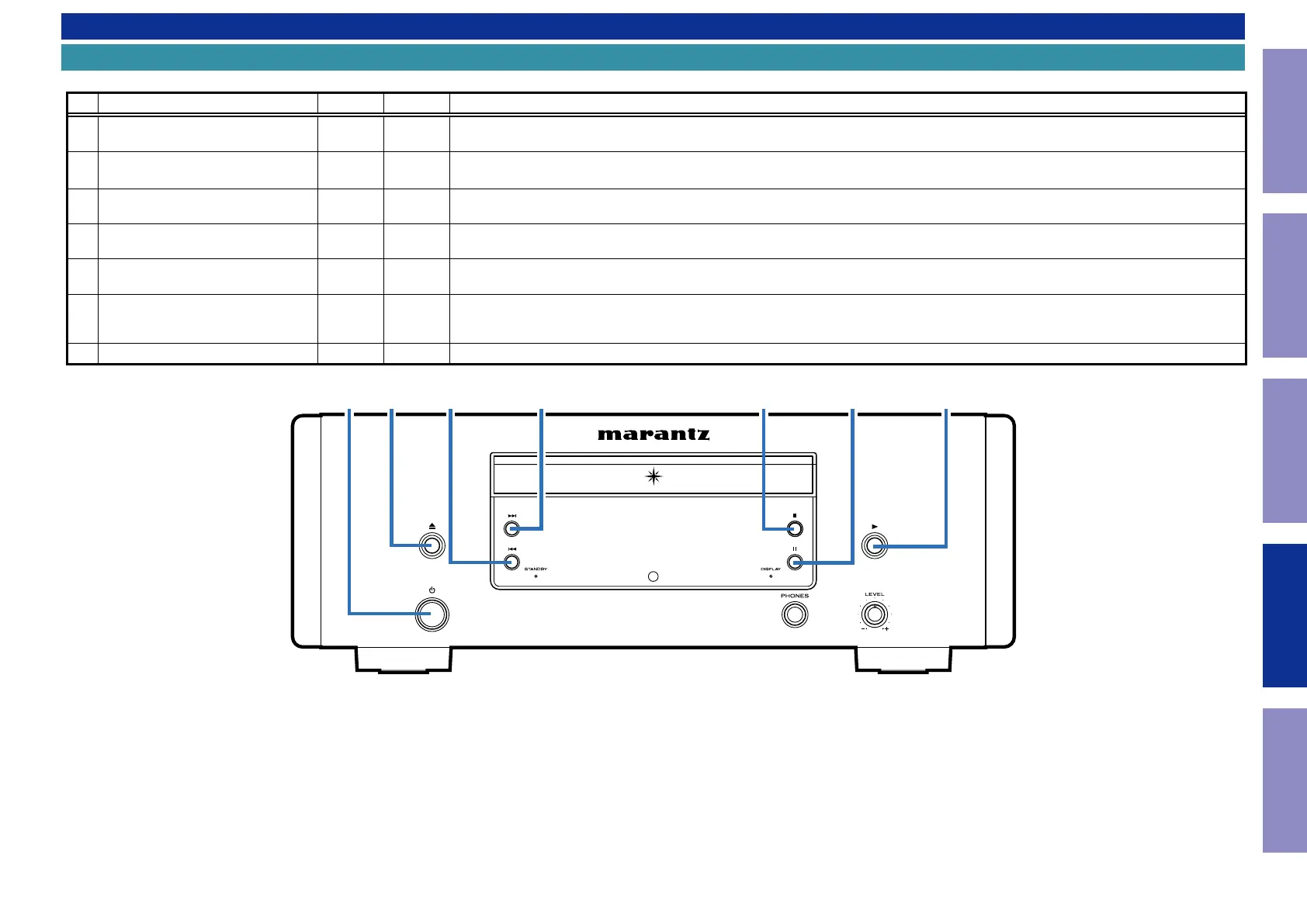
Special mode setting button
b
No. 1 - 7 : While holding down buttons "
A
" and "
B
" simultaneously, insert the AC plug into the wall outlet to turn on the power.
No. Mode Button A Button B Descriptions
1 Version Display Mode
9
STOP
The rmware version is shown on the display. Errors that have occurred are displayed.
(See 1. Version Display Mode)
2 FLD check mode
5
STOP
All segments on the FLD display ash in a 2 second cycle.
(See 2. Display check mode)
3 Initialization (cold start)
5
PAUSE
Initialize the CD player.
(See 3. Initialization (cold start))
4 CD test mode
8
PLAY
Initializing CD Player.
(See 4. CD test mode)
5 CD heat Run mode
8
STOP
Test of CD mech.
(See 5. CD Heat run mode)
6
Accumulated laser on time display
mode
8
PAUSE
Indicates the accumulated laser on time.
If the CD mechanism has been replaced, reset the laser ON accumulated time using this mode.
(See 6. Accumulated laser on time display mode)
7 Timer check mode
9
PLAY
Not for service.
36
Caution in
servicing
Electrical Mechanical Repair Information Updating


 To Next Page