11
ENGLISH
FRANCAIS
DEUTSCH
NEDERLANDS
ESPANOLITALINO PORTUGUES
SVENSKA
DANSK
DANSK
SVENSKAPORTUGUES ITALINOESPANOL NEDERLANDSDEUTSCH
FRANCAIS
ENGLISH
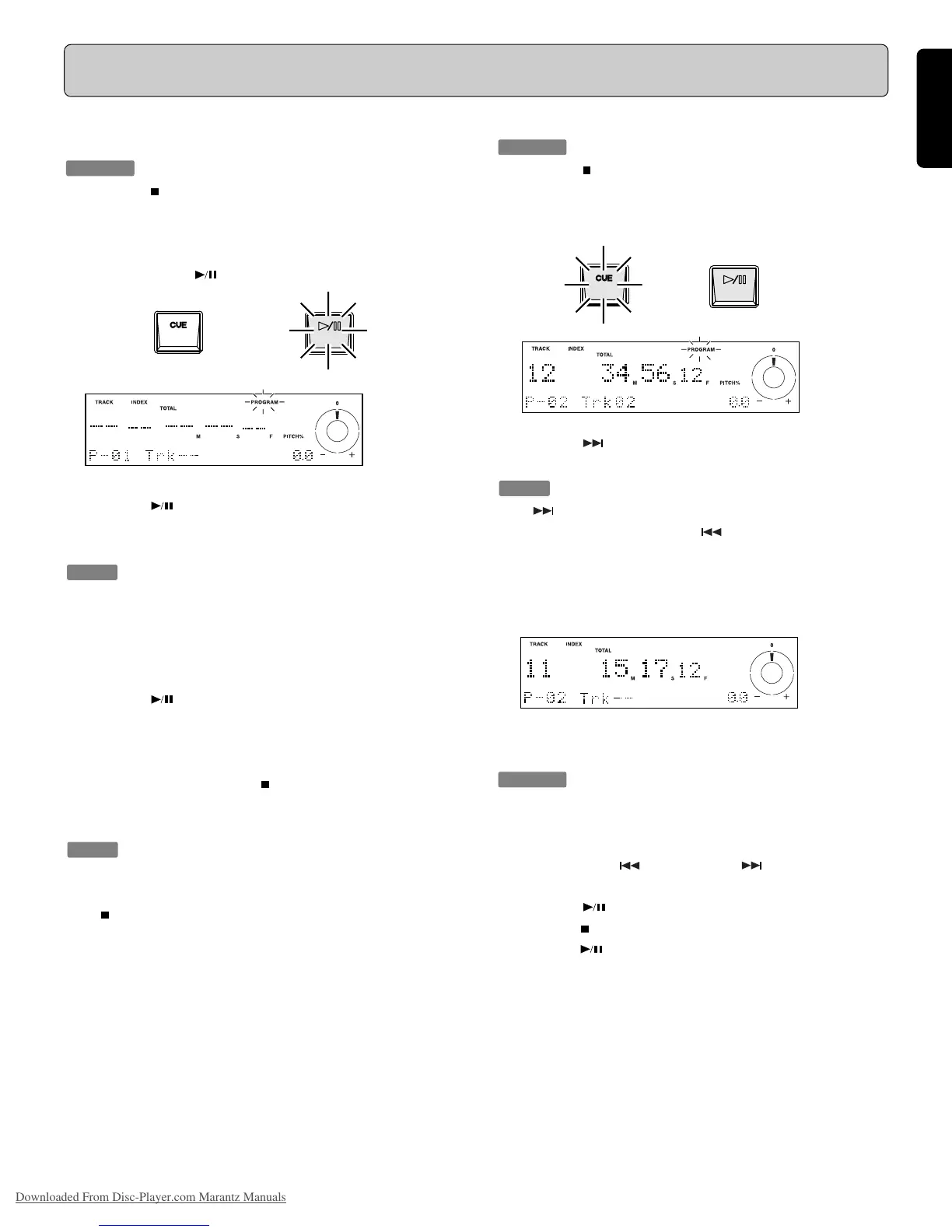
Playback Using the Program Function
Registration
It is necessary to register the tracks to use the program function.
Procedure
(For example, to store P-01, P-02. )
1. Press the
button !3 to stop playback and then press the
PROG button !1 .
2. Input the track number to be registered by pressing the
numeric buttons (0 to 9) o .
At this point, the /ENTER button !7 flashes.
3. Press the
/ENTER button !7.
The specified track number is registered in the program as
“P-01”.
Tip:
Input the track number within five seconds. If the track number
is not input within five seconds, it is cancelled.
4. The program number than changes to “P-02”.
5. Input the next track number to be registered by pressing
thenumeric buttons (0 to 9) o.
6. Press the
/ENTER button !7.
The specified track number is registered in program “P-02”.
7. The program number than changes to “P-03”.
8. When you have registered all the required tracks, press
thePROG button !1 or the /EXIT button !3.
The CD player will then exit the program registration mode
and enter the program play mode.
Tips:
- A maximum of 20 tracks can be registered in the program.
- To stop program registration, press the PROG button !1 or
the /EXIT button !3.
- Program play can be switched off via the MODE menu.
To clear a registered Track
Procedure
(For example, to clear P-02.)
1. Press the button !3 to stop playback, and then press the
PROG button !1.
2. The program number “P-01” is displayed.
At this point, the CUE/CLEAR button !5 flashes.
3. Press the
button !4, so that program number “P-02” is
displayed.
Tip:
If the button !4 is pressed, the program number that is dis-
played increases by one. If the
button !2 is pressed, the
program number that is displayed decreases by one.
4. Press the CUE/CLEAR button !5.
“P-02” is cleared and “P-02 Trk - -” is displayed on the
display E .
Switching Program Playback OFF
Procedure
1. Press the MODE button @2.
2. Select the playback mode so that “Program: On” is displayed
in the character display portion of the display t.
3. Press either the
button !2 or the button !4 to change
the display to “Program: Off”.
4. Press the /ENTER button !7 to confirm the setting.
5. Press the
/EXIT button !3 to exit the playback mode menu.
6. When the
button !7 is pressed, normal playback begins.
ENTER
CLEAR
ENTER
Downloaded From Disc-Player.com Marantz Manuals



 To Next Page