ENGLISH
14
STEREO
FRONT
CENTER
SURROUND
MULTI CHANNEL AUDIO OUT
R
L
L
DIGITAL
R
SUB
WOOFER
STANDARD
CUSTOM
IN
OUT
INTERNAL
EXTERNAL
REMOTE
CONTROL
AUDIO OUT
OPT.
COAX.
AC IN
FILTER
FRONT
CENTER
SUB
WOOFER
SURROUND
R
L
RL
SA-17S1
CONNECTIONS
(Red) (White) (Red) (White) (Red)
(White) (Red) (White) (Red) (White) (Red)
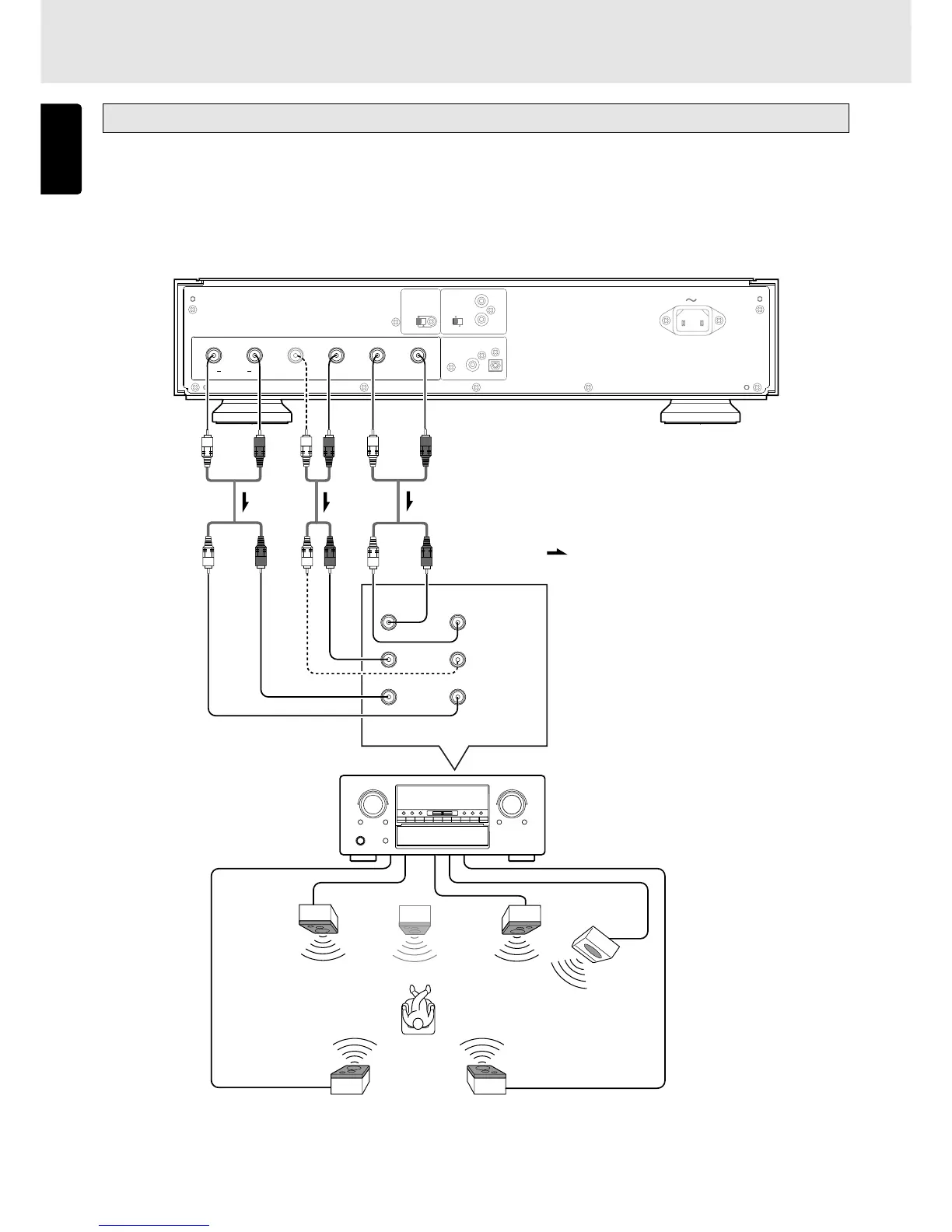
Audio cables x3 (supplied)
: Signal flow
Multi-channel input connectors
Analog multi-channel amplifier
or AV amplifier
Front speaker
(Left)
Front speaker
(Right)
Center
speaker
Sub woofer
Surround speaker
(Right)
Surround speaker
(Left )
qwe
Connections when the phantom center function is to be used
Connect the cables (q, w and e) to the corresponding connectors on the analog multi-channel amplifier or AV amplifier.
The phantom center function serves to synthesize in virtual terms the center channel with the front two (left and right) channels
when SACD multi-channel discs recorded with 5 or 6 channels are to be played. To play discs recorded with 4 channels, set the
phantom center function to OFF. (See page 17)
(White)



 To Next Page