11
NAMES AND
FUNCTIONS
BASIC
CONNECTION
BASIC
OPERATION
ADVANCED
CONNECTIONS
TROUBLESHOOTING
OTHERS
ADVANCED
CONNECTIONS
ENGLISH
APPLICATION
OPERATION
ADVANCED CONNECTIONS
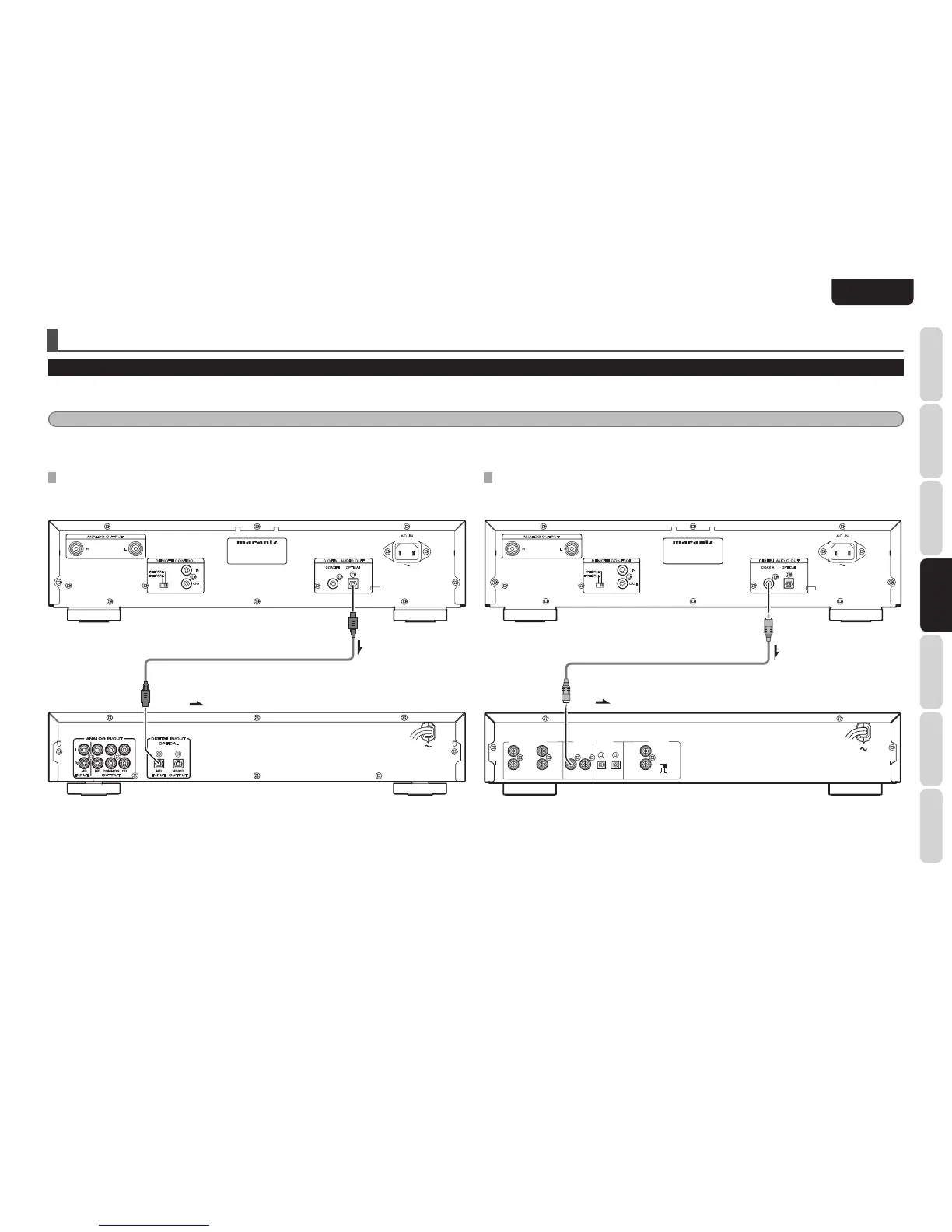
CONNECTING THE OPTICAL OUTPUT CONNECTOR
Use an optical digital connecting cable available on the market. Insert the plug firmly in until it clicks into
place. Do not bend or bundle the optical digital connecting cable.
CONNECTING TO A DIGITAL AUDIO COMPONENT
The player has one digital optical output connector and one digital coaxial output connector.
You can enjoy digital recording when the player is connected to a CD recorder or other digital recording component.
Caution:
Signals come of the Digital Audio Output (Optical and Coaxial) terminals only at the time of audio CD playback. There are no signals when other media a
re being played back.
CONNECTING THE COAXIAL OUTPUT CONNECTOR
Use a coaxial digital connecting cable available on the market.
Optical digital connecting cable (available on market)
: Signal flow
CD recorder, MD deck, AV amplifier, etc.
Coaxial digital connecting cable (available on market)
: Signal flow
CD recorder, MD deck, AV amplifier, etc.



 To Next Page